

WedUploader Review: Is It the Best Way to Collect Wedding Photos?
Your professional photographer can't be everywhere at once, and plenty of your wedding's best candid moments end up on guests' phones instead. You already know that chasing down 150 guests via text to find these shots is a logistical nightmare. You need a way to collect every high-resolution memory instantly, which is why many couples look at weduploader to solve the problem.
Our review of weduploader looks at whether this tool holds up for modern weddings or if it's time to consider an alternative like Bestever.pics for your 2026 celebration. We'll show you how the platform handles storage and guest uploads, what its premium package includes, and whether the QR code system is as simple as it sounds. By the end of this guide, you'll know if this software delivers the crisp, uncompressed images you need for your wedding album.
Key Takeaways
- Understand how weduploader acts as a technical bridge between guest phone cameras and your personal Google Drive storage.
- Evaluate the reality of "unlimited" upload claims when your Google Drive storage is the real limit, and what the one-time premium package adds.
- Navigate the folder setup and permissions required to link your private cloud account securely.
- Learn why a short MC announcement and strategic QR code placement can noticeably boost the number of photos your guests share.
- Compare the Google Drive workflow against hosted gallery platforms that remove technical hurdles for your guests.
What is WedUploader and How Does It Capture Wedding Memories?
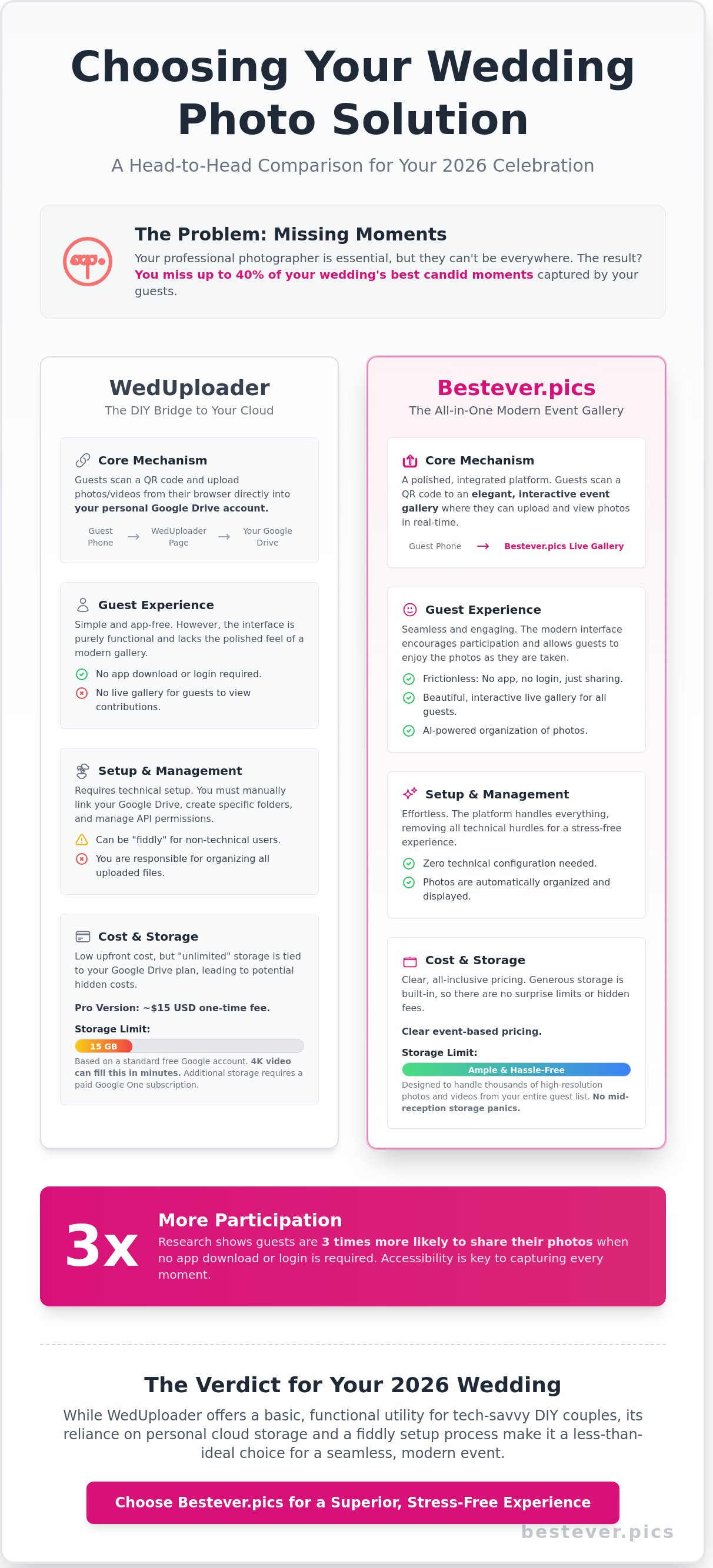
WedUploader is an app-free, browser-based upload solution designed to replace disposable cameras at wedding receptions and parties. It functions as a digital bridge, sending photos and videos directly from a guest's smartphone into a couple's personal Google Drive folder. For couples who already use Google Drive, it offers a functional, low-cost utility that avoids the clutter of physical film processing. It's a practical tool for those who want a simple way to collect files without managing a new social media platform.
The Core Mechanism: No Apps Required
The system relies on a simple workflow that removes the need for guests to visit an app store or create an account. You print a unique QR code on your table cards, and when a guest scans it, their phone opens a dedicated upload page in Safari or Chrome. It works in the browsers on modern iPhone and Android phones. By keeping the process within the browser, you ensure that even guests who never install new apps can contribute.
- Scan: Guests use their standard camera app to read the QR code.
- Select: They choose photos or videos directly from their camera roll.
- Upload: The files transfer to your linked Google Drive.
This "Old Way vs. New Way" shift is significant for modern events. The old way involved buying a box of plastic cameras and paying for development, only to receive blurry prints weeks later. The new way uses the high-resolution cameras your guests already carry in their pockets. Where a platform like Bestever.pics hosts the whole gallery for you, weduploader focuses on moving files from your guests' phones into your own Drive.
Why App-Free Sharing Wins in 2026
Digital friction is the primary reason guest participation drops at large events like a wedding or a quinceañera. If a guest has to download an app or remember a password, they'll likely keep their photos to themselves. Guests are far more likely to share their media when no login is required. This accessibility is vital for collecting user-generated content from family members who aren't tech-savvy.
Older guests often have valid privacy concerns about downloading unfamiliar software, but they're usually comfortable using a web browser. By using a browser-based tool, you respect their digital boundaries while still capturing their perspective of the day. It also avoids the "storage full" error that can happen when guests try to download a new app during a reception. You get more photos because you've removed the reasons not to share them.
Choosing weduploader makes sense for couples who prioritise data ownership. Since the files land in your Google Drive, they sit in an account you already control. It's a transparent, utility-first approach that fits a DIY wedding budget. You get the files in their original quality, ready for printing or professional editing whenever you're ready to look back on the day.
Features and Pricing: How WedUploader Compares in 2026
WedUploader works differently than most photo sharing services. You aren't paying for their server space; you're using your own Google Drive. This keeps costs down, but it adds a layer of technical setup that some couples find fiddly. You have to link your account, set up folders, and check permissions before the first guest arrives.
Guests upload for free. WedUploader's premium package is a one-time payment that unlocks its full feature set across all your albums. According to WedUploader, that includes a real-time gallery of everyone's photos and videos, a fullscreen slideshow photo wall, a private digital guestbook with messages and voicemails, custom album colours and layouts, and a library of QR code templates. Check the WedUploader pricing page for the current price in your currency, as it isn't fixed in this review.
The "unlimited" uploads come with a caveat. While weduploader doesn't cap your total files, your Google account does. A standard free Google account gives you 15GB of space, shared across Gmail, Google Photos and Drive. High-resolution wedding videos from a modern smartphone can eat that quickly. If your guests upload 4K footage, you might hit a storage wall mid-reception. You'll need to monitor your storage or pay for a larger Google One plan to keep the pipeline open.
Planning for Storage Costs
The premium package is a one-off cost, but storage is where ongoing costs can creep in. If you need a bigger Google One plan to handle the volume, that's a monthly subscription on top. Many couples find that wedding tech trends are shifting toward all-in-one platforms that include storage in a flat fee. This prevents the panic of a "Storage Full" notification while you're cutting the cake.
The Gallery and Slideshow
With the premium package, guests can see what others have uploaded in a real-time album gallery, and you can put a fullscreen slideshow on a screen at the reception. WedUploader also lets you choose which photos are displayed and which stay private. Because the original files live in your Google Drive, that folder is where you manage and back up the full collection after the event.
The design is functional and customisable, with album layouts and colours to choose from. Whether it suits your reception styling is a matter of taste, so look at an example album before you commit. For many couples, weduploader is a budget-friendly option that prioritises simplicity and data ownership.
The Google Drive Connection: Security and Setup Realities
The way weduploader functions is quite specific. It acts as a bridge between your guests' smartphones and your personal Google Drive account. You aren't just signing up for a gallery service; you're granting an external application permission to add files to your private cloud storage. Some couples find that step a bit daunting during an already busy wedding planning season.
To get started, you'll need to work through a short configuration process. You connect your Google account to weduploader and choose where the files should go. You'll see a standard Google permission screen asking for access to your Drive. If you aren't comfortable with third-party apps having access to your cloud storage, this step might give you pause. Bestever.pics, by contrast, hosts the storage for you, so there's no account to connect.
Storage limits are often the biggest hurdle for couples. Google provides 15GB of free space, but this is shared across Gmail, Google Photos, and Drive. If your inbox is already mostly full, you might only have a few gigabytes left for your wedding day. A single minute of 4K video from a recent iPhone can take up a few hundred megabytes, so a handful of guest clips adds up fast. When you hit that ceiling, uploads fail, and you'll have to scramble to buy more storage mid-reception.
Privacy Concerns for Your Wedding Guests
Privacy is a major talking point for couples. Under the Privacy Act 1988, Australian organisations have obligations around personal information, and even as a couple it's worth knowing where your guests' photos end up. Make sure your Google folder settings are private. If you accidentally set the folder to "Anyone with the link can view," anyone who gets hold of that link can see your private moments. It's worth double-checking your folder permissions before and after the event.
Setup Friction: Is It Truly "Set and Forget"?
It isn't quite a one-click solution. Allow time to connect your account, check your available storage and test the upload page before the event begins. Test the link on several different phones to make sure everything works. For couples who want to avoid technical heavy lifting, an all-in-one hosted solution is often the simpler choice. You don't want to be checking cloud permissions while you should be enjoying your hen do or final dress fitting.
- Time Investment: Allow time for setup and testing before the day.
- Technical Skill: Moderate; you'll need to be comfortable with Google Drive storage and permissions.
- Risk Factor: High if storage limits aren't monitored.
Maximising Guest Participation: Beyond the QR Code
Getting guests to actually use weduploader or any digital photo gallery requires more than a single printout by the guestbook. You need to place your prompts where people naturally linger. The bar is your highest-traffic area. While guests wait for their gin and tonic, they're looking for something to do with their hands. A small frame next to the cocktail menu is prime real estate for your digital gallery link.
Table settings are equally vital. Don't just put one sign in the middle of a large round table. Guests at the edge won't bother leaning over the centrepiece to scan it. Instead, include a small mention on the back of the individual menus or place cards. This makes the request feel personal and keeps the link within arm's reach throughout the meal.
The most effective tool in your arsenal isn't digital; it's the person with the microphone. A 30-second announcement from your MC during the transition to the evening reception can make a big difference to how many photos you receive. When the MC tells everyone to get their phones out and share the love, it creates a collective moment of action that silent signage alone rarely matches.
Design matters just as much as placement. Your signage should complement your wedding theme without becoming invisible. If you're using a lot of gold foil and script fonts, ensure the QR code itself remains a solid, dark colour. Handing out business-sized cards during the evening reception is a great way to remind guests to upload their photos, because they'll find them in their wallets or pockets the next day.
Creating Signage That Actually Works
Make your QR codes big enough to scan easily, at least 2 to 3cm square and larger on signs viewed from a distance. Low-light receptions are the enemy of tech, so use high-contrast colours like black on white or deep navy on cream. Avoid placing codes on glossy or reflective cardstock that creates glare under venue spotlights. Every sign should include a simple 3-step guide: scan the code, select your best shots, and hit upload. This removes the guesswork for less tech-savvy relatives who might feel intimidated by a new platform like weduploader.
Timing Your Requests for Candid Shots
The best photos often happen before the ceremony even starts. Many couples forget to capture the chaos of the "getting ready" phase or the energy of the hen do and buck's party. You can open your Bestever.pics gallery weeks in advance to collect these pre-wedding memories. Don't stop the requests when the music ends, either. The morning-after brunch is a fantastic time to catch those recovery photos and the day-after reflections. It's often the last chance to remind everyone to empty their camera rolls before they head off on their honeymoon.
Ready to see your wedding through your guests' eyes? Start your Bestever.pics wedding gallery today and capture every angle.
Why Bestever.pics is a Simpler Choice for Modern Events
Choosing between platforms often comes down to how much technical management you want to handle on your wedding day. Weduploader asks you to connect your personal Google Drive before you can begin, which is a hurdle many couples don't have time for during the final weeks of planning. Bestever.pics removes that step by hosting your gallery and storage for you, so nothing ends up tucked away in a cloud folder you have to manage. It's the shift from a DIY file-sharing project to a ready-made event gallery.
The interface matters because your guests interact with it directly. You can add your event name and a background image so the gallery fits your celebration, from rustic vineyard weddings to sleek city receptions. You can go from signing up to printing your QR codes in a couple of minutes. If you hit a snag, you won't be waiting for a generic ticket response from a different time zone. Our Australian-based team provides human support, so you get help from a real person when you actually need it.
The Bestever.pics Difference: Sophisticated Simplicity
We don't believe in making you manage your own cloud storage. Bestever.pics handles the storage, which means you never have to worry about running out of space on your personal Drive mid-reception. Full-resolution storage is our default standard. This ensures you capture the intricate lace on a dress or the specific colour palette of your floral arrangements without grainy compression. It's a simple, high-quality way to handle guest photo sharing, built for those who refuse to compromise on quality.
- No Third-Party Hassle: No need to link Google Drive, Dropbox, or OneDrive accounts.
- Automatic Organisation: Photos appear in a beautiful gallery as soon as they're uploaded.
- Premium Quality: We never compress your memories, keeping every pixel sharp for future printing.
Ready to Capture Every Moment?
The digital guestbook has evolved into a core part of the guest experience. We make using a wedding QR code for photos feel like a natural extension of your celebration. Guests scan the code and upload without downloading an app or creating a profile. Our system is designed to be inclusive, ensuring that even less tech-savvy relatives can participate without frustration.
The final verdict comes down to control versus convenience. If you're comfortable managing your own Google Drive and want the files there, weduploader is a reasonable option. If you'd rather have an elegant gallery that's ready in minutes with nothing to connect, Bestever.pics is the easier choice. Hosts of more than 30,000 events worldwide have used Bestever.pics to collect the candid moments a professional photographer might have missed.
Ready to see the difference for yourself? Start your gallery with Bestever.pics today and ensure not a single memory from your big day goes uncaptured.
Upgrade Your Wedding Content Strategy
Capturing hundreds of guest photos shouldn't feel like a technical chore. While weduploader offers a path for those comfortable managing Google Drive storage, it adds extra admin to a busy wedding schedule. You need a system that handles the heavy lifting while you focus on the party. Don't let your wedding memories get stuck in a full storage quota.
Modern weddings deserve full-resolution photos and videos. We built Bestever.pics as an Australian-founded solution to remove the friction of cloud setups. There is no Google Drive configuration required. It's a faster way to collect every memory in one place. Your guests simply scan, upload, and enjoy the night.
Create your wedding gallery with Bestever.pics today
Your wedding photos are the only part of the day that lasts forever, so make sure you collect them with confidence.
Frequently Asked Questions
Is WedUploader actually free for all my guests?
Yes, WedUploader is free for your guests to use. They won't pay anything to upload their photos or videos from your reception or ceremony. You connect your own Google Drive account to hold the files. Features like the live gallery and slideshow come with WedUploader's one-time premium package, which the couple pays for, not the guests.
Do my guests need to download an app to use WedUploader?
No, your guests don't need to download any apps to use WedUploader. They simply scan a QR code or visit your unique URL through their phone's mobile browser. This removes the friction of waiting for a download or clearing space on their devices. Whether they're using an iPhone or an Android, the web-based uploader works in browsers like Safari or Chrome.
How many photos and videos can I collect with WedUploader?
Your collection limit depends on your Google Drive storage. A standard free Google account provides 15GB of space, shared with Gmail and Google Photos, which is enough for thousands of photos but fills up quickly with video. If you need more room, you can upgrade to a larger Google One plan for a monthly fee. WedUploader itself doesn't cap the number of files you receive.
What happens if my Google Drive storage gets full during the wedding?
Guest uploads will fail if your Google Drive hits its storage ceiling. You'll want to check your available space well before the wedding starts. If you run out during your cocktail hour, guests will see an error instead of a success screen. It's a good idea to clear out old backups or buy extra storage beforehand to make sure every guest's video makes it through.
Can I see the photos in real-time as guests upload them?
Yes. Files appear in your Google Drive folder as they're uploaded, and WedUploader's premium package adds a real-time album gallery and a fullscreen slideshow photo wall you can show at the reception. If you'd rather not deal with Google Drive at all, Bestever.pics gives you a hosted gallery with live viewing built in.
Does WedUploader work for corporate events or just weddings?
You can use WedUploader for any type of gathering, from corporate holiday parties to 50th birthday bashes. While the name suggests a wedding focus, the underlying technology is a file transfer tool that works for any event. It's a practical choice for organisers who already use Google Drive or Google Workspace for their business.
Is there a limit on video length for guest uploads?
WedUploader doesn't advertise a video length limit, but larger files take longer to upload over venue Wi-Fi or patchy mobile data. Keep in mind that 4K video files are large and eat into your Google Drive storage quickly. If lots of guests upload long clips, you'll likely need a storage upgrade to handle the incoming data.
How do I print the QR code for my wedding tables?
WedUploader gives you a QR code for your album, along with a library of QR code templates. Most couples print the code on table cards or include it in their printed programs. We recommend testing the printed code with your own phone before the big day to make sure the contrast is high enough for phone cameras to read. It's a simple step that ensures your guests can start sharing photos the moment they sit down.