

Wedding Reception Photo Sharing: Modern Ways to Collect Memories

Article by
Gabi
Hi, I'm Gabi - Co-Founder of Bestever Pics. Thanks for visiting our blog. We are working hard to produce content which we hope resonates with you. Feel free to drop us a line on socials or via the contact form on the site.
The most authentic candid moments of your wedding reception stay permanently locked away on guests' phones the second you ask them to download an unfamiliar mobile app, register a new account, or fiddle with confusing password resets while they're trying to enjoy dinner and drinks. You shouldn't have to spend your post-wedding morning chasing down family members across disjointed group chats or settling for heavily compressed social media uploads that destroy print quality, which is why modern wedding reception photo sharing requires an intuitive, browser-based approach that works instantly for tech-savvy friends and older relatives alike. In this guide, you'll discover how private, browser-based QR albums allow everyone to upload original, full-resolution photos and video clips straight from their default camera rolls, giving you a complete digital archive of every unposed dance floor memory the very next morning without forcing a single app download on anyone at the party.
Key Takeaways
- Social hashtags and cloud drive folders cause high drop-off rates because guests run into login walls, privacy concerns, and heavy file compression.
- Modern wedding reception photo sharing works best through browser-based QR codes that let guests upload instantly without downloading a single app.
- Browser uploads protect original photo and video resolution so you get frame-worthy keepsakes instead of blurry, downsized social media exports.
- Placing high-contrast QR cards at high-traffic zones like the cocktail bar and table place settings dramatically increases candid uploads across all age groups.
- You can set up a private digital gallery in minutes and wake up the next morning with an organized album while waiting for professional photographer edits.
Why Wedding Reception Photo Sharing Fails With Traditional Methods
Couples often spend months perfecting reception timelines, table settings, and playlists, only to treat memory collection as an afterthought. Whether you plan every detail from scratch or explore 極致婚宴套餐 for a full-service banquet experience, relying on makeshift solutions for wedding reception photo sharing almost guarantees you'll miss the best candid moments from your celebration. Group messaging threads crush image clarity, stripping away the resolution needed for heirloom prints. Meanwhile, shared cloud drive links stop dinner guests cold with mandatory account creation screens and forgotten passwords.
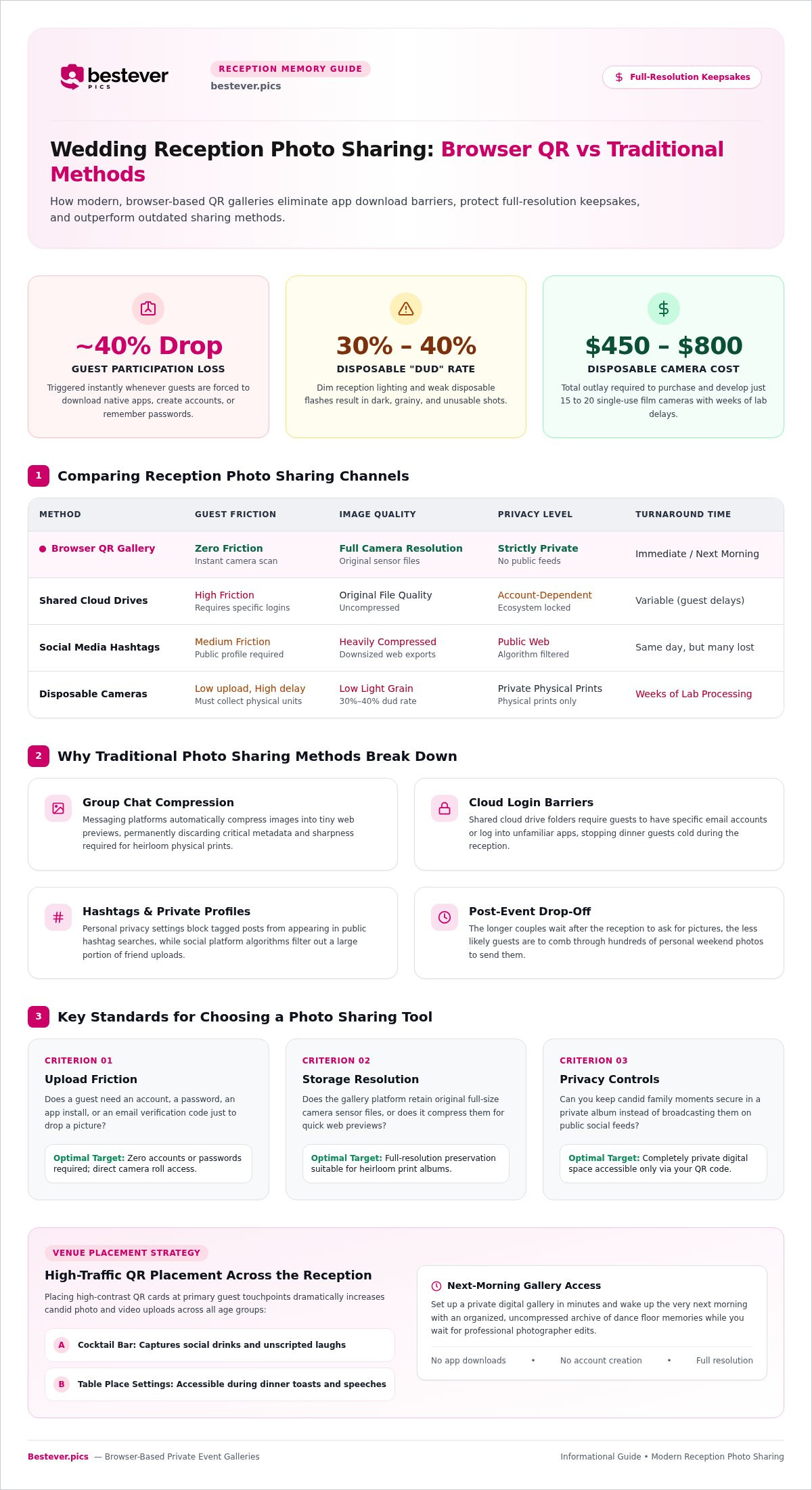
- Group chat compression: Messaging platforms automatically shrink uploads to tiny file sizes, discarding fine detail and critical image metadata.
- Cloud login barriers: Links to personal drives often demand specific email logins, locking out guests who don't already use that ecosystem.
- Post-event drop-off: The longer you wait to ask guests for their snaps, the less likely they are to sort through hundreds of weekend photos to find them.
The Downside of Social Media Wedding Hashtags
Relying on a custom wedding hashtag was popular a decade ago, but it no longer works for modern receptions. Most guests keep their personal accounts private, which blocks their tagged posts from ever appearing in a public search. Platform algorithms also filter out content unpredictably, causing couples to miss a massive portion of what friends actually post. Beyond that, many couples want to keep private family moments off public feeds while preserving full-resolution files for physical albums, making hashtags an unreliable choice for digital photo sharing for modern events.
Why App Downloads Kill Guest Participation at the Bar
Nobody wants to stand near the cocktail bar downloading a brand-new app just to share a quick video clip. Industry benchmarks show that photo tools requiring native app downloads or account logins suffer an estimated 40% drop in guest participation. Venue cellular signals can be spotty, app store passwords get forgotten, and older family members get stuck on operating system permission screens. When the process demands extra effort, guests simply close their phones, pocket the photos, and return to the party.
Comparing Wedding Reception Photo Sharing Options for Modern Couples
| Method | Guest Friction | Image Quality | Privacy Level |
|---|---|---|---|
| Browser QR Gallery | Zero (instant camera scan) | Full camera resolution | Strictly private |
| Shared Cloud Drives | High (requires account logins) | Original file quality | Account-dependent |
| Social Media Tags | Medium (requires public profile) | Heavily compressed | Public web |
| Disposable Cameras | Low upload, high delay | Low light grain (30-40% dud rate) | Private physical prints |
Key Criteria for Evaluating Photo Sharing Tools
When selecting your setup, judge each platform by three essential standards:
- Upload friction: Does a guest need an account, a password, or an email verification code just to drop a picture?
- Storage resolution: Does the platform retain full-size sensor files, or does it compress them into tiny web previews?
- Privacy controls: Can you keep personal family moments secure instead of broadcasting them across public social networks?
Prioritizing zero-friction uploads guarantees you won't spend your honeymoon troubleshooting login errors for relatives.
Disposable Cameras vs. Digital QR Albums
Single-use film cameras offer nostalgic charm, but the real-world results often disappoint. Buying and developing 15 to 20 disposable cameras commonly runs $450 to $800, and weak built-in flashes cause a 30% to 40% dud rate in dim reception halls. You also have to wait weeks for lab processing. Setting up a private wedding photo gallery with no app needed gives your tables that same candid point-and-shoot energy on modern smartphone sensors, saving money while gathering clear, full-resolution files instantly.
How Browser-Based QR Galleries Work at the Wedding Reception
Modern browser technology has transformed wedding reception photo sharing by running directly through your phone's default web browser. Instead of routing guests through an app store, everything happens via standard web protocols. Platforms like Bestever.pics let couples set up a private digital album ahead of time, generating a custom link that guests access in seconds.
The Friction-Free Guest Upload Journey
The entire upload process takes less than thirty seconds from start to finish. Guests simply point their camera lens at a table placard to get started. Here is how the three-step flow unfolds during dinner:
- Point and scan: The guest opens their standard iOS or Android camera app and focuses on the printed QR code.
- Tap the link: A mobile browser banner appears instantly, directing them into your private event gallery without requiring an account login or email capture.
- Select and send: They choose their favorite photos or video clips directly from their camera roll and hit upload.
Because there are no tracking cookies or mandatory registration forms, older relatives and casual attendees can participate without confusion. You can see how simple this setup is when you use QR codes for wedding photo sharing across your stationery.
Managing Low-Light Venue Settings and Weak Cell Signals
Historic stone barns, subterranean wine cellars, and rural estates often suffer from patchy cellular coverage. High-volume dinner crowds can also slow down local cell towers during peak evening hours. Reliable browser galleries handle these reception hurdles gracefully by utilizing background browser caching.
- Local queueing: When guests tap upload in a dead zone, the browser queues the full-resolution files and completes the transfer once a stable signal or venue Wi-Fi reconnects.
- Low-light candid tips: Remind guests to tap their smartphone screen to lock focus on subjects under dimmed banquet lighting rather than relying on harsh direct flash.
- Bar placement: Position secondary scan cards near well-lit spots like the bar or coffee station where guests naturally pause with strong phone reception.
Strategic QR Code Placement Across Your Wedding Reception Venue
Even the slickest upload tool won't collect memories if your cards sit buried out of sight. Successful wedding reception photo sharing depends heavily on physical placement. Whether you are hosting in an expansive ballroom like The Atrium Venue or an intimate banquet room, treat your signage like interactive decor rather than an afterthought, placing high-contrast cards in clear view wherever people naturally gather, pause, or mingle.
High-Converting Signage Spots in the Reception Space
Position your scannable cards across locations where guests have idle moments with their phones already in hand:
- Cocktail bar counters: Place framed 5x7 signs right where guests line up for drinks. Waiting for an espresso martini creates an immediate window to scan and share.
- Dinner table centerpieces: Stand folded place cards at eye level between floral arrangements and glassware so they remain visible throughout toasts.
Explore practical styling advice with creative QR code display ideas to blend tech effortlessly into your floral themes.
Working With Your DJ, MC, and Wedding Coordinator
Visual prompts do heavy lifting, but a brief vocal reminder spurs action across the whole room. Ask your DJ or master of ceremonies to deliver a quick fifteen-second announcement right after the first dance when energy is high. A friendly shoutout like, "Point your camera at the cards on your tables to share your best shots directly with the newlyweds tonight," prompts dozens of phones to scan at once.
Setting Up Your Private Reception Gallery With Bestever.pics
Setting up your private event gallery takes less than two minutes from your phone or laptop. You don't need technical skills or design background to build an album that matches your celebration. Streamlining your wedding reception photo sharing ensures you collect every spontaneous snapshot without turning memory collection into another planning chore.
Customizing Your Reception Album and QR Assets
Personalizing your gallery creates an inviting experience for friends and family the moment they scan. You can upload an engagement portrait, list your wedding date, and add a welcoming message thanking guests for coming. The dashboard generates high-resolution, print-ready files sized for table stands, bar signs, or custom stationery.
- Clean aesthetic: The album interface stays clean and elegant, keeping the focus entirely on your photos rather than third-party branding.
- Custom messaging: Add personal notes guiding guests on what to capture, from dance floor antics to sweet table moments.
- Versatile exports: Download vector and PDF assets that your stationery designer can easily incorporate into printed place cards or menus.
Post-Reception Curation, Privacy, and High-Res Downloads
Host administrative tools give you complete peace of mind throughout the evening. You can activate moderation toggles so uploads require your review before appearing in the communal feed, preventing accidental bursts or unflattering pictures from going live. When you are ready to review everything the next morning, you won't have to chase down individual files across texting apps.
Couples can download their entire collection in a single folder with original camera sensor resolution intact. That means you get print-ready images suitable for large-format frames, heirloom albums, and thank-you cards. Review how it works to see how simple hosting can be, or launch your private gallery on Bestever.pics to capture every unposed moment from your big day.
Start Collecting Your Reception Memories
Designed by event creators Steve and Chloe, this setup takes just two minutes to configure and protects original camera resolution for all your future keepsake prints.
Focus on celebrating with the people you love tonight. You will wake up tomorrow morning with a rich archive of spontaneous, joyful moments waiting right on your phone.
Frequently Asked Questions
Do wedding guests need to download an app to upload photos from the reception?
No, wedding guests don't need to download any apps or register an account. Everything runs directly inside their smartphone's native web browser. Scanning the printed tabletop QR code opens a secure web page where they can pick images from their camera roll and hit upload immediately. Removing app store barriers makes wedding reception photo sharing effortless for 100% of your attendees.
How do older or non-tech-savvy wedding guests use QR code photo sharing?
Older family members simply open their standard phone camera and point it at the printed QR card. Most modern iPhone and Android cameras automatically detect the code and show an instant browser link on screen. Tapping that link opens the upload page without asking for passwords, Apple IDs, or app store verifications. Anyone who can take a picture can upload within seconds.
What happens if our wedding reception venue has poor cellular service or no Wi-Fi?
Modern browser-based galleries queue guest uploads locally on the phone until an active connection returns. If your venue has thick stone walls or spotty reception, guests can still select their photos on the upload page. The browser holds the files and transfers them automatically once the phone reconnects to venue Wi-Fi, cell service outside, or the hotel network later that night.
Can wedding guests see each other's uploaded photos during the reception?
Yes, you can allow guests to browse the communal gallery, or you can keep it completely private. Enabling the shared gallery view lets guests view candid uploads in real time, which often encourages more people to contribute. If you prefer complete privacy during the celebration, you can set the gallery to upload-only so only the hosts can view the incoming images.
Are the photos uploaded via QR code saved in their original full resolution?
Yes, uploads sent through browser QR albums retain their original camera sensor resolution. Unlike group texts or social media apps that heavily compress files, browser galleries preserve uncompressed image dimensions and metadata. Modern wedding reception photo sharing ensures you collect crystal-clear files that are fully suitable for large-format physical albums, canvas prints, and custom holiday cards down the road.
Can we review or delete inappropriate guest photos before others see them?
Yes, hosts have access to moderation controls to manage every photo that enters the gallery. You can turn on pre-moderation mode so that guest uploads remain hidden until you review them. Even in live-viewing mode, you can quickly delete accidental burst shots, poorly lit misfires, or unflattering candids directly from the host dashboard in a couple of taps.
How long do we have to download our wedding reception photos after the event?
You can download photos in real time on the night or export the entire archive after your honeymoon. Event galleries typically provide multiple months of secure hosting, giving late-uploading guests plenty of time to add their weekend shots. When you are ready, you can export the full collection in a single organized zip folder straight to your hard drive.