

Wedding Reception Photo Sharing Ideas: Your 2026 Guide

Article by
Gabi
Hi, I'm Gabi - Co-Founder of Bestever Pics. Thanks for visiting our blog. We are working hard to produce content which we hope resonates with you. Feel free to drop us a line on socials or via the contact form on the site.
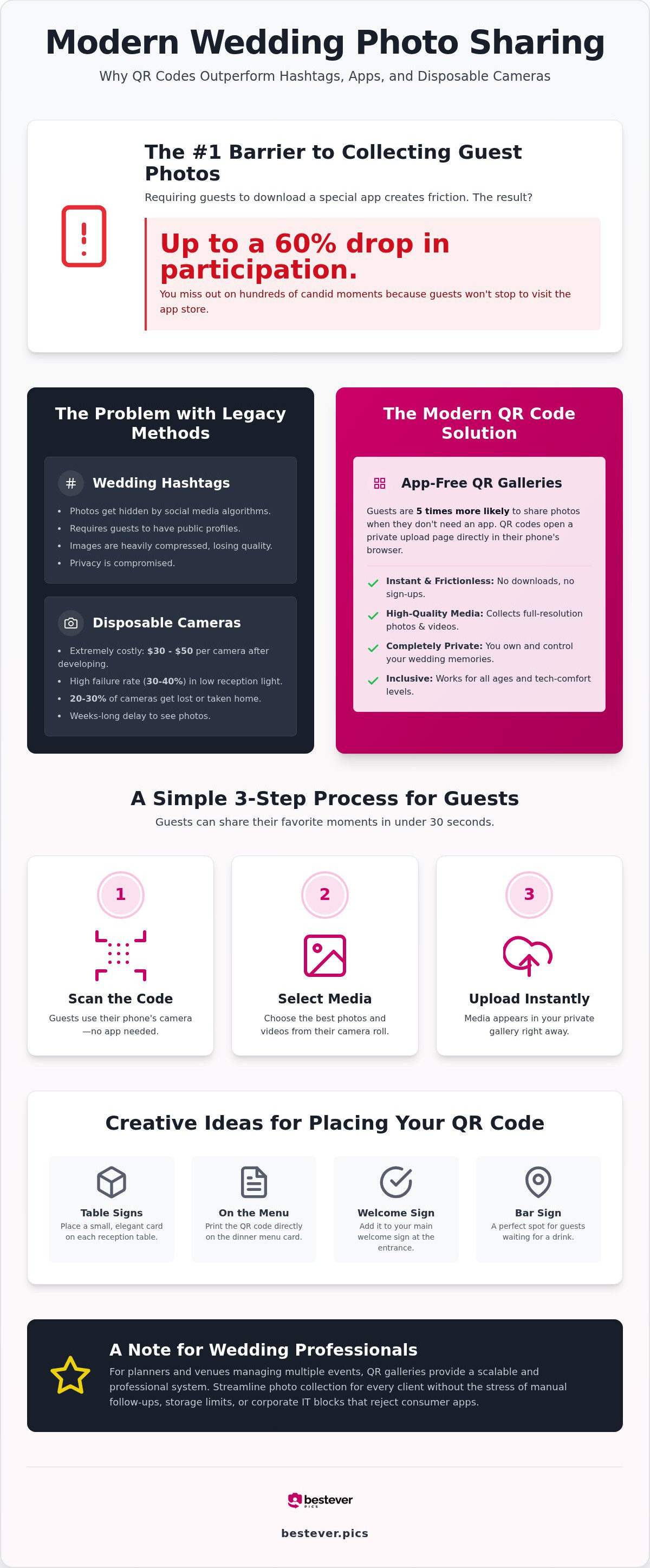
Finding the right wedding reception photo sharing ideas is essential. Requiring guests to download a new app can slash participation by 60%, but Bestever.pics helps you collect high-quality memories instantly by using wedding reception photo sharing ideas that remove friction. This guide explores the most effective wedding reception photo sharing ideas for 2026 to turn your guests into a pro-grade content team.
Key Takeaways
- See why legacy methods like hashtags and disposable cameras often fail to capture the full story of your day due to technical friction and high costs.
- Learn how app-free QR code galleries remove the barriers that stop 60% of guests from sharing their candid photos and videos.
- Get 10 practical wedding reception photo sharing ideas for placing QR codes on table signs and menus to ensure you don't miss a single dance floor moment.
- Follow a simple 60-second setup to create a private digital album that collects unlimited high-quality media without requiring guest downloads.
- Discover how wedding professionals use scalable tools to manage photo collection for every client without the stress of manual follow-ups.
The Problem with Hashtags, Disposable Cameras, and Wedding Reception Photo Sharing Ideas
Most couples realize too late that their guest photos are scattered across five different apps and a dozen private text threads. Chasing down your friends for pictures weeks after the big day is a chore you don't need. If you're tired of chasing low-quality screenshots, it's time to rethink your wedding reception photo sharing ideas. These legacy photo sharing habits are breaking the flow of modern celebrations.
The Decline of the Wedding Hashtag
Social media algorithms have made wedding hashtags nearly obsolete. Instagram frequently filters out "recent" posts to prioritize trending content, effectively hiding your guests' photos from your own view. You're also forced to trade your privacy for convenience. Public hashtags expose your wedding to strangers and bots; meanwhile, the heavy image compression on social platforms destroys the resolution of your best moments. You deserve better files. When vetting wedding reception photo sharing ideas, remember that a public feed is not a backup plan.
Disposable Cameras: A Nostalgic but Costly Mistake
The retro vibe of film is tempting, but the numbers don't add up in 2026. Research shows that total costs for a single disposable camera, including development and scanning, now sit between $30 and $50. That's a massive investment for a product with a 30% to 40% failure rate in typical indoor reception lighting. Physical waste is a major drawback. Consider these verified statistics from the 2026 wedding season:
- 20-30% of cameras are lost or taken home by guests by mistake.
- Poor flash performance results in dark, unusable frames in dim reception halls.
- Development takes weeks. The excitement dies.
Modern couples are choosing bestever.pics for a more reliable path. Digital galleries offer instant access and zero physical waste. You get the same candid energy of film without the blurry disappointments or the environmental impact of plastic cameras. It's time to stop paying for mistakes and start collecting memories that actually look good.
Professional planners and venues often face even greater friction when managing hundreds of events per year. For those running a business, the bestever.pics Pro subscription provides a scalable way to collect media without hitting storage limits or corporate IT blocks. It turns a manual, messy process into a streamlined professional standard.
Why QR Codes Are the Simplest Way to Collect Guest Photos
A QR code for photos is a scannable link that launches a private upload page directly in a mobile browser. It eliminates the single biggest barrier to guest participation: the app download. While native apps often see a 40% to 60% drop in engagement, browser-based systems like bestever.pics keep the momentum going. Guests are five times more likely to share their perspectives when they don't have to visit an app store or create a new account.
This technology bridges the gap between your guests' phones and your permanent collection. It works for everyone from tech-savvy teenagers to grandparents who just want to point and click. By focusing on accessibility, you ensure your wedding reception photo sharing ideas actually result in a full gallery rather than a handful of texts. It's about making the process so fast that guests can get back to the dance floor in seconds. The "No-App" advantage is a fundamental shift in how we handle event media, ensuring your collection is as diverse as your guest list.
When you remove the friction of account creation, participation sky-rockets. Guests feel more comfortable sharing candid, unpolished moments when they know the process is private and immediate. This level of engagement is exactly why modern wedding reception photo sharing ideas have moved away from legacy social media tools and toward dedicated browser-based platforms. For wedding planners managing a busy season, this simplicity is a lifesaver; it's a professional-grade standard that feels like a simple, friendly tool for the end user.
How the Scan-and-Upload Process Works
The process is built for speed and simplicity. There's no registration, no password to remember, and no login required. It works across all modern iPhone and Android devices without any special configuration. Most guests can complete the entire process in under 30 seconds by following three clear steps:
- Scan: Use the phone's native camera app to read the QR code.
- Select: Choose the best photos and videos from the camera roll.
- Upload: Hit the button and watch the memories land in your gallery instantly.
Privacy and Security for Your Private Gallery
Using a private link keeps your wedding memories away from the prying eyes of public social media algorithms. You own your data. You aren't handing over your rights to a massive tech corporation just to see what your maid of honor captured. This setup gives you total control over who sees your photos and how they are used. You can even moderate the gallery to ensure only the best shots appear in the final collection, protecting the integrity of your digital guestbook from inappropriate or blurry uploads.
Comparing Apps, Shared Folders, and QR Gallery Platforms for Wedding Reception Photo Sharing Ideas
While looking for wedding reception photo sharing ideas, you've likely seen suggestions for generic cloud storage or traditional wedding portals. These options seem convenient because they're familiar, but they often lack the specialized features needed for a high-energy event. You don't want your guests struggling with permissions while they should be on the dance floor. Many "free" options come with the hidden cost of technical support, forcing you to troubleshoot guest phones during your own party.
Why General Shared Folders Fail at Receptions
Google Drive and Dropbox are excellent for work, but they're clunky for weddings. The biggest hurdle is the login requirement; guests usually need a specific account to upload to a shared folder. If a guest doesn't have a Google account or can't remember their password, the photo never gets shared. These folders also lack a branded, celebratory interface, making your high-end event feel like a corporate file transfer. Without built-in moderation tools, you're also left with a gallery that's vulnerable to accidental deletions or disorganized file naming from hundreds of different sources.
App-Based Sharing vs. Web-Based Galleries
Traditional wedding registry sites often struggle with low adoption rates for their built-in photo tools. Guests are currently experiencing "app fatigue" and are hesitant to download a new program just for a four-hour party. Web-based solutions like bestever.pics bypass this entirely by using the phone's existing browser. It's an instant connection that works even under strict corporate IT policies for professional users. You get immediate uploads without waiting for a background app to sync, ensuring your digital guestbook grows in real-time as the night unfolds.
Legacy platforms often compress your photos to save space, resulting in grainy images that won't look good in print. When you compare wedding reception photo sharing ideas, look for services that prioritize original file quality and high storage limits. You only get one chance to capture these moments, so don't settle for a platform that treats your memories as an afterthought. Using a dedicated gallery ensures your photos stay private, high-resolution, and easy for everyone to access without a single login. This sophisticated simplicity is why modern hosts are moving away from legacy apps and toward web-based collection tools.
10 Creative Wedding Reception Photo Sharing Ideas for Guests
Your guests are already taking photos. The challenge is getting those files off their phones and into your hands. Effective wedding reception photo sharing ideas rely on visibility and timing. You want to place prompts where guests naturally linger; the bar and the dinner table are prime real estate for these calls to action. By integrating scannable codes into your decor, you transform passive observers into active contributors to your wedding story.
Start with the bar. Everyone visits the bar at least once. A QR code on the signature cocktail sign is impossible to miss and gives guests something to do while they wait for their drinks. Next, look at the dinner table. Personalized table talkers or the back of place cards work beautifully. You can even use the back of your ceremony program as a final nudge before the transition to the party. Using a platform like bestever.pics allows you to turn these physical placements into a streamlined digital collection.
Display Ideas for the Cocktail Hour
The cocktail hour is the perfect time for candid shots. Guests are mingling and relaxed. Try putting your upload codes on custom napkins or drink coasters. A large "Welcome" sign at the entrance sets the expectation early. You can also place a scan-to-share prompt next to your physical guest book to capture a digital message alongside the handwritten one. These creative qr code display ideas ensure no one misses the chance to contribute. Consider these specific placements:
- Entrance welcome boards
- High-top cocktail tables
- Custom drink stirrers
- Lounge area coffee tables
Reception and Dance Floor Nudges
Once the music starts, the energy shifts. Subtle prompts in your table centerpieces keep the momentum going during dinner. As the night ends, place a final code on "Thank You" cards at the exit or on each setting. One of the most engaging wedding reception photo sharing ideas is the live slideshow. Projecting a real-time feed of guest uploads onto a large screen encourages others to join the fun. This wedding photo sharing guide explains how to keep the dance floor captures coming all night long.
Finally, consider a digital projection. A rolling QR code on a screen near the DJ booth acts as a beacon for those late-night dance floor moments. It turns photo sharing into an interactive part of the entertainment rather than a chore. This works exceptionally well for pro planners who want to demonstrate high engagement to their clients. By making the process part of the party, you ensure a higher volume of authentic, high-quality uploads.
Setting up your gallery shouldn't be another item on your high-stress checklist. You've already handled the venue, the catering, and the guest list; this part should be the easiest. With the right wedding reception photo sharing ideas, you can go from a blank screen to a fully functional upload portal in about 60 seconds. It's about reclaiming your time so you can focus on the celebration itself.The 60-Second DIY Setup
The process is designed for speed. Start by choosing a unique event name and a custom URL that's easy for guests to remember if they need to type it in. Once your gallery is created, you'll get a high-resolution QR code that's ready for your printer. Don't wait until the last minute to download this file; get it to your stationer early so it can be integrated into your menus and table talkers. Professional planners managing a full season of events should look at the Bestever.pics Pro plan. It provides the scalability needed to handle multiple galleries without hitting storage caps or getting bogged down in individual account setups.
Ensuring Maximum Guest Participation
Technology only works if people use it. You need to make the sharing process feel like part of the party rather than a chore. Ask your DJ to make a brief announcement right before a major event, like the cake cutting or the first dance, to remind everyone to keep their cameras ready. It's also helpful to use your "hen and stag dos" as a trial run for the technology. This gets your closest friends and family used to the scan-and-upload flow, making them your "power users" on the wedding day who can show other guests how it works. Check these logistical boxes before the guests arrive:
- Test the QR code in the actual reception lighting to ensure it scans easily.
- Verify the venue's Wi-Fi password and display it near your photo prompts.
- Ensure your bridal party knows how to help less tech-savvy relatives.
Communicate with your professional vendors too. Tell your photographer where the guest gallery is located so they don't feel like they're competing for the same shots. When everyone is on the same page, your wedding reception photo sharing ideas turn into a massive, multi-angle documentary of your day. It's a simple way to ensure no candid moment is lost to a private camera roll or a forgotten text thread. Start your setup today and cross one more thing off your list with confidence.
Capture Every Angle of Your Celebration Today
Legacy tools like hashtags and disposable cameras fail the 2026 wedding standard. You've seen the data. By removing the friction of app downloads, you empower guests to share candid moments instantly. Implementing these wedding reception photo sharing ideas ensures you collect a high-resolution gallery that reflects the true energy of your night.
Your memories shouldn't be trapped in a group text or a grainy social media feed. bestever.pics provides the unlimited storage and customizable QR codes you need for professional results. Stop chasing guests for photos. Start looking forward to the hundreds of captures waiting for you when the music stops.
You deserve to see your wedding through every guest's eyes. Focus on the dance floor and let your digital gallery handle the rest. Your future self will thank you for choosing the simplest path to a perfect collection.
Discover the best wedding reception photo sharing ideas for 2026. Collect guest photos without app downloads or manual follow-ups using our QR code guide.
Frequently Asked Questions
Do guests need to download an app to share photos?
Guests don't need to visit an app store or create an account to use these wedding reception photo sharing ideas. They simply scan a code and upload directly through their mobile browser. This approach removes the friction that often stops friends from sharing their best shots. It works on any modern device, making it one of the most reliable ways to collect media today.
Can I moderate the photos before they appear in the public gallery?
You have full control over your digital album and who sees what. Most modern solutions include a moderation dashboard where you can approve or hide specific images before they go live. This ensures your gallery remains curated and appropriate for all ages. It's a practical way to manage your memories without having to police every guest's camera roll during the event itself.
How long do I have access to the photos after the wedding reception?
Standard galleries typically stay active for 12 months, giving you plenty of time to download your favorites. Many couples use this tool to bridge the gap between the big day and receiving their professional proofs. You can export the entire high-resolution collection in one go, ensuring your guest-captured memories are safely stored on your own hardware for years to come.
Is there a limit to how many photos or videos guests can upload?
Most premium platforms offer unlimited storage for both high-resolution photos and video clips. You won't have to worry about hitting a cap mid-party or paying for extra space. This allows your guests to capture every angle of the dance floor without hesitation. For those planning their 2026 entertainment, surefiretrio.com provides an excellent guide on combining live music and DJ services to keep that dance floor busy. It's a scalable way to ensure you don't miss a single moment from your celebration.
Will the QR code work for guests who aren’t tech-savvy?
The beauty of these wedding reception photo sharing ideas is their simplicity. Guests only need to know how to use their phone’s native camera app. Once the code is scanned, the upload page opens automatically, guiding them through the selection process with just a few taps. It’s an inclusive method that works for everyone from your youngest cousins to your grandparents.
Can I print the photos that guests upload to the digital album?
Even in remote locations, this system functions effectively. Guests can scan the code and select their photos even with a weak connection. The browser will automatically finish the upload process once the guest returns to an area with better signal or joins a local network. This background syncing ensures that no memories are lost due to venue connectivity issues or dead zones.
Is it possible to use the same QR code for my engagement party and wedding?
You can certainly use a single gallery for all your related celebrations. Many couples find that this approach works perfectly for engagement parties, hen and stag dos, and the main event. Keeping everything in one place creates a beautiful chronological timeline of your entire journey. It’s a convenient way to manage all your guest-captured media under a single, easy-to-access digital roof.