
Wedding Photo Online Upload: The Ultimate 2026 Guest Guide

Article by
Gabi
Hi, I'm Gabi - Co-Founder of Bestever Pics. Thanks for visiting our blog. We are working hard to produce content which we hope resonates with you. Feel free to drop us a line on socials or via the contact form on the site.
The best wedding photo sharing website isn't the one with the most features. It's the one your guests will actually use. And right now, most couples are losing hundreds of candid shots because they're asking guests to jump through hoops: download this app, create that account, remember to share before the story disappears.
You already know the frustration. You've been to weddings where the photographer captured the formal moments beautifully, but nobody can find that brilliant photo of Nan doing the Macarena, or the look on the groom's face during the best man's speech. Those unscripted moments live on private camera rolls and Instagram stories that vanish after 24 hours.
This guide fixes that. Whether you're planning a backyard micro wedding or coordinating the hen and stag dos beforehand, you'll learn exactly how to collect every candid shot your guests take, without needing a tech budget, a dedicated helper on the day, or a single app download. We'll cover how QR code photo albums work, what to look for when choosing a platform, and how to get guests sharing before the first dance even starts.
Key Takeaways
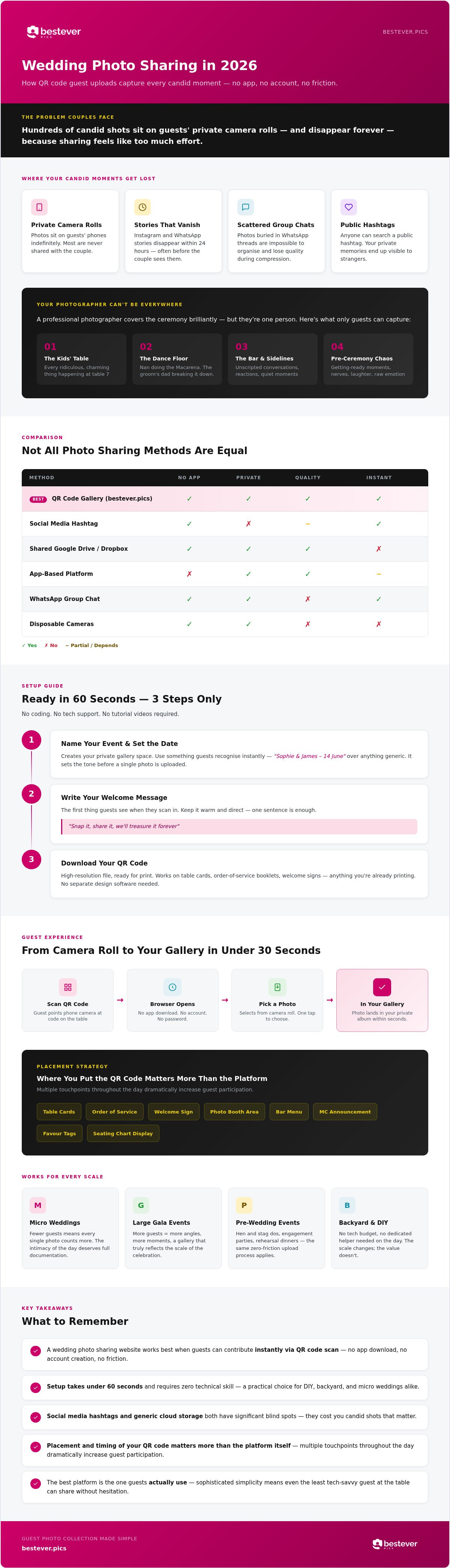
- A wedding photo sharing website works best when guests can contribute instantly via QR code scan - no app download, no account creation, no friction.
- Setup takes under 60 seconds and requires zero technical skill, making it a practical choice for DIY, backyard, and micro weddings alike.
- Not all sharing methods are equal - social media hashtags and generic cloud storage both have significant blind spots that cost you candid shots.
- Placement and timing of your QR code matters more than the platform itself; multiple touchpoints throughout the day dramatically increase guest participation.
- bestever.pics was built specifically to solve real event friction, with sophisticated simplicity at its core so even the least tech-savvy guest at the table can share without hesitation.
Why wedding photo online upload is the 2026 guest standard
Think about what's actually sitting on your guests' phones right now. Candid shots from the pre-ceremony chaos, a sneaky video of the flower girl refusing to walk down the aisle, the exact moment your partner's dad started crying. None of that ends up in your professional gallery. It lives in private camera rolls, WhatsApp threads, and Instagram stories that disappear before the thank-you cards go out.
A wedding photo online upload system fixes this at the source. Guests scan a QR code, their browser opens, they pick a photo or video from their camera roll and hit send. No account. No password. No waiting. The image lands directly in your private gallery within seconds. That's the mechanic, and it's genuinely that simple.
Compare that to disposable cameras, which had a certain charm but came with real costs: development fees, unpredictable image quality, and a two-week wait before you saw anything. The results were often blurry, dark, or just plain unusable. The upgrade to digital isn't sentimental. It's practical.
The death of the wedding app
Asking a guest to download an app for a single day is asking a lot. Most people have limited storage on their phone, a low tolerance for unfamiliar interfaces, and zero interest in creating yet another account they'll never use again. The friction isn't imagined; it's the reason so many app-based photo collection attempts quietly fail by the second course.
Browser-based uploads remove that barrier entirely. When there's nothing to install, participation rises sharply because the path from "I took a great photo" to "it's in the album" takes under thirty seconds. There's also a privacy argument here that matters to a lot of couples: a private gallery on a dedicated wedding photo sharing website keeps your memories off public feeds and out of stranger's search results, unlike a hashtag anyone can stumble across.
Capturing the moments between the milestones
Your photographer is brilliant at the ceremony. They're trained for it. But they can't be at the kids' table and the bar and the dance floor simultaneously. Guests fill those gaps instinctively; the problem has always been retrieval, not capture.
This is where guest uploads genuinely change the morning after. Newlyweds who wake up to a gallery already populated with 200 guest photos get something no professional package includes: the full story of their day, told from every angle. It works just as well for a 20-person backyard wedding as it does for a 200-guest venue event. The scale changes; the value doesn't.
- Micro-weddings: Fewer guests means every photo counts more, and the intimacy of the day deserves to be fully documented.
- Large gala events: More guests means more angles, more moments, and a gallery that genuinely reflects the scale of the celebration.
- Pre-wedding events: Hen and stag dos, engagement parties, and rehearsal dinners all benefit from the same zero-friction upload process.
The shift to guest-led photo sharing isn't a trend. It's the logical response to how people actually behave at weddings in 2026: phones in hand, capturing everything, sharing nothing useful unless you make it effortless.
How to set up your wedding photo online upload in 60 seconds
No coding. No tech support. No weekend spent watching tutorial videos. Setting up your wedding photo online upload is genuinely one of the quickest things on your pre-wedding to-do list, and that's not a marketing claim. It's the whole design philosophy behind how bestever.pics was built.
The setup process runs in three steps, and the longest part is deciding what to write in your welcome message.
Step-by-step gallery creation
- Choose your event name and date. This creates your private gallery space. Use something guests will recognise instantly, like "Sophie & James - 14 June" rather than a generic title. It sets the tone before anyone uploads a single photo.
- Write your welcome message. This is the first thing guests see when they scan in. Keep it warm and direct: "Snap it, share it, we'll treasure it forever" works better than a formal instruction. One sentence is enough.
- Download your QR code. You'll get a high-resolution file ready for print. It works on table cards, order-of-service booklets, welcome signs, and anything else you're printing anyway. No separate design software needed.
From there, the gallery handles everything. Guests scan, their browser opens, they select a photo or video from their camera roll, and it lands in your album. The system supports unlimited uploads from any smartphone, which means whether you have 18 guests or 180, the process is identical.
Customisation matters more than couples expect. Matching your upload page to your wedding colours and theme makes it feel intentional rather than bolted-on. It's a small detail that signals to guests: this is the official place to share, not an afterthought.
Testing your upload link before the day
Do a test scan at least a week before the wedding. This isn't optional; it's the step that catches problems while you still have time to fix them.
- Test across different devices. Scan on an iPhone, an Android, and if possible an older model phone. Browser-based uploads work across platforms, but it's worth confirming your specific QR code resolves correctly on each.
- Check your venue's connectivity. Most modern venues have guest Wi-Fi. If yours doesn't, confirm there's reliable mobile data coverage in the main spaces. Uploads only need a basic connection, not high-speed broadband.
- Ask someone else to test it. Hand your phone to a family member who isn't particularly tech-savvy and watch them scan without guidance. If they get through it without questions, your guests will too.
Ready to see how straightforward it actually is? You can set up your private wedding photo gallery and have your QR code in hand before you finish your morning coffee.
Comparing online upload methods for your wedding gallery
Not every photo-sharing method is created equal. The one you choose will directly affect how many guest photos you actually end up with, and the difference between options isn't subtle. Some methods lose you candid shots before the cake is even cut. Others hand you a private gallery full of high-resolution originals by the time you're on your honeymoon.
QR codes vs. wedding hashtags
Wedding hashtags had their moment. The idea was sound: create a clever tag, guests post to Instagram, you search it later and collect everything. The reality is messier. A growing number of people keep their social media accounts private, which means their posts under your hashtag are invisible to you. Others simply forget the tag, misspell it, or don't post publicly at all. You end up with a fraction of what was actually taken.
There's a quality problem too. Social platforms compress images on upload. What your guest captured as a crisp, full-resolution photo gets squeezed down to a fraction of its original size before it ever reaches your feed. That's fine for a story that disappears in 24 hours. It's not fine for a photo you want to print and frame.
QR code uploads sidestep both issues entirely. The guest scans, selects, and submits directly to your private gallery. No public profile required. No compression. bestever.pics stores the original file as uploaded, which means you keep the detail, the colour accuracy, and the resolution your guest's phone actually captured. It also keeps your wedding memories off public feeds, away from strangers' searches, and entirely under your control.
Generic cloud storage vs. event-specific platforms
Google Drive gets suggested a lot, particularly on forums where "free" is the primary decision-making criterion. It works, technically. But hand a guest a shared Drive link at a wedding reception and watch what happens. They'll open a folder that looks like a work file system, feel uncertain about whether they're in the right place, and quietly put their phone away.
Generic storage tools weren't designed for guests. They lack the branded welcome screen, the warm prompt, the visual confirmation that says "yes, this is where the wedding photos go." That context matters more than it sounds. A dedicated wedding photo sharing website creates a curated environment that signals intention, and guests respond to that signal by actually participating.
The practical gaps in generic tools add up quickly:
- No live slideshow capability: Dedicated platforms can display uploads in real time on a venue screen; Drive folders cannot.
- No branded interface: A generic folder feels impersonal; an event-specific gallery feels like part of the day.
- No upload guidance: Guests using Drive often don't know whether to upload, comment, or just browse, which creates hesitation.
- No privacy by default: Shared Drive links can be forwarded to anyone; a private event gallery is closed to everyone except those with your QR code.
The trade-off is real: free generic tools cost nothing upfront but quietly cost you participation. Purpose-built platforms are designed around the guest experience from the first scan, and that design difference shows up directly in how many photos end up in your gallery.
Pro tips to encourage wedding photo online upload
Getting guests to actually use your wedding photo sharing website comes down to one thing: removing every possible moment of hesitation. The platform does the heavy lifting, but you control the context around it. Placement, timing, and a nudge or two from the right person on the day can be the difference between 40 uploads and 400.
Creative QR code placement ideas
Think of your QR code as a guest at the wedding who needs to be everywhere at once. The couples who end up with the fullest galleries don't rely on a single table card. They put the code where guests naturally reach for their phones.
- Save the dates and invitations: Including the code here does something clever. Guests arrive already familiar with the upload process, which means no learning curve on the day itself.
- Table cards at the reception: One per table, positioned near the centrepiece where people are already looking. Keep the prompt short: "Scan to add your photos to our album."
- The bar area: People wait at the bar. They have their phones out. A small card propped next to the drinks menu gets scanned more than almost any other placement.
- Order of service booklets: Guests hold these during the ceremony. A small QR code on the back cover is a natural fit.
- Welcome sign at the venue entrance: First thing guests see, first chance to scan.
For visual placement inspiration and print-ready ideas, the creative QR code display ideas guide covers formats that work across different venue styles.
Start before the wedding day
Here's the angle most couples miss entirely: the hen and stag dos are the perfect rehearsal for your upload system. Set up the same gallery link, share the QR code with the group, and let guests get comfortable with the process in a low-stakes environment. By the time the wedding day arrives, scanning and uploading feels like second nature. You also collect a set of pre-wedding memories that your professional photographer will never have access to.
Engagement parties and rehearsal dinners work the same way. Every pre-wedding event is a chance to build the habit before it counts most.
Incentivising your guests
A light competitive element works surprisingly well. "Best candid photo wins a bottle of bubbly" gives guests a reason to be deliberate about what they capture and share. It also gives the MC something fun to announce during the reception, which leads directly to the single most effective tactic on this list.
Ask your DJ or celebrant to mention the upload link. Once. Clearly. At a moment when guests are seated and paying attention, such as just before the first dance or during the welcome speech. A verbal prompt from someone with a microphone converts passive awareness into active participation faster than any printed card. Pair that announcement with a live slideshow displaying guest uploads on a venue screen in real time, and you create a feedback loop: guests see their photos appear, others want theirs up there too, and uploads keep coming well into the evening.
Why bestever.pics is the top choice for your wedding
Most photo sharing platforms were built for general use and then adapted for weddings as an afterthought. bestever.pics went the other way. Steve and Chloe, the father-daughter team behind it, built the platform specifically because they'd experienced the friction of trying to collect event photos and couldn't find anything that actually worked for real guests in real situations. That origin story matters, because it shapes every decision the platform makes, from the zero-app philosophy to the way the upload screen reads on a five-year-old Android at the back of a marquee.
The result is what they call sophisticated simplicity. The technology doing the work behind the scenes is genuinely clever. But guests never see any of it. They scan, they share, they're done. That's the only experience that matters when your Great-Aunt Margaret is holding a glass of prosecco and squinting at a QR code on a table card.
For couples choosing a wedding photo sharing website, the difference between a platform built for events and one adapted for them shows up immediately in participation rates. When there's nothing to install and no account to create, the barrier to sharing disappears. That's not a feature. It's the entire design principle.
A personal touch for DIY couples
Wedding planning is already a pressure cooker. bestever.pics was designed with that reality front of mind. The support team isn't a faceless helpdesk; it's a small, human team that understands what's at stake when you're asking for help three days before your wedding. Setup is genuinely quick, customisation is straightforward, and if something doesn't make sense, there's a real person who can help you sort it. You can explore the full wedding-specific features, including QR code options and gallery customisation, on the QR codes for wedding photo sharing page.
Scalable solutions for wedding pros
For venues, planners, and photographers running events week after week, the challenge isn't setting up one gallery. It's managing dozens without losing your mind. The Pro tier on bestever.pics is built for exactly that: recurring events, branded galleries that carry your business identity, and a system that doesn't require you to start from scratch every Saturday.
- Branded galleries: Your logo, your colours, your client's experience. Every gallery reflects your business, not a generic template.
- Multiple events under one account: Manage all your upcoming events from a single dashboard without juggling separate logins.
- A repeatable system your clients notice: When photo sharing works effortlessly at every event you run, it becomes part of your professional reputation.
It's a gap most competitors haven't addressed well. Platforms focused on individual couples rarely think about the planner who needs the same wedding photo sharing website functionality to work reliably across fifty events a year. The Pro page covers the business-specific tools in full, including everything relevant for vendors and venues looking to add guest photo sharing as a standard part of their offering.
Your wedding day deserves a complete story
The candid shots are the ones you'll reach for first, ten years from now. The look exchanged across the room. The dancing that started before it was supposed to. Those moments live on your guests' phones, and a dedicated wedding photo sharing website is the only reliable way to get them into your hands.
No app downloads. No account creation. A QR code your guests can scan in seconds, whether they're tech-savvy or just about managing their camera roll. That's the standard bestever.pics was built to deliver, for DIY couples planning a backyard ceremony and for professional planners running events every weekend.
The setup is quick. The participation follows naturally. And the gallery you wake up to the morning after will tell the full story of your day, not just the polished version.
Your future self will be glad you sorted this one early.
Frequently Asked Questions
Do my guests need to download an app for the wedding photo online upload?
No app download required, full stop. Guests scan your QR code and their phone's browser opens directly to your upload page. They select a photo or video from their camera roll and hit send. The whole process runs through the browser, which means no storage space lost, no account creation, and no unfamiliar interface to figure out mid-reception.
This matters more than it sounds. Guests who'd happily ignore an app prompt will scan a QR code without hesitation, especially when there's nothing waiting on the other side except a simple upload button.
How many photos can my guests upload to the digital album?
bestever.pics supports unlimited uploads, so the gallery doesn't cap out halfway through the evening. Whether you have 20 guests at a backyard ceremony or 200 at a venue reception, every photo and video they choose to share lands in your album without hitting a wall. There's no need to ration uploads or ask guests to pick their best one.
Will the photos be high-resolution enough for me to print later?
Yes. bestever.pics stores the original file as uploaded, so the resolution your guest's phone captured is the resolution you receive. Nothing gets compressed or downsized in transit, which is a significant difference from photos collected via social media hashtags, where platforms squeeze files before they ever reach your feed. If a guest shoots on a modern smartphone, the image will be print-ready.
Can guests upload videos as well as photos?
Yes, guests can upload both photos and videos through the same QR code scan. That means the speech reactions, the first dance, the moment the flower girl decided to sit down mid-aisle, all of it can land in your gallery directly from guests' camera rolls. Check the platform's current video length limits before the day so you know what to expect.
What happens if my wedding venue has poor Wi-Fi or mobile signal?
Uploads only need a basic data connection, not high-speed broadband, so most modern venues with standard guest Wi-Fi or reasonable mobile coverage will work fine. The practical step is to test your QR code at the venue during your final walk-through, ideally on both an iPhone and an Android. If signal is genuinely patchy in certain areas, position your QR codes in spots where connectivity is strongest, typically near the entrance, the bar, or the main reception space.
Can I use the same QR code for my hen do and the wedding day?
You can set up your gallery early and share the same link across multiple pre-wedding events. Using it at your hen or stag do first has a practical benefit: guests arrive at the wedding already familiar with the upload process, so there's no learning curve when it counts most. You also collect a set of pre-wedding memories that your professional photographer won't have, which makes the gallery feel more complete.
Is the wedding photo online upload private or can anyone see it?
Your gallery on a dedicated wedding photo sharing website like bestever.pics is private by default. Only people with your QR code can access it, which means your photos stay off public feeds and out of strangers' search results entirely. That's a meaningful difference from a wedding hashtag, where anyone on the platform can stumble across your images regardless of whether you know them.
How long will my online gallery stay active after the wedding?
Gallery duration depends on the plan you choose at setup, so it's worth checking the current terms on the bestever.pics website before your wedding day. The practical advice is to download your full gallery to a personal hard drive or cloud backup as soon as you're back from your honeymoon. Don't rely on any single platform as your only long-term archive, regardless of how long access is guaranteed.