

Wedding Guest Upload Site: How to Pick the Best Platform

Article by
Gabi
Hi, I'm Gabi - Co-Founder of Bestever Pics. Thanks for visiting our blog. We are working hard to produce content which we hope resonates with you. Feel free to drop us a line on socials or via the contact form on the site.
Forcing wedding guests to download a mobile app is the fastest way to guarantee you never see their photos. Your friends and family capture hundreds of genuine, joyful moments during the reception, yet chasing them down through cluttered group texts or compressed cloud links is exhausting. Choosing the right wedding guest upload site solves this problem before the party even starts. With a quick browser-based setup, you give everyone an instant path to drop full-resolution memories into a unified private album without passwords or logins.
You shouldn't have to spend your honeymoon pleading for video clips or sorting through fuzzy, resized screenshots. This guide shows you exactly what to look for when picking a platform, from effortless QR code access to reliable storage limits and video support. We'll unpack the essential features that keep guest participation high across all generations, ensuring you capture every candid angle of your celebration.
Key Takeaways
- Skipping required app downloads removes the friction that stops guests across generations from sharing their photos.
- Choosing the right wedding guest upload site ensures you collect full-resolution images and original video clips without social media compression.
- Instant QR code access lets attendees upload directly from their standard camera app without creating accounts or passwords.
- Placing print codes strategically on reception tables, bar menus, and welcome signs dramatically boosts contribution rates throughout the night.
- Unified private albums give hosts complete control over their galleries alongside simple bulk downloads after the celebration ends.
What Is a Wedding Guest Upload Site and Why Ditch Apps?
A wedding guest upload site is a web-based gallery where wedding attendees contribute pictures and video clips directly through their mobile browsers. Unlike traditional methods that demand software downloads, these platforms use standard camera scanning to connect phones straight to a central album. Think of it as an evolution of the traditional image-sharing website, stripped of complex menus and rebuilt purely for event speed. When you eliminate technical obstacles during the reception, your guest contribution rate climbs dramatically.
Every extra step you ask a guest to take reduces the chance you will ever see their photos. Wedding receptions are fast-moving events filled with conversation, dancing, and drinks. Nobody wants to stop mingling to manage app permissions or create new profiles. A dedicated digital photo sharing site meets guests where they already are, letting them drop snapshots into your album in seconds.
The Hidden Cost of App-Based Photo Tools
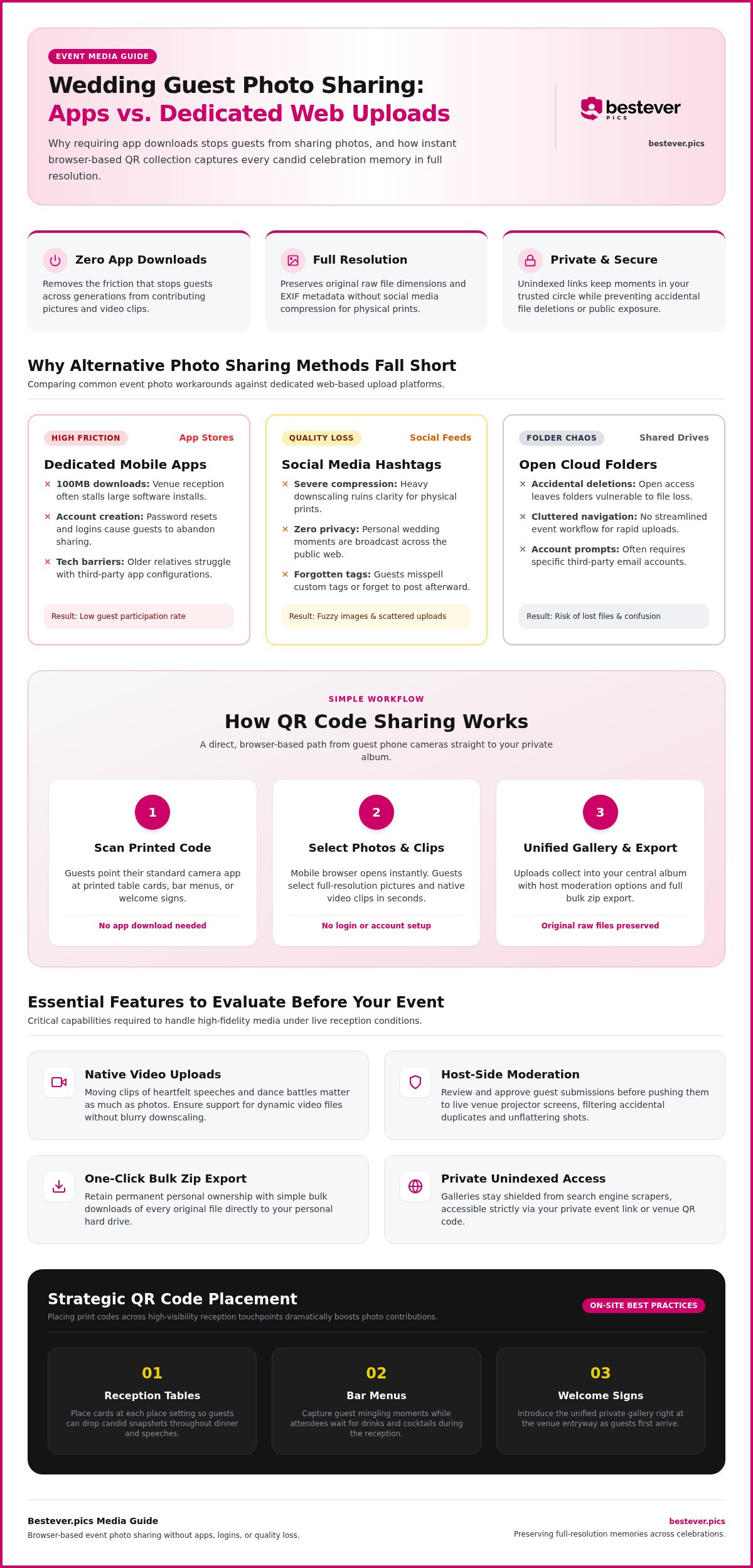
Event apps look great on paper, but they fall apart in practice. Historic barns, coastal venues, and hotel ballrooms often suffer from weak cellular reception. Asking a guest to pull down a 100-megabyte app over congested 3G kills momentum instantly. Account creation creates another hurdle; nobody wants to reset a forgotten password just to send you a candid shot of the cake cutting. Older relatives also find third-party app settings frustrating. If grandma needs tech support to share her picture of the first dance, she will simply put her phone away.
Hashtags and Shared Drives: Why Free Workarounds Fall Flat
Many couples turn to social media tags or free cloud storage folders to cut costs, but these workarounds bring real drawbacks:
- Quality loss: Social media feeds heavily compress image data, stripping out the crisp resolution needed for physical wedding prints.
- Privacy concerns: Public hashtags display personal moments to the entire internet rather than keeping memories within your trusted circle.
- Accidental deletions: Open cloud drive links leave your photo folders vulnerable to guests accidentally overwriting or deleting files.
- Forgotten tags: Guests frequently misspell custom hashtags or forget to post entirely once the party wraps up.
A private wedding guest upload site bypasses these headaches by giving everyone a simple, direct destination to store memories without compromising picture quality or privacy.
Essential Features to Evaluate in a Wedding Guest Upload Site
Not every photo platform handles the chaos of a reception smoothly. Choosing the right wedding guest upload site means looking beyond basic image hosting to examine how the tool performs under real wedding conditions. A quality service balances high-fidelity file collection with simple, barrier-free access for your friends and family.
You need to know your memories are safe, complete, and easy to retrieve after the celebration ends. Check for these critical capabilities before deciding where your guests will send their pictures:
- Full-resolution media retention: The system must preserve raw file dimensions and original EXIF metadata for future physical prints.
- Native video support: Moving clips of heartfelt speeches and dance battles matter just as much as still photography.
- Host-side moderation controls: You should have the option to review guest uploads before pushing them to live venue screens.
- Bulk export capabilities: A simple zip download ensures you retain permanent ownership of every original file on your own hard drive.
Image Quality, Storage Limits, and Video Uploads
Free services cut corners by compressing files, which ruins candid shots if you plan to print an album later. Look for a platform that accepts full camera resolution straight from modern iPhones and Android devices. Video is equally crucial; short clips quickly eat up server space, so confirm the service handles dynamic video files without forcing strict ten-second caps or blurry downscaling.
Privacy Controls and Live Host Moderation
Wedding celebrations are intimate. Your photo collection shouldn't sit exposed to search engine scrapers or public directories. The gallery should operate via a secure, unindexed link where only attendees with your event link or code can view or contribute. If you run a live slideshow on a projector, moderation filters let you approve guest submissions first, preventing accidental duplicates or unflattering outtakes from appearing on the big screen.
Effortless Guest Access and Mobile Compatibility
Adoption drops the moment a system creates technical obstacles. The platform must load fast in any standard mobile browser without forcing accounts, email registrations, or phone verifications. Given the massive surge in QR code usage at events, scanning a card at the table should take guests directly to the upload screen in under two seconds. If you want a stress-free option built around this exact principle, setting up a private wedding photo gallery with no app needed gives your celebration an easy, instant way to collect every view.
How QR Code Photo Sharing Works Without Guest Logins
Behind every successful wedding guest upload site is a remarkably straightforward mechanic: point, scan, and upload. As a host, you set up a private album that automatically generates a unique QR code. When attendees aim their smartphone cameras at that code, it launches your dedicated web portal without prompting them to install anything or set up credentials. Platforms like Bestever.pics make this happen by operating entirely inside standard mobile browsers, cutting out every traditional point of friction.
Files transfer straight from the guest's mobile gallery into your secure host dashboard. You get an organized, real-time stream of candid moments while attendees get back to enjoying the party.
The Technology Behind Instant Web Uploads
Modern iOS and Android camera sensors read embedded web addresses instantly. When a guest scans your table card, the QR code passes a temporary, secure token directly to their browser. This token grants upload permissions for that specific album without granting access to your administrative account or billing settings. Recent consumer scanning trends show that guests already expect camera-based interactions to work instantly without friction. The platform processes file transfers in the background, which protects mobile battery life and minimizes data usage even when attendees upload several high-definition files at once.
Eliminating the Login Barrier for Older Guests
Account requirements turn older relatives away faster than anything else. A login-free workflow eliminates the need to remember passwords, confirm email addresses, or authorize two-factor text messages. The interface keeps things obvious and accessible:
- Single-tap launch: Tapping the camera banner opens the upload page immediately.
- Direct camera roll access: Large, clear buttons let guests choose photos directly from their phone storage.
- Instant visual confirmation: Green checkmarks reassure guests that their pictures uploaded successfully.
Understanding how it works helps couples see why browser-based tools consistently capture more memories than app-reliant alternatives. Anyone who knows how to open their camera app can contribute within seconds.
How to Set Up Your Guest Photo Gallery Step by Step
Setting up your private gallery takes minutes, but planning where and how your guests interact with it determines your final haul of memories. A thoughtfully prepared wedding guest upload site works silently in the background while you focus on enjoying your reception. By pairing digital tools with smart physical placement, you encourage contributions throughout the entire celebration.
A few deliberate steps turn passive observers into active memory collectors:
- Create and personalize your private online gallery dashboard.
- Print sharp QR graphics and place them across strategic venue spots.
- Coordinate quick verbal reminders with your wedding party and entertainment.
- Back up your complete archive once the celebrations wrap up.
Step 1: Create and Personalize Your Digital Album
Start by setting up your central event portal. Upload a clear engagement portrait or welcome graphic to reassure scanning guests they reached the right space. Configure whether uploads appear immediately in a public feed or wait in a queue for host approval. Once your settings are locked, test the scanning workflow on your own smartphone before sending anything to the printer.
Step 2: Design and Place High-Visibility Reception Displays
Visibility makes all the difference. Small tent cards placed beside floral centerpieces catch guests while they wait between courses. Place additional standing signs near open bars, dessert buffets, and lounge furniture where people naturally pull out their phones to chat. Checking out creative QR code display ideas can help blend these print assets directly into your chosen table styling without cluttering place settings. Make sure venue pin-spotting or ambient lighting illuminates the printed codes clearly so camera sensors focus instantly.
Step 3: Keep the Momentum Going Post-Reception
Candid sharing does not stop when the last song ends. Many guests capture their best shots during late-night afterparties or the morning-after recovery brunch. Send a quick digital thank-you message containing your gallery link two days later to prompt those lingering camera-roll uploads. Once the contributions taper off, perform a full bulk export to your local hard drive so you hold permanent, high-definition backups of every single snapshot and toast.
Why Bestever.pics Delivers a Friction-Free Photo Experience
Founded in 2023 by father-daughter duo Steve and Chloe, Bestever.pics was created with a straightforward goal: replace complicated event software with an approachable, reliable tool anyone can use. While massive wedding directories push bloated apps loaded with advertisements and sponsor signups, this platform focuses purely on guest photo sharing that works right out of the box. Choosing an uncluttered wedding guest upload site ensures your celebration remains focused on human connection rather than troubleshooting technical glitches.
A memorable reception shouldn't require you to act as an on-call IT specialist for your guests. Instead of wrestling with app store downloads or forced user profiles, attendees scan a code and immediately upload their candid files. You receive a clean, organized stream of every moment without losing days tracking down missing files after the party ends:
- Frictionless access: Zero app downloads, account creation, or software installations required for anyone.
- Uncompromised media quality: Preserves full-resolution photos and original video clips without forced compression.
- Direct host management: A simple, private dashboard makes viewing, moderating, and bulk downloading memories effortless.
Human-Centered Design for Modern Weddings
Large tech platforms often treat guest photo collection as an afterthought, tucking it behind intrusive permission screens and endless marketing pop-ups. In contrast, a clean and ad-free interface keeps attention right where it belongs: on your gallery. Because the browser layout relies on clear, simple prompts, guests of every generation can contribute with equal confidence. If you ever have a question while preparing your gallery, direct support from real people ensures you get prompt answers instead of generic chatbot scripts.
Start Collecting Your Wedding Memories Today
Event planning moves fast, and locking in your media collection system early removes a major item from your checklist. You can personalize your online album, adjust privacy settings, and download print-ready QR files in just a few minutes. That gives you plenty of time to add your custom codes to reception stationery, bar signage, or welcome displays. Check out the private wedding photo gallery to launch your space and ensure no candid memory slips through the cracks.
Collect Every Wedding Memory Without the Hassle
Your wedding day passes in an instant, but your guests capture the genuine, unscripted perspectives that complete the celebration. Choosing the right wedding guest upload site ensures you collect every heartfelt toast, wild dancefloor moment, and quiet embrace without forcing anyone to install an app or register an account. Removing that digital barrier guarantees full-resolution image and video preservation while welcoming instant participation from tech-savvy friends and older relatives alike.
Backed by attentive support from a dedicated father-daughter team, your private gallery keeps every memory secure, organized, and ready for high-quality printing. Set up your digital album before the invitations go out, place your codes where guests can easily spot them, and immerse yourself in the party knowing every spontaneous shot is making its way straight to your collection.
Frequently Asked Questions
Do wedding guests need to download an app to upload photos?
No, guests do not need to download an app or create an account. When using a modern browser-based wedding guest upload site, attendees simply scan a QR code with their default camera app. This action opens a direct web portal right in Safari, Chrome, or any mobile browser. It eliminates app store searches, long download times, and forgotten passwords, allowing guests of all ages to share photos in seconds.
How do guests access the wedding guest upload site during the reception?
Guests access the platform by scanning a printed QR code displayed throughout your venue. Couples usually place these codes on table cards, bar signs, cocktail napkins, or printed dinner menus. Once scanned by a smartphone camera, the code instantly directs the browser to your private upload album. No login or verification code is needed, making the transition from taking a picture to submitting it completely painless.
Are the photos uploaded by guests stored in their original full resolution?
Yes, the right upload service preserves files in their original resolution and retains camera metadata. Many free messaging platforms and social media networks heavily compress images to save server bandwidth, producing pixelated results. Browser-based event galleries accept full-size JPG, PNG, and HEIC files straight from the smartphone camera roll. This ensures every candid image remains crisp enough for professional photo album printing or physical wall art framing later.
Can guests upload short video clips in addition to still pictures?
Yes, guests can upload short video clips directly alongside standard photos. Dynamic moments like toast reactions, impromptu dance battles, and the cake cutting are often best captured on video. Modern mobile upload portals let users select recorded video clips straight from their phone library. The files upload directly into your host album without requiring guests to trim them down or convert formats first.
What happens to our wedding photos after the event ends?
Your photos remain safely stored in your private cloud gallery until you download them. Once the festivities wind down, you can export your entire collection of pictures and videos in a single bulk zip file to your local computer or external drive. This gives you permanent, uncompressed ownership of every candid memory captured during your celebration, completely independent of the online hosting window.
Can guests see photos uploaded by other people at the wedding?
You have full administrative control over whether guests see other uploads. You can configure your gallery as an open community stream where attendees browse each other's candid shots in real time, or lock it down so only the hosts view submissions. If you prefer to screen images before displaying them on a live reception screen, moderation tools let you review and approve each photo first.
What if our wedding venue has weak Wi-Fi or cellular service?
Guests can still take photos as usual and upload them once they connect to service later. Browser upload links don't expire the minute your reception concludes. By sending a follow-up text or email with your gallery link the next day, friends and family can upload their favorite shots from their hotel rooms or home Wi-Fi networks. This ensures spotty countryside reception won't stop you from collecting every photo.