

Wedding Guest Photo Gallery: The 2026 Guide to Candid Snaps

Article by
Gabi
Hi, I'm Gabi - Co-Founder of Bestever Pics. Thanks for visiting our blog. We are working hard to produce content which we hope resonates with you. Feel free to drop us a line on socials or via the contact form on the site.
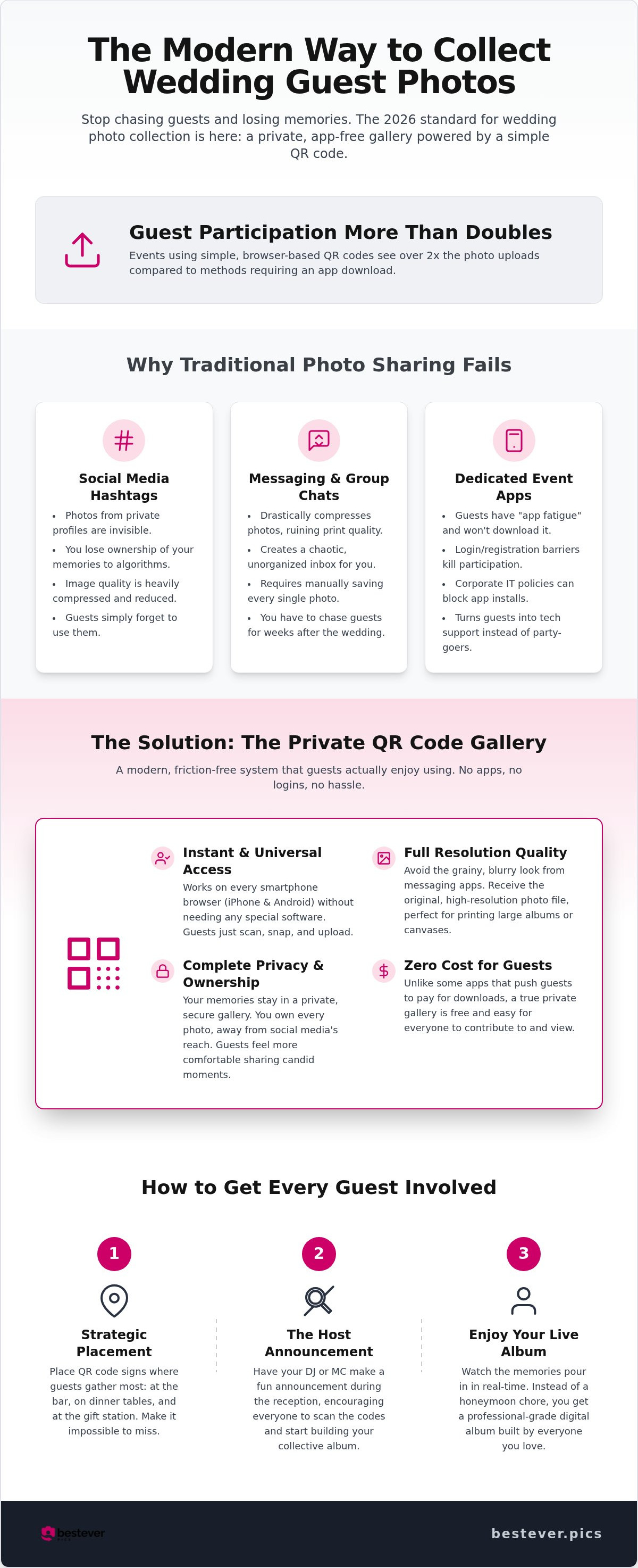
Research shows that guest participation more than doubles when you swap mandatory app downloads for a simple, browser-based QR code scan. It's a massive shift for 2026. Most couples realize too late that hashtags get ignored and messaging apps destroy photo quality, leaving your wedding guest photo gallery feeling empty.
We'll show you exactly how to collect every high-resolution candid shot instantly while keeping the experience entirely private and secure. You'll learn how to set up a frictionless system that guests actually enjoy using without you having to chase anyone for weeks after the honeymoon. It's about transforming your anxiety over lost memories into excitement for a professional-grade digital album.
This guide breaks down the 2026 standards for digital albums, ensuring you capture every raw, unposed moment from your big day using tools like bestever.pics. Forget the frustration of blurry messaging threads and the legacy processes that kill the party mood. By the end, you'll have the confidence to embrace a faster, smarter way to celebrate your wedding.
Key Takeaways
- Discover how a private wedding guest photo gallery keeps your memories away from social media algorithms while maintaining full image quality.
- Stop using messaging apps that compress your photos and create a messy inbox for you to clear out during your honeymoon.
- Learn why QR codes outperform shared folders by removing the need for guests to create accounts or download clunky apps.
- Place your custom QR codes at the bar and dinner tables to catch guests when they're most likely to snap candid photos.
- Master the host announcement trick to get every guest involved in building your digital album during the reception.
What Is a Private Wedding Guest Photo Gallery?
A wedding guest photo gallery is a centralized digital album that allows attendees to upload candid snaps instantly via unique QR codes. Unlike public social media, it provides a private, friction-free space for high-resolution images. In 2026, the gold standard is browser-based technology, requiring no app downloads or guest registrations to participate.
Think of this as the digital evolution of the disposable camera on the dinner table. Instead of waiting weeks for development, you see the magic happen in real time. The history of wedding photography shows a clear path from formal portraits to the raw, unposed energy of the dance floor. Using a platform like bestever.pics ensures you capture those lightning-in-a-bottle moments without the technical headaches of the past.
The Shift from Hashtags to Private Galleries
Social media hashtags are failing couples. If a guest has a private profile, their post won't show up in your feed, and you'll never even know it exists. You're also handing your most personal data to massive corporations that prioritize algorithms over your memories. A private wedding guest photo gallery puts you back in control of your content.
- Data Ownership: You own every pixel, meaning no one can delete your memories or change the privacy terms.
- Intimate Atmosphere: Guests feel more comfortable sharing "behind-the-scenes" shots, from the morning prep to the late-night snacks, when they know it's a private space.
- Full Resolution: Avoid the grainy, compressed look of social media uploads and keep your photos print-ready.
Why App-Free Technology Is Essential
App fatigue is a major mood killer at modern celebrations. Most guests refuse to download new software for a single day, especially if they're already busy balancing a drink and a phone. Browser-based uploads solve this by working on every smartphone instantly. Whether your guests are on the latest iPhone or an older Android, they just scan and snap.
Removing the login barrier is a total disruptor for engagement. Research from April 2026 shows that events using QR codes and browser-based uploads see more than double the participation rates of those requiring an app. It's a simple equation: less friction equals more photos. This is especially vital for professional planners managing high-stakes hen and stag dos or large-scale ceremonies where every second counts. You want your guests on the dance floor, not troubleshooting a password reset in the corner.
Why Traditional Photo Sharing Fails at Modern Weddings
Traditional methods like texting or group chats are the fastest way to ruin your wedding memories. While it feels easy to say "just text it to me," you're actually creating a logistical disaster for yourself. Your inbox becomes a chaotic mess of low-resolution files while you should be relaxing on your honeymoon. For those planning intimate backyard or micro weddings, the lack of a formal structure makes a centralized wedding guest photo gallery even more essential to prevent these moments from vanishing into private camera rolls. You don't want to be chasing your cousins for photos three weeks after the event.
The 'Compression' Trap: Losing Your High-Res Memories
Messaging apps like WhatsApp and iMessage are built for speed, not quality. They often compress images significantly, stripping away the fine detail needed for a professional-grade physical album. If you want to print a large canvas of a candid guest shot later, a compressed file will look blurry and pixelated. A dedicated gallery ensures you receive the original file size, preserving every sharp detail from the lace on a dress to the laughter in the background.
This quality gap is exactly why professional photographers deliver files via specialized galleries rather than email attachments. By providing your guests with a high-end upload tool, you're essentially giving them the ability to contribute to your official record. It transforms amateur snapshots into valuable assets for your future family archives, ensuring that even the most spontaneous dance floor moments are captured in stunning detail.
IT Policies and Privacy Concerns
Modern guests are more tech-savvy and privacy-conscious than ever before. Many professionals have strict corporate IT policies on their work phones that prevent them from downloading new, unverified apps for a single-day event. By choosing an app-free solution, you respect their boundaries and ensure everyone can participate without compromising their device security. It’s a quietly confident way to host that shows you value your guests' digital safety as much as their presence.
This approach also clears up confusion regarding photo copyright ownership, as the platform provides a clear, private space for sharing rather than a public social media free-for-all. Physical guestbooks often sit gathering dust on a side table, but a digital album captures the raw energy of the celebration. If you're ready to ditch the inbox nightmare, you can set up your private gallery in under a minute and start collecting high-resolution memories the right way.
QR Codes vs. Shared Folders: Finding the Best Sharing Method
Choosing between a QR code and a generic shared folder link is the difference between a high-speed highway and a dirt road. Google Drive and Dropbox are built for office work. They aren't built for weddings. A professional wedding guest photo gallery must be fast. Guests won't spend two minutes digging through a folder structure or signing into accounts. They want to snap, scan, and dance.
The Problem with Generic Cloud Storage
Permission walls kill the mood. Generic cloud folders often trigger "request access" errors at the worst possible time. These platforms force guests into specific ecosystems, creating a massive barrier for those who value privacy. The experience feels clinical. It feels corporate. It lacks the celebratory energy your event deserves.
Unsecured links also expose guests to the dangers of oversharing sensitive data across the web. Standard folders lack a live visual feed. Guests can't see the story of the day as it happens. It’s a static, one-way street that fails to engage. Using bestever.pics creates a branded environment that looks like part of your decor. It keeps the focus on the memories rather than the tech.
Why QR Codes Win for Live Events
QR codes are the physical bridge to your digital album. They offer a psychological nudge for immediate action. Place them on bar menus or table talkers. The instruction is clear. The effort is zero. Scanning a code takes three seconds. Fumbling with shared links takes minutes. It’s the inevitable evolution of event interaction.
Instant access captures the dance floor energy. Guests share photos while they're still in the moment. You get the peak excitement, not the next morning's blurry recollections. Read more about qr codes for wedding photo sharing to understand why this tech is the modern standard. Build a wedding guest photo gallery that respects your guests' time and your vision for the day.
How to Set Up Your Gallery for Maximum Guest Engagement
Placement is the secret sauce for a successful wedding guest photo gallery. You want to catch guests when they have their phones out but aren't busy. The bar, dinner tables, and guest transport are prime real estate for signage. Participation rates skyrocket when the tech is right in front of them during those waiting moments. A well-placed wedding guest photo gallery sign can double your photo count by reminding people to capture the candid energy of the room.
Step 1: Creating Your Custom Gallery
Start by choosing a platform that prioritises no-app uploads for your wedding guest photo gallery. You can set up your space on bestever.pics in about 60 seconds. Customise the welcome message to greet your guests and make the space feel personal. If you're a professional planner managing multiple weddings or hen and stag dos, this localized customization helps maintain a high-end feel for every client. Always test the QR code on both iPhone and Android devices before the big day to guarantee a smooth experience.
Step 2: Designing Your Signage for Impact
Keep your signage language warm and human. Use phrases like "Scan to Share the Love" instead of tech-heavy instructions. You can use Canva templates to match your signage to your wedding theme, whether it's a rustic barn or a sleek micro-wedding. Ensure your QR codes are at least 3cm wide. This size allows phone cameras to focus easily, even in the dim lighting of a reception venue. For more inspiration, look at these creative qr code display ideas. Clear, well-designed signs act as a constant, friendly nudge for guests to keep snapping.
Step 3: Timing Your Reminders
Consistency is key for maximum engagement. Print a small code on the back of the order of service for the ceremony. Use the MC Announcement trick: have your host explain the gallery during the transition to the reception. For the evening party, consider showing a live slideshow of uploads on a projector. This visual element creates an immediate feedback loop, encouraging more guests to contribute their own snaps. Place a large Thank You sign at the exit for those final departure photos, and send a follow-up link via text the next morning. This ensures you get the most out of your wedding guest photo gallery long after the music stops.
Choosing the Best Platform for Your Digital Memories
Selecting the right platform ensures your memories are preserved in a way that respects the gravity of your big day. Not every wedding guest photo gallery is built to the same standard. You need a tool that balances technological sophistication with extreme accessibility. Prioritize platforms that offer unlimited photo storage so you never have to delete a single memory to make room for another. It’s about creating a permanent home for your candid snaps that exists outside the volatile world of social media feeds.
Standard vs. Pro: What Does Your Event Need?
DIY couples should focus on ease of use and one-time pricing models. You want a system that works immediately without requiring a subscription for a single day of celebration. For professional wedding planners and venues, the requirements are different. You need a Pro dashboard to manage multiple client galleries simultaneously. This level of control allows you to oversee corporate event engagement and private weddings from one central location, ensuring a consistent experience for every couple.
Venues can also use these galleries as a high-value service to differentiate themselves from competitors. Offering a built-in digital guestbook as part of a wedding package adds immediate value for the couple. It removes a major planning hurdle for them while providing the venue with a stream of high-quality candid content for their own marketing. It’s a win for everyone involved.
The Bestever.pics Advantage
The story of bestever.pics is rooted in a real human connection. Founded by father-daughter duo Steve and Chloe, the platform was built to solve the exact frustrations couples face today. This isn't just another piece of software; it's a tool designed by people who understand the importance of a well-organized wedding guest photo gallery. Their commitment to a 60-second setup means you spend less time on tech and more time enjoying your celebration.
We’ve positioned our platform as the inevitable evolution of the digital guestbook. Beyond still photos, look for video guestbook capabilities to capture moving messages and laughter that a photo simply can't hold. It’s fast. It’s sophisticated. It’s the simplest way to ensure that the unposed, raw energy of your wedding is captured forever. By choosing a platform that prioritizes speed and quality, you're investing in the longevity of your most precious memories.
Secure Your Memories for the Next Decade
Capturing the raw energy of your celebration shouldn't feel like a chore for you or your guests. By prioritizing a frictionless, app-free experience, you ensure that every spontaneous laugh and dance floor moment is preserved in high resolution. Traditional methods like hashtags and messaging apps simply can't compete with the privacy and quality of a dedicated wedding guest photo gallery. Whether you're a DIY couple or a professional planner, the goal is the same: zero friction and total creative freedom.
It's time to stop chasing people for photos and start enjoying your honeymoon. You've done the hard work of planning the perfect day; now it's time to make sure you actually get to keep the memories. We've built bestever.pics to be the inevitable evolution of event sharing, trusted by pros and loved by guests who just want to snap and celebrate.
Your future self will thank you when you're scrolling through a complete, high-res album of your favorite people. Let's make it happen.
Frequently Asked Questions
Do my guests need to download an app to upload photos?
No, your guests don't need to download any software or create an account. They simply scan your custom QR code and upload directly through their mobile browser. This removes the friction of app fatigue and ensures everyone can participate instantly regardless of their phone's operating system. It's the most efficient way to ensure your wedding guest photo gallery is filled with candid shots from every perspective.
Is there a limit to how many photos guests can upload?
We provide unlimited photo storage so you never have to worry about hitting a cap during the party. Whether you have fifty guests or five hundred, every single snap is captured in high resolution. This freedom allows your guests to be as creative as they want without the fear of running out of space. You get a complete digital record of the entire day without any compromise on quality.
Can I download all the photos from the gallery at once?
Yes, you can download your entire collection with a single click after the event. There's no need to save images individually or deal with messy files that fail halfway through. You'll receive every high-resolution file in its original quality, ready for professional printing or sharing. It simplifies the post-wedding process so you can focus on enjoying your first weeks as a married couple without digital clutter.
What happens if my venue has poor Wi-Fi or no signal?
Guests can still take photos and they'll upload automatically once they hit a better signal or return to their hotel Wi-Fi. The browser-based system handles the queueing so no memories are lost in dead zones. While a live slideshow might lag without a connection, your permanent digital album remains secure. It's a reliable fail-safe for remote barn weddings or basement reception venues with thick stone walls.
Can I moderate the photos before they appear in the live gallery?
Yes, you have full control over which images appear in your live slideshow. You can set the gallery to require approval for every upload or simply delete any unwanted shots after they appear. This ensures your live feed stays family-friendly while still capturing the raw energy of the night. It gives you peace of mind without slowing down the fun for your guests on the dance floor.
How long does the wedding guest photo gallery stay active after the event?
Your wedding guest photo gallery typically remains active for twelve months, providing plenty of time to organize your professional prints. You can extend this storage if you want a permanent digital home for those memories. Guests can continue to browse the album long after the honeymoon, making it a living record of the celebration. Check your specific plan on bestever.pics for exact storage duration details.
Is it possible for guests to upload videos as well as photos?
Absolutely, guests can upload video clips to capture moving messages and dance floor highlights. This transforms your gallery into a video guestbook that holds the sound and motion of the day. It's a fantastic way to hear the laughter and see the speeches from the crowd's perspective. These clips are saved in high definition alongside your still images for a truly immersive and modern experience.
Can I print a QR code for the gallery on my physical wedding invitations?
Yes, printing the QR code on your invitations is a brilliant way to get guests excited before the big day starts. They can scan the code to see engagement photos or travel details leading up to the ceremony. It sets the tone for an interactive celebration from the very first touchpoint. You can even use the same code for your hen and stag dos to keep everything organized.