

Shared Photo Album: 2026 Guest Photo Sharing Guide

Article by
Gabi
Hi, I'm Gabi - Co-Founder of Bestever Pics. Thanks for visiting our blog. We are working hard to produce content which we hope resonates with you. Feel free to drop us a line on socials or via the contact form on the site.
Forcing your guests to download a clunky app just to share a photo is the fastest way to ensure those memories stay locked on their phones forever. You've spent months planning every detail, but the most authentic moments often vanish into private group chats or get crushed by messaging platform compression. Launching a high-quality shared photo album for event success shouldn't require your guests to become amateur IT experts.
You need a system that works instantly, preserves original image quality, and requires zero friction from your attendees. This 2026 guide shows you how to bypass the outdated hurdles of legacy platforms and embrace a faster, smarter way to collect media. By choosing the right shared photo album for event needs, you ensure every candid shot is captured in full resolution without a single download.
We'll walk through how modern technology transforms the guest experience by using simple QR codes to bridge the gap between the physical moment and your digital archive. This guide breaks down the shift toward app-free sharing, compares the top platforms available right now, and shows you how to display a live photo wall. It's time to turn your guests into your most enthusiastic content creators while keeping your focus on the celebration.
Key Takeaways
- Don't force guests to download apps; let them upload photos directly through their mobile browser to keep things simple and participation high.
- Learn why a central shared photo album for event hosting captures more authentic moments than hashtags that often get lost in social algorithms.
- Boost your photo count by placing QR codes in strategic, high-traffic spots like the bar, buffet line, or lounge areas.
- Discover how to balance the creative freedom of a DIY wedding with the stricter data and branding requirements of a corporate function.
- Pick a "photo captain" to lead the way and show everyone how easy it is to get their shots into the gallery the moment the event starts.
Why a shared photo album for event success is essential
Chasing guests for photos weeks after your party is a losing game. A shared photo album for event hosting acts as a central hub for every candid memory captured on the floor, from the first toast to the last dance. It's about securing the raw, unfiltered energy that professional photographers might miss while they focus on formal setups. Understanding what image sharing is in a modern context means moving beyond basic social media posts toward dedicated galleries where you own every high-resolution file.
The death of the event hashtag
We used to rely on hashtags, but privacy settings have made them completely unreliable. If a guest has a private profile, their photos will never appear in your public feed, even if they use your exact tag. You're left with a fragmented mess of memories scattered across different platforms, buried by algorithms that don't prioritize your personal milestones. Chasing down people for "that one great shot" is frustrating and time-consuming. Using digital photo sharing for modern events ensures you aren't at the mercy of a third-party social network's privacy filters or data-crushing compression.
Why app-free is the only way to go
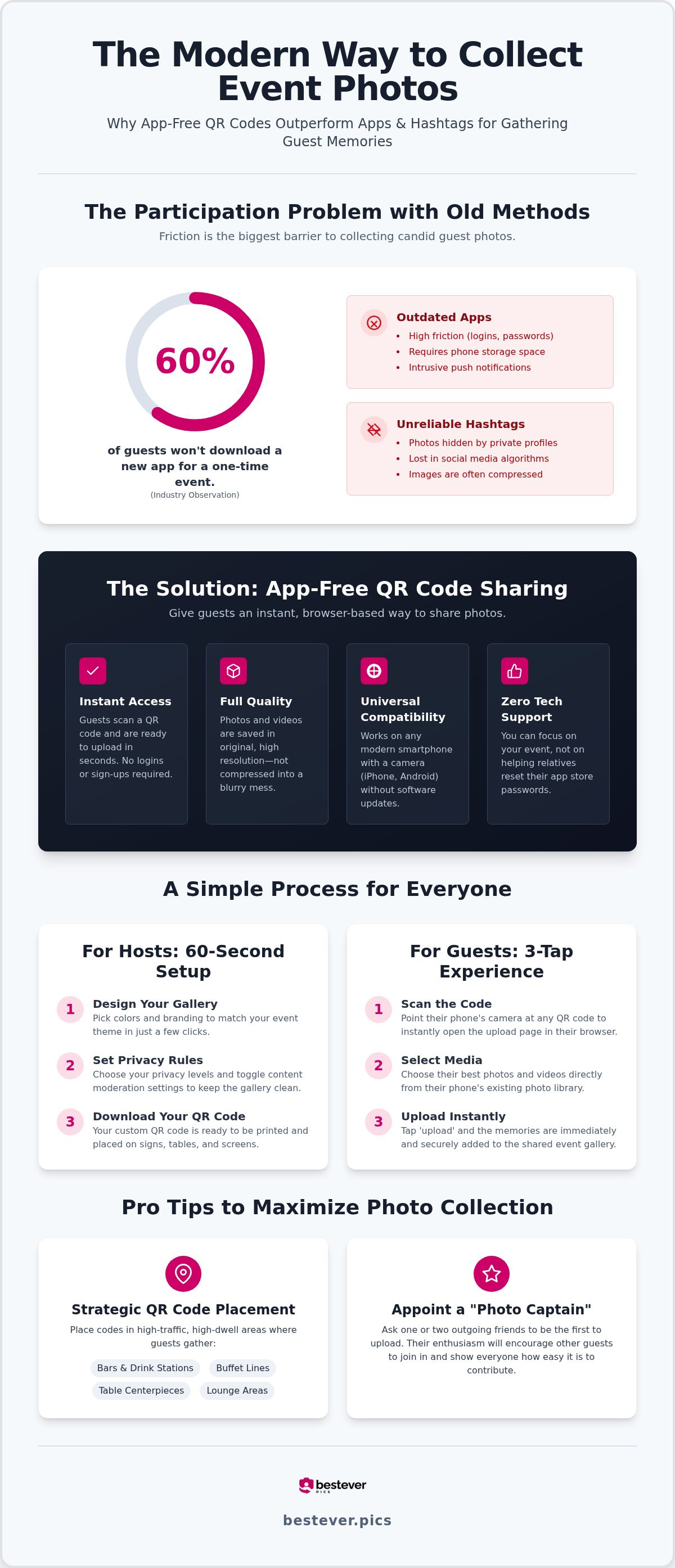
Friction is the ultimate participation killer. Industry observations suggest that roughly 60% of guests won't bother downloading a new app for a one-day event. They don't want to manage another login, clear phone storage, or deal with intrusive notifications. Web-browser uploads change the math entirely by removing every barrier to entry for your guests.
- Instant access: Guests scan a QR code and they're ready to upload in seconds.
- Universal compatibility: The system works on iPhones, Androids, and older devices without requiring software updates.
- Preserved quality: Unlike messaging apps that compress files into blurry messes, a dedicated web gallery keeps the original resolution intact.
- Zero tech support: You won't spend your night helping tech-shy relatives reset their app store passwords.
This streamlined approach, championed by platforms like bestever.pics, turns every guest into a contributor without asking them for a single minute of their time for setup. It's the difference between a gallery with ten photos and one with hundreds of unique perspectives.
How app-free QR code photo albums work
Modern guest photo sharing has evolved into a streamlined, browser-based experience that leaves clunky apps in the past. Your shared photo album for event success relies on a simple QR code that bridges the physical world and your digital gallery. This tech works through the native camera app on any smartphone; your guests don't need to clear storage or remember app store passwords. Behind the scenes, high-speed cloud processing handles everything from standard selfies to large 4K video files instantly.
User-generated content is now an essential component of event marketing and personal storytelling because it provides a perspective you can't buy. Hosts get a real-time feed of every upload as it happens. This allows you to moderate content on the fly or simply enjoy the stream of memories hitting your dashboard in seconds. This streamlined approach, led by bestever.pics, ensures your guests stay in the moment while your gallery grows in the background.
The 60-second setup for hosts
Getting started is faster than making a cup of coffee. You'll create an event profile and customize your unique gallery link in just a few clicks. Once the profile is live, you can download a custom QR code ready for your signage.
- Design your space: Pick your branding and gallery colors to match your event theme.
- Set the rules: Choose your privacy levels and toggle moderation settings to keep the gallery clean.
- Go live: Print your codes and place them where guests can't miss them.
If you're planning a DIY celebration, you can set up a private wedding photo gallery in minutes without any technical expertise. This gives you full control over who sees your photos without forcing guests to create accounts.
The guest experience in three taps
The goal is zero friction. When your guests see a QR code, the path to contributing to your shared photo album for event memories is incredibly short. There is no need for software downloads or account setup.
- Scan: The guest opens their camera and scans the code.
- Select: They choose their favorite shots or videos from their library.
- Send: One tap uploads the media directly to your secure web portal.
No account registration is required. No email verification is needed. It is a pure, fast, and respectful way to collect every angle of your big day without the typical digital hurdles.
Creative ways to display your event QR codes
Successful photo collection doesn't happen by accident. It's a direct result of smart, high-visibility placement. When you build a shared photo album for event memories, you're competing for a slice of your guests' attention. If the QR code is hidden in a dark corner or buried at the back of a program, your digital gallery will stay empty. Strategic visibility creates a frictionless path from the physical moment to your digital archive.
Placement is the engine of participation. You need to target the "wait-state" moments where guests have their phones out but aren't actively engaged in a task. The bar is prime real estate. So is the buffet line or the lounge area where people gather to chat. Understanding how QR codes streamline events allows you to turn these idle minutes into productive content creation windows. Every time a guest waits for a drink, they should see a clear invitation to share their perspective.
Live slideshows take this a step further by creating an immediate feedback loop. When guests see their candid shots pop up on a big screen in real-time, they feel like part of the entertainment. It transforms the act of uploading from a chore into a social game. To get the best results, you need to think beyond the basic printout. Explore these creative QR code display ideas to see how to blend technology with your specific event decor.
Physical signage that guests actually notice
Design your signage to be an extension of your event's aesthetic. Elegant table cards are a classic choice, but they work best when they're framed and placed centrally. Don't just print a raw code; surround it with clear, punchy instructions that match your specific colour palette and theme. Subtle prompts like QR codes on cocktail napkins or coasters work wonders during the drinks hour because they're tactile and impossible to ignore. For larger venues, use high-impact posters at the entrance and exit to catch arrivals and final farewells.
Digital integration for modern gatherings
Your shared photo album for event success shouldn't be limited to paper. Embed your QR code into rolling digital presentations or live photo walls to keep the prompt top-of-mind throughout the night. Add the gallery link to your digital invitations and the "thank you" emails sent after the party to catch those who forgot to upload on the night. You can even spark creativity with "photo challenge" prompts. Asking guests to find "the best dancer" or "the most emotional moment" makes them more likely to engage with the gallery while providing you with a more diverse range of shots.
Tailoring photo sharing for weddings vs corporate functions
Every gathering has its own rhythm and specific requirements. A backyard wedding doesn't need the same heavy-duty security as a national sales conference, but both deserve a gallery that works without a hitch. Choosing a shared photo album for event success means matching the technology to your specific audience. DIY hosts usually prioritize a one-off, cost-effective solution that doesn't require a tutorial to set up. Professional planners and venue owners, however, need the ability to scale their efforts across dozens of different dates with ease.
Platforms like bestever.pics bridge this gap by offering a flexible web-based system that works for ten guests or ten thousand. The core technology remains the same, but the way you deploy it changes based on the goals of the night. Whether you're celebrating a milestone birthday or launching a new product, the focus stays on the photos rather than the friction of the platform. Chasing individual links for every party is a nightmare for busy pros, so look for systems that centralize your management into a single, clean dashboard.
Capturing the candid side of corporate events
Corporate IT policies are often the biggest hurdle for event engagement. Many companies block popular social media apps or strictly forbid employees from downloading new software onto work-issued devices. Browser-based QR galleries bypass these firewalls completely, allowing guests to contribute without touching their app store. This is vital for collecting authentic employee-generated content that feels more real than a polished press release. These raw shots are perfect for internal newsletters, recruitment drives, and building a genuine presence on LinkedIn.
Data privacy is another non-negotiable factor for business functions. You can't just throw sensitive company moments onto a public hashtag and hope for the best. A private web portal ensures that your media stays within your control while still being accessible to the people who were actually there. If you're a venue manager or a professional planner running multiple shows a month, the bestever.pics Pro subscription is the logical choice for keeping your branding consistent and your workflow fast.
The DIY wedding photo strategy
Your professional photographer is there to capture the big, cinematic moments. They'll get the kiss, the cake cutting, and the formal portraits, but they can't be at every table at once. A shared photo album for event memories fills the gaps with the quiet jokes and the messy "behind the scenes" energy that makes a wedding feel personal. Encourage your guests to start uploading during the morning preparations or while they're waiting for the ceremony to begin. This sets the tone early and ensures you see what the other half of the wedding party was doing while you were getting ready.
These candid perspectives often become the most cherished parts of your collection. You'll see your cousins' selfies and your friends' blurry dance floor videos that a pro would never think to take. It's about capturing the heart of the day from the people who love you most. For more specific advice on making the most of your gallery, check out these tips on modern wedding photo sharing to maximize your collection of memories.
Professional tips for managing your shared digital album
A successful shared photo album for event memories doesn't just happen; it's managed with a bit of foresight. You've already done the hard work of setting up the gallery and placing your QR codes, but the real magic happens when you guide the flow of content. Start by giving your guests clear, verbal instructions during the opening remarks or the first toast. This simple nudge reminds everyone that their perspective is valued and wanted. It turns a passive audience into an active production crew for your memories.
Don't try to do it all yourself. Assign a "photo captain" or a trusted bridesmaid to lead the charge and start the uploading trend early. When guests see photos appearing on a live wall or notice their friends scanning the codes, the participation barrier vanishes. It's a social cue that says it's okay to have your phone out for a few seconds to capture a great moment. Before the big day, take a few minutes to review these best practices for collecting event photos so you can lead with confidence.
Moderation and privacy controls
Maintaining the quality and privacy of your gallery is easier than you might think. If you're hosting an intimate gathering, a password-protected gallery adds an extra layer of security that keeps your shots strictly private. For those using live slideshows to entertain the crowd, the "approve before display" feature is your best friend. It allows you to filter out blurry shots or inappropriate content before it hits the big screen. The host dashboard is designed for speed, letting you delete unwanted images with a single tap. You stay in full control of the narrative without feeling like you're working a shift.
Preserving your memories for the long term
The best shared photo album for event hosting is the one that lasts long after the lights go down. Once the celebration is over, prioritize your digital organization. Use a platform that supports bulk downloads so you can grab every high-resolution file in one go. Chasing individual images is a waste of your time. Save the entire library to a physical hard drive and a secondary cloud backup for total peace of mind.
- Bulk download: Grab the entire high-resolution library in one click to save hours of manual work.
- Physical backup: Move your files to a dedicated hard drive for long-term security beyond the cloud.
- Print memories: Turn those raw, candid guest shots into a high-quality physical photo book for your home.
- The digital gift: Send a curated "Best of" link to your guests as a final, thoughtful thank you.
Think about the life of these photos beyond the screen. The candid nature of guest photos makes them perfect for a physical book that captures the real energy of the night. You can curate a specific gallery and share that link with your attendees as a digital gift. This final loop of sharing ensures the memories stay alive and accessible for years to come.
Capture every perspective before the night ends
Chasing guests for blurry screenshots is a legacy problem you don't need to solve. By removing the friction of app downloads, you transform your attendees into an active production crew for your memories. A high-quality shared photo album for event success is built on simplicity; scan, upload, and get back to the party. You've worked hard to create the perfect atmosphere, so don't let the best moments vanish into private group chats or compressed messaging threads.
Instant high-resolution uploads and custom QR codes give you immediate access to every candid angle without the wait. It's time to reclaim your creative freedom and ensure every guest feels like part of the story. You'll have a complete, high-quality digital archive ready for bulk download before the last song finishes.
Start your gallery in seconds and watch the memories roll in. Your celebration deserves to be remembered in full resolution.
Frequently Asked Questions
Do guests need to download an app to share photos?
No, your guests don't need to download anything at all. They simply scan the custom QR code with their phone's native camera app and upload directly through a mobile web browser. This removes the friction that usually kills participation at large parties. Since there's no account registration required, even your tech-shy relatives can contribute in seconds without feeling overwhelmed by new technology.
Is there a limit to how many photos guests can upload?
Most premium plans offer unlimited photo and video uploads to ensure you don't miss a single moment of the celebration. This is essential for a high-traffic shared photo album for event success where hundreds of guests are snapping shots simultaneously. You won't have to worry about hitting a storage cap mid-party or choosing which memories to keep. Every candid perspective is preserved, allowing your digital archive to grow as the night progresses.
Can I moderate the photos before they appear in the gallery?
Yes, you have full control over what appears in your collective gallery. Hosts can enable a moderation setting that requires every photo or video to be approved before it goes live for others to see. This is a vital feature for corporate functions or weddings with a live slideshow, as it keeps the content appropriate and high-quality. You can manage these approvals quickly from your host dashboard on any mobile device during the event.
How do I get my QR code for guests to scan?
You receive a unique QR code automatically the moment you create your event on bestever.pics. You don't need any design skills or external software to get started. Once the code is ready, you can download it and add it to your table cards, posters, or digital displays. It's a fast, one-step process that links your physical venue directly to your secure, private digital photo gallery without any manual linking required.
Will the photos be high quality?
Yes, the platform preserves the original, high-resolution quality of every file your guests upload. Unlike standard messaging apps that often compress images into small, blurry files, this system keeps the full data intact. This means you can later print your favorite candid shots into a physical photo book or large-format posters without worrying about pixelation. It's the professional-grade way to collect user-generated content from a shared photo album for event archives.
Can I use this for a multi-day event?
Yes, you can keep your gallery active for several days to capture the full story of your gathering. This is perfect for destination weddings, multi-day conferences, or weekend-long sports tournaments where the action starts long before the main ceremony. Guests can contribute photos from the pre-event setup, the rehearsal dinner, and the post-event brunch. It ensures that every chapter of your story is collected in one central, easy-to-access digital home for everyone involved.
What happens if my event has no Wi-Fi?
If your venue has poor Wi-Fi or no reception, guests can still participate without a problem. They can take their photos as usual and then use the same QR code link to upload them once they reach a stable internet connection later. The web-based portal remains active after the event ends, so there's no rush. Your guests can simply open the link from their hotel room or home to finish sharing their favorite memories.