

QR Code for Corporate Event Photos: The 2026 Engagement Guide

Article by
Gabi
Hi, I'm Gabi - Co-Founder of Bestever Pics. Thanks for visiting our blog. We are working hard to produce content which we hope resonates with you. Feel free to drop us a line on socials or via the contact form on the site.
Stop losing your best event content to private WhatsApp groups and IT-blocked apps. A qr code for corporate event photos from Bestever.pics bypasses technical hurdles to capture every candid moment in real-time. You'll discover how to drive high guest participation while building a professional, branded gallery that satisfies your strictest security protocols.
Key Takeaways
- Stop fighting app downloads and IT security policies that kill guest participation at large business gatherings.
- Learn how a qr code for corporate event photos creates a live, branded gallery that marketing teams can access instantly.
- Discover the specific physical locations at your event that trigger the highest volume of candid uploads.
- Protect your company's data by choosing browser-based tools that don't require unapproved third-party software.
- Scale your event strategy with systems designed for agencies and venues managing multiple high-stakes activations.
Why a QR Code for Corporate Event Photos Beats Traditional Methods
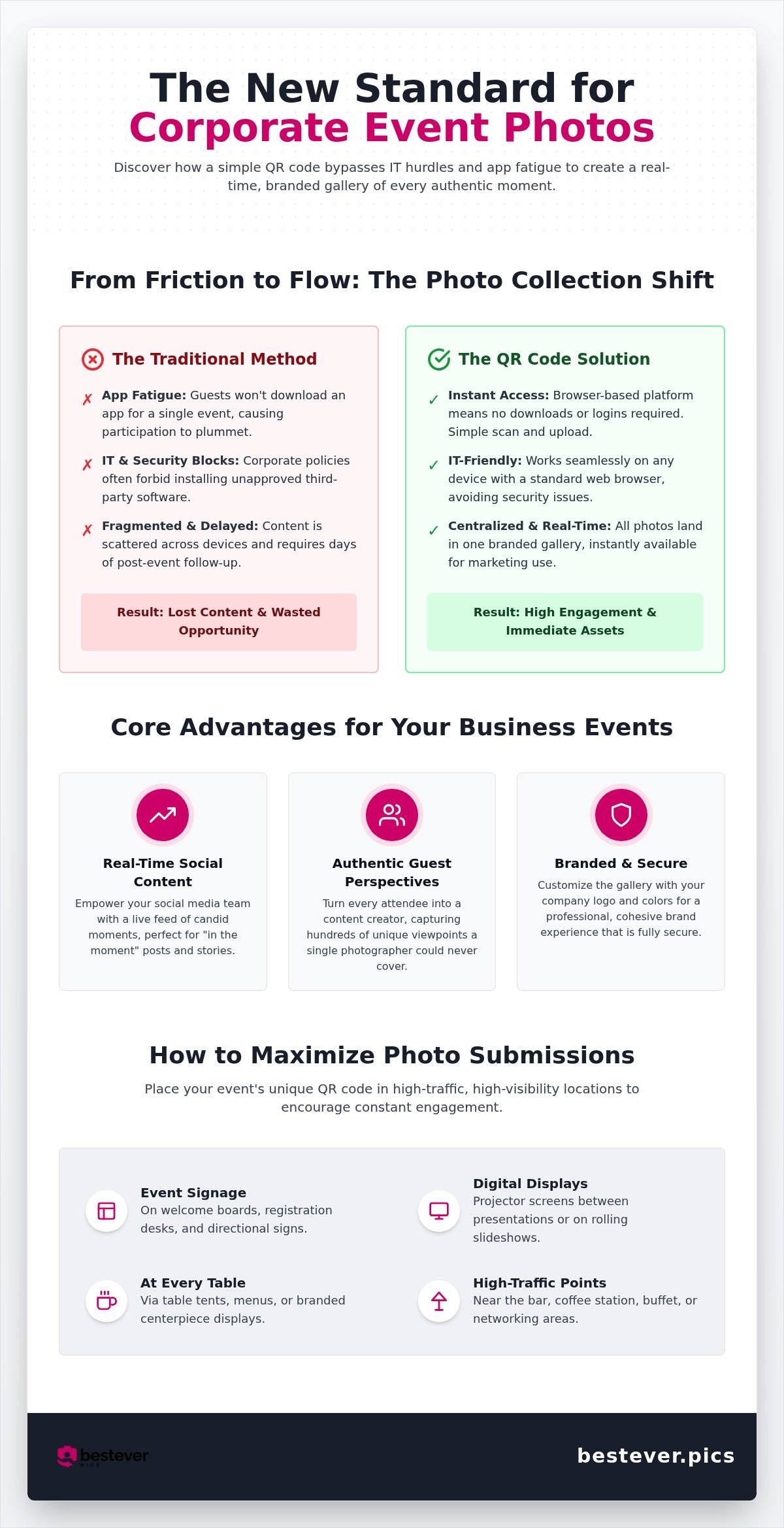
A qr code for corporate event photos acts as a digital bridge between your guests and your marketing team. It functions as a scannable link that sends attendees straight to a private cloud album. While most of us already know what a QR code is from menus or check-ins, using them for media collection at a conference is a total shift in strategy. It replaces the slow method of chasing down guests for their phone footage days after the party is over.
Traditional methods simply can't keep up with the pace of a modern business event. Physical photo booths are fun but static, and they only capture one tiny corner of the venue. Disposable cameras might feel nostalgic, but the poor image quality and high development costs don't align with professional brand standards. The biggest failure usually comes from app-based sharing tools. Most professionals won't tolerate the friction of a new download just to share a few candid shots. This results in fragmented photo collections scattered across private devices rather than a unified brand asset.
Eliminating App Fatigue in Professional Settings
Attendees at high-stakes business events are often protective of their time and their device security. They'll likely refuse to download a third-party app for a single-day event. It isn't just about storage; it's the psychological barrier to entry created by registration forms and logins. Browser-based platforms solve this by offering instant access. Whether a guest is using a personal iPhone or a locked-down company Android, they can participate without a single install. This inclusivity ensures your participation rates stay high across all demographics.
Capturing the Energy of Real-Time Events
The Speed of Real-Time Collection
Marketing teams need content while the energy is still high, not two weeks after the fact. When you use a qr code for corporate event photos, your digital gallery becomes a live feed of the day's successes. You'll capture the authentic, behind-the-scenes moments that a professional photographer might miss while they're focused on the keynote speakers. It reduces the post-event workload for your communications team because the assets are already centralized and ready for immediate use. You can transition these shots into social stories or internal recaps before the guests even leave the venue.
- Instant Access: No waiting for file transfers or email attachments.
- Authentic Content: Gather hundreds of unique perspectives from every table in the room.
- IT Compatibility: Works within standard mobile browsers to avoid security blocks.
- High Participation: The 60-second upload process encourages even the busiest executives to join in.
Maximising Engagement with a QR Code for Corporate Event Photos
Setting up a qr code for corporate event photos does more than just gather files; it transforms your audience into a distributed creative team. Every attendee has a high-quality camera in their pocket. By giving them a frictionless way to share, you're tapping into a goldmine of authentic perspectives that a single pro photographer could never cover. This organic content builds a sense of community that feels far more real than a staged corporate headshot.
When you provide a central hub for media, you encourage guests to document the small details that make your company culture unique. This is especially powerful for hybrid events. Remote employees can view the gallery in real-time, seeing the same candid moments as those on the ground. It creates a shared experience that transcends the physical boundaries of the conference hall or office space.
Real-Time Content for Social Media Managers
Marketing teams often struggle to find "in the moment" content while an event is actually happening. With a live gallery, social media managers can pull high-quality candid shots and post them to LinkedIn or Instagram stories within minutes. It bridges the gap between the physical room and your digital followers. You don't have to wait for the professional edit to show the world your event's energy. This constant stream of media provides the perfect fuel for your official event hashtags, encouraging even more people to join the conversation online.
Customising the Gallery to Match Brand Identity
A corporate event is a branding exercise. The digital space where guests upload their photos should feel like an integrated part of your business event strategy. Bestever.pics allows you to incorporate logos and company colours into the upload interface. This ensures a professional first impression from the moment a guest scans the code. It keeps the experience cohesive and reinforces your brand authority. You want the transition from the physical table setting to the digital upload screen to feel like a single, unified journey.
- Brand Consistency: Use your specific hex codes and assets to keep everything on-brand.
- Frictionless Sharing: No logins mean more people actually contribute to the story.
- Social Proof: Real-time uploads prove your event is the place to be.
- Instant Assets: Download high-res files immediately for press releases or internal comms.
If you're ready to see how this looks in practice, you can start your own private gallery in about sixty seconds to see the engagement for yourself.
Solving the Corporate IT and Privacy Challenge
Large organisations have strict rules for a reason. When you introduce a qr code for corporate event photos, the first question from the tech team is usually about security. They want to know if guests are being forced to download unvetted third-party software onto company-issued devices. Browser-based systems remove this friction because they treat the upload as a simple web interaction rather than a software installation.
Why App-Based Solutions Fail in Business Environments
Many corporate smartphones are locked down by Mobile Device Management software. This means employees can't just pop into an app store to download a tool for a one-off conference or gala. If your strategy relies on an app, you've already excluded a huge chunk of your most important attendees. Browser-only solutions bypass these security firewalls by working within the native Safari or Chrome apps already on the phone. This approach effectively eliminates the "shadow IT" concern where employees might try to use unapproved, risky apps just to share a few shots.
Data Sovereignty and Professional Control
Data Security and Private Gallery Controls
Privacy isn't just a buzzword; it's a legal requirement for many industries. You need to ensure that internal company moments aren't accidentally leaked to the public web. Implementing private links and password-protected galleries ensures only invited guests can see the content. You can also use moderation features to review every image before it goes live on a display screen, which keeps the tone professional and on-brand. Following [LINK: best practices for collecting event photos] helps you stay compliant with company image usage policies while still gathering great candid content.
- Password Protection: Keep sensitive internal moments away from the public eye.
- Moderation Tools: Filter out unprofessional content before it hits the gallery.
- Browser-Only Access: Avoid the security risks of unvetted third-party apps.
- Data Sovereignty: Maintain total control over your brand's visual assets in one secure place.
Secure cloud storage is non-negotiable for business assets. You aren't just collecting photos; you're building a library of brand intellectual property. Ensuring those files are stored safely, rather than scattered across various personal messaging threads, is the only way to maintain control over your visual narrative. It's about turning a chaotic process into a streamlined, secure system that satisfies both the marketing team and the IT department.
Strategic Placement: Where to Display Your Event QR Codes
Visibility is the engine of engagement. If guests can't find the link, they won't share their shots. A well-placed qr code for corporate event photos ensures you capture content at the exact moment the energy is highest. It's about moving beyond a single sign at the door and integrating the experience into the room's layout so it feels like a natural part of the day.
Success depends on timing. You want the code to be available when people are naturally reaching for their phones. This might be during a networking coffee break, right after a major keynote, or during the celebratory dinner. By mapping out these high-energy moments, you can place your prompts where they'll have the most impact without disrupting the professional flow of the event.
Physical Signage and Digital Displays
Start at the registration desk to set the expectation early. Use table talkers during the gala dinner and pull-up banners near the networking bar. We recommend the "Rule of Three" strategy for large venues. This means a guest should encounter the upload prompt at least three times: once in the arrival lobby, once in the main presentation hall, and once in the dining or breakout area. This repetition builds familiarity without being intrusive.
Don't forget the power of the big screen. Projecting your qr code for corporate event photos on the main stage during networking breaks turns a passive background into an active engagement tool. It’s hard to ignore a large call to action when it's displayed right where everyone is looking. You can see more creative qr code display ideas to help blend these signs with your event's specific decor and professional aesthetic.
Incorporating QR Codes into Presentation Decks
Keynote sessions are prime opportunities for media collection. Ask your speakers to include a "scan-to-upload" slide at the very end of their deck. It gives the audience something productive to do while they wait for the next session to begin. This works exceptionally well for capturing the immediate reaction to a successful product launch or an inspiring company announcement. Guests love seeing their own perspective of the stage shared in the live gallery.
Design matters when you're dealing with varied lighting. In a dimly lit gala environment, your QR codes need high contrast to work effectively. Stick to black codes on a white or very light background for the best results. Avoid placing them on reflective surfaces like glass or glossy metal, as the glare can prevent phone sensors from locking on. Digital event programmes and PDF invites sent via email also provide a great digital touchpoint before the first guest even arrives at the venue.
Scaling Your Event Strategy with Bestever.pics Pro
One-off events are great, but agencies and venues need a system that grows with them. Using a qr code for corporate event photos shouldn't mean starting from scratch every time you sign a new client. You need a centralized hub that handles fifty activations as easily as one. It's about moving from manual file chasing to a high-speed, automated workflow that keeps your brand moving forward.
Managing Multiple Activations for Venues and Planners
Professional planners often run back-to-back events that require distinct branding and separate galleries. The Bestever.pics Pro dashboard allows you to manage every activation from a single, high-octane interface. You can create templates for your branded QR codes, saving hours on setup for every new conference or gala. This efficiency lets you offer photo sharing as a standard high-value perk, increasing your profit margins without adding to your headcount. The Pro plan includes unlimited events, making it the only logical choice for high-volume agencies.
From One-Off Gatherings to Scalable Systems
Internal communications teams are moving away from fragmented storage and private chat groups. They're using this system for monthly town halls, team-building sessions, and annual summits. This creates a consistent, long-term digital archive of company culture that's actually searchable and useful for future recruitment. By tracking corporate event engagement, you can see exactly which activations drive the most participation. It turns your qr code for corporate event photos into a valuable data point for your next strategy meeting.
- Unlimited Events: Scale your business without worrying about per-event costs.
- Centralised Dashboard: Control every client gallery from one professional screen.
- Branded Templates: Launch new event galleries in sixty seconds or less.
- Long-Term Archiving: Build a permanent library of company milestones and brand history.
Automation is the only way to handle high-volume media collection without burning out your staff. Bestever.pics is the preferred partner for venues because it removes the technical support burden entirely. Guests scan, upload, and move on. It's a professional-grade workflow that turns every attendee into a brand contributor. Stop chasing files and start building a library of brand milestones today.
When selecting a venue that prioritises guest interaction, you might explore Per-person admission and event booking fees at immersive spaces like Quirky Quarter to evaluate them for your next corporate social.
Ready to scale your event media? Get started with Bestever.pics Pro and launch your next gallery in sixty seconds.
Elevate Your Next Corporate Activation
Moving from fragmented messaging groups and IT-blocked apps to a streamlined, browser-based system isn't just a convenience; it's a competitive advantage for your brand. By using a qr code for corporate event photos, you ensure that every high-resolution candid moment is captured and stored in a secure, branded environment. You'll satisfy the tech team and the marketing department with a single, efficient choice.
Bestever.pics is trusted by event planners worldwide because it removes the frustration of downloads and logins. This allows your team to focus on the event itself while a professional gallery fuels your social media and internal comms in real-time. It's the simplest way to build a lasting digital archive of your company's milestones and culture.
It's time to turn your attendees into your most powerful content creators. We can't wait to see the authentic moments you'll capture at your next big event.
Frequently Asked Questions
Do guests need to download an app to upload photos to the corporate gallery?
No, your guests won't need to download any software to share their shots. They simply scan the qr code for corporate event photos with their native camera app and upload directly through their mobile browser. This removes the friction that usually kills participation at large business gatherings where people are hesitant to install new apps.
Can I moderate the photos before they appear in the public event gallery?
Yes, you have full control over every piece of content shared by your attendees. You can enable a moderation setting that requires an admin to approve each image before it becomes visible in the shared gallery or on a live slideshow. This ensures your event's digital presence stays professional and strictly aligned with your brand standards.
Is there a limit to how many guests can scan the QR code at once?
There are no limits on simultaneous scans or uploads during your event. Our infrastructure is built to handle thousands of concurrent users, making it a reliable choice for massive industry expos and stadium-sized corporate summits. You won't have to worry about the system slowing down during peak networking sessions or high-energy keynote moments.
How do I ensure the QR code for corporate event photos works on company-managed phones?
Because our platform is browser-based, it bypasses the security restrictions found on most company-managed devices. Corporate IT policies often block third-party app installations, but they almost always allow standard web browsing. Using a qr code for corporate event photos is the most effective way to gather content from employees using locked-down hardware without needing IT department intervention.
Can we download all the high-resolution images after the conference ends?
Yes, you can download all guest-submitted media in its original high-resolution format whenever you're ready. These files are perfect for your post-event marketing, press releases, or high-quality internal newsletters. You'll have a centralized library of authentic assets that are much higher quality than the compressed versions found on social media or messaging apps.
Does the platform support video uploads as well as photos?
Yes, guests can upload short video clips alongside their still images to give your gallery more life. This allows you to capture the sound and motion of the event, from the applause after a big announcement to candid interviews on the trade show floor. It's a great way to build a dynamic archive that tells a more complete story of your brand's success.
How long does the digital album stay active after the event?
Your digital album remains active and accessible long after the final session concludes. This gives your marketing team plenty of time to organize assets and share the gallery link with stakeholders who couldn't attend in person. You don't have to worry about a short expiration date cutting off access to your valuable event media.
Can I customise the QR code with my company's branding and logo?
Yes, you can fully customize the look of your QR codes and the upload interface to match your event's aesthetic. You can add your company logo and use your specific brand colors to ensure a cohesive experience for every attendee. This keeps the digital interaction feeling like an official part of your event's visual identity rather than a generic tool.