

QR Code for Corporate Event Photos: 2026 Engagement Guide

Article by
Gabi
Hi, I'm Gabi - Co-Founder of Bestever Pics. Thanks for visiting our blog. We are working hard to produce content which we hope resonates with you. Feel free to drop us a line on socials or via the contact form on the site.
What if you could capture every authentic, behind-the-scenes moment of your next conference or gala without forcing a single guest to download a clunky third-party app that triggers security warnings or clutters their personal device? Most event managers struggle with low participation because of app friction and strict corporate hardware locks, but a qr code for corporate event photos eliminates these barriers by opening a private, branded gallery directly in any mobile browser for instant, high-quality sharing. This guide reveals how to bypass restrictive IT policies, implement strategic scan points across your venue footprint, and use live gallery displays so you'll turn every attendee into a content creator while building a massive library of marketing assets for your next social media campaign.
Key Takeaways
- Learn how a qr code for corporate event photos creates a browser-based gateway for guests to share media without downloading apps.
- Understand why browser-based tools bypass strict IT security restrictions that often block third-party software on corporate devices.
- Discover how live photo sharing builds immediate event momentum and creates a library of candid marketing assets.
- Get practical advice on strategic QR code placement across your venue to ensure every attendee contributes.
- Explore how professional planners use scalable systems to manage recurring events and maintain consistent branding.
Understanding the QR code for corporate event photos
A qr code for corporate event photos is a scannable digital gateway that connects guests directly to a private event album. Using their mobile browser, attendees contribute high-quality photos and videos without downloading third-party software. This solution replaces expensive physical booths and provides a streamlined way to collect candid branding assets in real time.
The traditional photo booth is a massive space hog. It requires power, a dedicated attendant, and floor space you would rather use for networking or extra seating. A qr code for corporate event photos shifts the focus from a single corner of the room to every guest's hand. By utilizing standard QR code technology, you empower your team to capture the moments that professional photographers often miss, like the spontaneous laugh during a coffee break or the behind-the-scenes prep work.
How QR photography works in a business setting
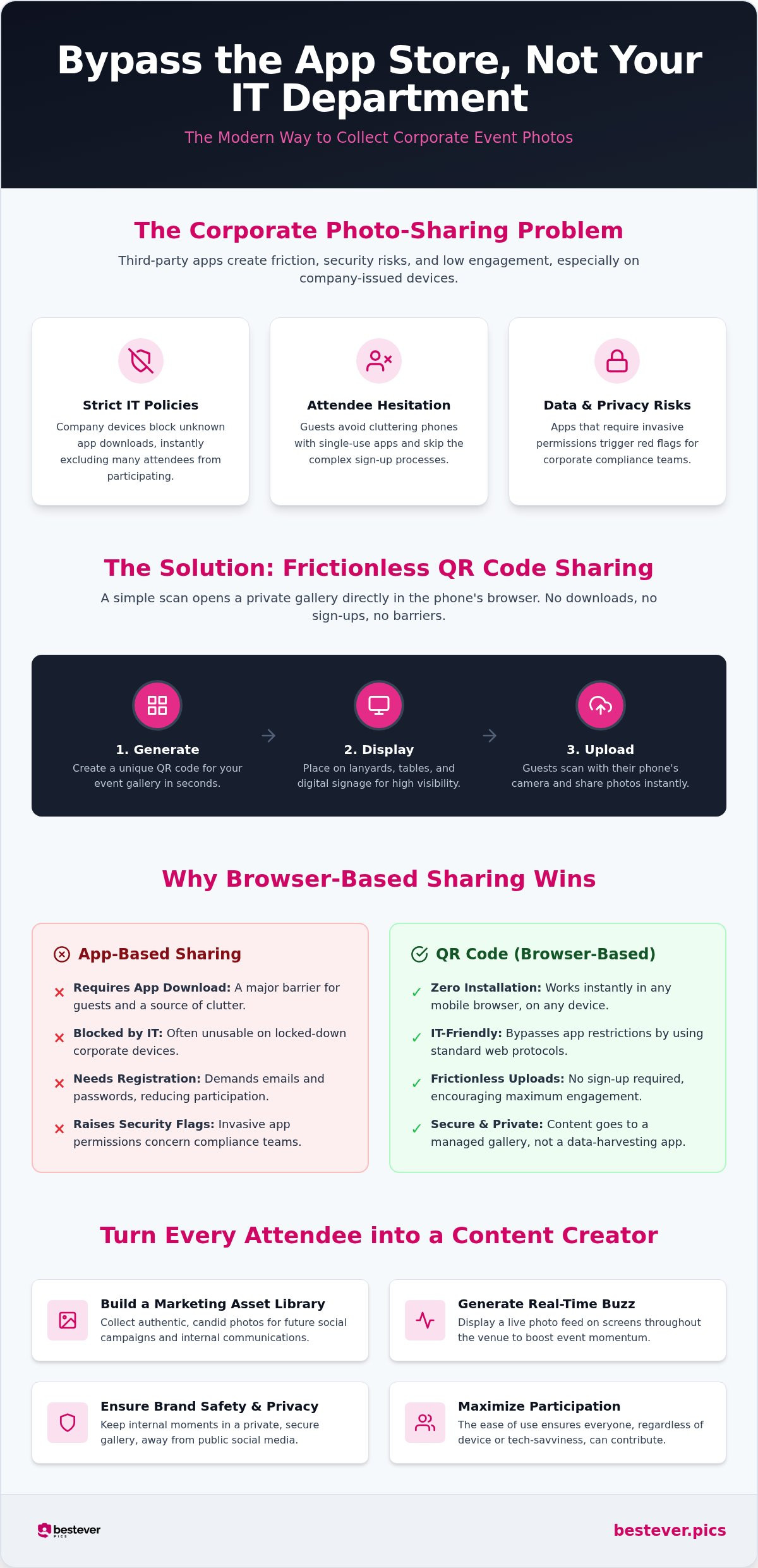
Setting up a digital album is often faster than booking a caterer. You start by creating a dedicated space for your event on a platform like Bestever.pics. Once your gallery is live, you get a unique code that serves as the key to that album. Implementation is flexible, but the goal is always visibility. You should consider these steps for your next rollout:
- Generate: Create your unique scan point in seconds through your dashboard.
- Display: Print the code on lanyards, place it on digital signage, or add it to table talkers. You can find more creative QR code display ideas to help maximize scans.
- Upload: Guests scan with their native camera, pick their best shots, and hit send.
Why browser-based sharing beats traditional methods
Apps are a massive hurdle for corporate guests. Most people don't want to clutter their phones with software they'll only use for three hours. Even worse, many company-issued devices have strict locks that prevent app downloads altogether. Browser-based sharing bypasses these headaches because it uses the tools already on the phone. It's a universal solution that works for everyone, regardless of their phone's operating system or security settings.
Speed is the other major factor. When guests can upload instantly, the engagement stays high. You don't have to wait for a professional to edit and export a gallery days after the energy of the event has faded. You get a live feed of high-quality media that is ready for your social media manager to use before the keynote speaker has even finished their closing remarks. This approach turns 500 guests into a 500-person content team, ensuring no corner of your gala or conference goes undocumented.
Why corporate IT policies hate photo sharing apps
Corporate IT teams are paid to be cautious. They see a third-party app and immediately think about data leaks and security vulnerabilities rather than event engagement. If your event relies on a specific app download, you have already lost half your audience before the first keynote begins. A qr code for corporate event photos solves this by staying entirely within the mobile browser. It doesn't ask for invasive permissions to a user's contacts or location, making it the only logical choice for a professional environment.
Compliance officers have a difficult job. They worry about apps that harvest metadata or require broad access to a phone's internal storage. This creates a massive conflict with almost any modern corporate data security policy. Bestever.pics sidesteps these hurdles by using standard web protocols. Since there is nothing to install, there is no software for the security team to vet or block. You get 100% participation because the hardware doesn't matter; the system works on every device right out of the box.
Bypassing the friction of registration
Guests value their privacy and their time. They don't want to hand over an email address or create yet another password just to share a photo of the team lunch. Registration-free uploads lead to significantly higher engagement rates because the path from scanning to uploading takes only a few seconds. If you want to see how this impacts your final gallery, take a look at our guide on how to collect guest photos without the usual roadblocks. Eliminating the signup process removes the psychological barrier that stops people from contributing.
Data privacy and brand safety for businesses
Brand safety is about more than just avoiding blurry photos. It's about ensuring your company's internal culture is represented accurately and securely. When you use a qr code for corporate event photos, you aren't just opening a floodgate; you are creating a managed stream. Private galleries keep your internal celebrations away from public social media algorithms until your marketing team is ready to share them. You can use specific management features to protect your assets:
- Moderation: Review and approve every image before it appears on the live event screen.
- Access Control: Decide exactly who has the rights to view or download the high-resolution files.
- Walled Gardens: Keep sensitive presentation slides or confidential branding out of the public eye.
Setting up a private digital gallery ensures your event stays both fun and compliant with your internal standards. This balance of openness and control is exactly why professional-grade tools are superior to messy WhatsApp groups or public hashtags.
Strategic benefits of live guest photo sharing
Live sharing isn't just a convenience; it's a powerful tool for brand activation. When you deploy a qr code for corporate event photos, you create a feedback loop that fuels itself. The more people see photos appearing in real time, the more they want to contribute. It's a high-energy cycle that keeps the atmosphere buzzing without needing a heavy-handed MC to drive participation.
Boosting engagement with live gallery displays
Projecting a live feed onto main stage screens turns your event into an interactive experience. This "social wall" acts as a magnet for attendees. It encourages them to document their experience and share it immediately. For event managers, this is a dream for digital photo sharing in modern events. It provides a constant stream of fresh content that keeps the visual backdrop of your event dynamic and representative of the actual attendees.
This setup serves as a cost-effective alternative to traditional event entertainment. You don't need a massive budget for roving performers when your guests are actively engaged in creating the night's highlights. It's authentic, it's personal, and it's far more memorable than a generic stage act. You are essentially turning your audience into the stars of the show and giving them a reason to keep their cameras ready. Check out these creative QR code display ideas to see how to integrate these screens into your venue layout.
Capturing the 'unseen' moments for internal culture
Professional photographers are great for the "hero" shots of the CEO or the awards presentation. However, they can't be at every table simultaneously. A qr code for corporate event photos empowers your staff to capture the authentic, behind-the-scenes moments that define your company culture. These are the shots of team members laughing over a shared joke or a spontaneous group photo at the bar during a break.
These candid assets are pure gold for your internal newsletters and LinkedIn posts. They show a real, unpolished side of your brand that resonates with both current employees and potential recruits. Instead of relying on stiff, staged photography, you build a massive library of genuine moments that speak volumes about your workplace environment. Bestever.pics makes it easy to organize these into private event photo galleries that your marketing team can use for months to come.
Implementing QR codes across your event footprint
Visibility is the engine of your gallery. You can't just stick a code in a dark corner and hope for the best. A qr code for corporate event photos needs to live where your guests naturally linger. Think about the "dwell time" at your venue. If people are waiting in line for a coffee or sitting at a table, they are much more likely to pull out their phones and contribute.
Best practices for QR code display
Success starts at the front door. Place your codes on registration desks or even on the back of name badges. This sets the expectation early that your event is an interactive space. You should also place scannable cards on dining tables and bar areas where guests are already relaxed and socialising. For digital signage, remember that size matters. If the code is on a main stage screen, ensure it's large enough for someone at the back of the room to scan without leaving their seat.
Your event staff are your biggest advocates. Brief them to mention the gallery during check-in or while they are serving drinks. A quick "Feel free to share your snaps via the QR code" goes a lot further than a silent sign. To keep things looking professional, use branded frames or templates that match your corporate identity. This ensures the qr code for corporate event photos feels like a premium part of the event design rather than a last-minute addition.
Setting up your gallery in 60 seconds
We know you're busy. That's why we've made the setup process as fast as possible. You can move from a blank screen to a live gallery in less time than it takes to grab a latte. Follow these simple steps to get started:
- Create your event on Bestever.pics to reserve your private album space.
- Customise your gallery name and write a warm welcome message for your guests.
- Download your high-resolution QR code, ready for your digital assets or physical printing.
- Share the link with your internal team for a quick test to ensure everyone is ready to go.
If you need more inspiration for your layout, check out our creative QR code display ideas. This will help you integrate the tech into your physical footprint without disrupting the flow of the room.
Start your corporate gallery today
Why Bestever.pics is the pro-choice for corporate teams
Professional planners don't have time for tools that only work half the time. You need a system that feels like a natural extension of your team. A qr code for corporate event photos isn't just a one-off gimmick; it's a structural improvement to how you handle media. Whether you're running a single gala or a nationwide series of roadshows, the ability to manage everything from one central dashboard is what separates the amateurs from the pros.
Bestever.pics offers a quietly confident solution that prioritises speed and branding. The Pro subscription is designed specifically for those who need to scale their operations without increasing their workload. It allows you to maintain consistent branding across every touchpoint, ensuring that the guest experience remains premium from the first scan to the final upload. This is the inevitable evolution of the digital guestbook, adapted for the high-stakes environment of the modern workplace.
Scaling for agencies and event venues
For venues and agencies, this isn't just about photos; it's about adding value to your client packages. Our business page shows how venues can offer a qr code for corporate event photos as a standard perk for every booking. It's a low-effort, high-impact way to stand out in a crowded market. If you're managing recurring meetings or a complex series of events, you can standardise your photo collection process across the entire organisation without the usual technical headaches.
Planners can use the Pro tier to see live stats and manage multiple galleries at once. This level of oversight is essential for maintaining quality control across different teams or locations. You aren't just collecting images; you're building a scalable content engine that works in the background while you focus on the bigger picture of the event. It's a professional approach for professionals who value their time.
Final thoughts on frictionless collection
The best part of this system happens after the lights go down. You can avoid the stress of chasing guests for photos or hunting through messy group chats weeks after the event ends. Instead, you get immediate access to a library of high-resolution assets. You can download every original image in one simple zip file for your archives or your next marketing campaign. No more manual sorting and no more lost opportunities.
It's about simplicity. We've built a platform that removes the technical barriers so you can focus on the creative ones. When you choose a platform built by experts for experts, you're choosing a workflow that respects your time and your brand. Experience the difference of a frictionless system and see how much more your guests are willing to share when you make it easy for them. It's the simplest way to ensure your event's legacy lives on in high definition.
Capture every moment with confidence
Capturing the spirit of a professional gathering shouldn't feel like a chore for you or your guests. By ditching the friction of app downloads and choosing a qr code for corporate event photos, you're choosing a path that respects your team's privacy and your company's IT policies. You'll end up with a high-quality library of candid moments that staged photography simply can't replicate. It's the most effective way to turn a passive audience into active contributors without making them jump through technical hoops.
It's time to stop chasing guests for files and start enjoying the live feed of your event's success. Whether it's a small team building day or a massive industry conference, browser-based sharing ensures that every voice is heard and every moment is saved. Bestever.pics is trusted by professional event planners to deliver private, brand-safe galleries that look great and work even better. You get high-resolution assets ready for marketing while your guests enjoy a seamless, modern experience.
You've done the hard work of planning the perfect event; now let the photos take care of themselves. We're excited to help you transform your next gathering into a lasting digital legacy that your whole team will enjoy.
Frequently Asked Questions
Do guests need to download an app to use the QR code?
No app downloads are required to use a qr code for corporate event photos. Your guests simply scan the code with their phone's native camera; it opens a dedicated upload page in their mobile browser. This approach removes the biggest barrier to participation, especially for those on company-issued devices with strict software locks. It's a fast, frictionless way to get everyone involved without cluttering their phones with new software.
Can I moderate the photos before they appear in the gallery?
You have full control over the content that appears in your digital album. Our moderation tools allow you to vet every photo or video before it goes live on a public display or shared gallery. This feature is essential for maintaining brand safety and ensuring that only appropriate, high-quality images are visible to your attendees. You can approve or decline uploads instantly from your organiser dashboard during the event.
Is there a limit to how many photos guests can upload?
Upload limits depend on the specific package you choose for your event. Most of our plans are designed to handle the high volume of media generated at large corporate functions, so you don't have to worry about running out of space mid-presentation. Guests can contribute as many candid shots as they like, ensuring you capture the full scope of the day. Check the details of each tier on our site before you start.
How long do the corporate event photos stay online?
Your gallery remains active and accessible for 12 months after the event date on our standard plans. This gives your marketing team plenty of time to download high-resolution assets for newsletters or social media campaigns. If you need longer-term storage for recurring annual meetings or internal archives, our Pro subscription offers extended hosting options. You can always download the entire collection as a single zip file to keep on your own servers.
Can we use our own company branding on the QR code and gallery?
Custom branding is a core feature of our professional tier. You can add your company logo, choose specific brand colours, and customise the welcome message that guests see when they scan the qr code for corporate event photos. This creates a professional, cohesive experience that feels like an official part of your corporate identity. It's an excellent way to reinforce your brand while providing a fun, interactive tool for your employees or clients.
Does the platform work with corporate firewalls and IT policies?
Our platform is built to be IT-friendly. Because it operates entirely within the standard mobile browser using HTTPS protocols, it bypasses the security risks associated with third-party app installations. Most corporate firewalls and device management policies allow standard web traffic, so your guests won't face the usual connectivity hurdles. It's a reliable way to ensure 100% participation regardless of the hardware your attendees use on the day.
Can guests upload videos as well as photos?
Guests can definitely share video clips alongside their still photos. This adds a dynamic element to your event gallery, capturing the sound and movement of keynote speeches or team celebrations. The upload process is exactly the same: scan, select, and send. These video assets are perfect for creating wrap-up reels or high-energy social media content that shows the true atmosphere of your gathering. Just ensure your guests have a stable data connection for larger files.
What happens if our event has no Wi-Fi or poor reception?
If the venue has patchy Wi-Fi, guests can still use their mobile data to upload their shots. In cases where there is no reception at all, attendees can simply keep the browser tab open and hit the upload button once they are back in range or connected to a stable network. The QR code stays valid, so they can even contribute their favourite snaps once they've returned to the office or their hotel.