

How to Create a QR Code for a Photo Album: The 2026 Guide

Article by
Gabi
Hi, I'm Gabi - Co-Founder of Bestever Pics. Thanks for visiting our blog. We are working hard to produce content which we hope resonates with you. Feel free to drop us a line on socials or via the contact form on the site.
Learning how to create a QR code for a photo album is the fastest way to stop chasing guests for photos and start seeing your event through their eyes in real-time. Most hosts lose the best candid shots to a dozen different camera rolls, but a single scan can bridge that gap and build a live gallery instantly. This guide reveals the quickest way to turn your memories into a scannable gateway that lets anyone upload or view photos without the friction of app downloads or account sign-ups.
Key Takeaways
- Skip the app store and the messy text threads. A QR code gallery gives you a private, instant way to collect every guest's point of view without anyone needing to download a single thing.
- You'll learn exactly how to create a QR code for a photo album that lets guests upload their favorite shots in seconds, keeping your digital memories organized and secure.
- Generic cloud folders like Google Photos often trip up guests with login requirements, so we’ll look at why dedicated sharing platforms offer a much smoother experience.
- Learn the strategic spots to place your QR codes, from the buffet line to the bar, to make sure your gallery is filled with candid shots by the time the music stops.
- Get your event setup finished in under a minute, allowing you to focus on your guests while the platform handles the heavy lifting of media collection.
What is a QR Code Photo Album and Why Use One?
A QR code photo album is a scannable gateway to a digital gallery. Think of it as the modern, high-octane evolution of the disposable camera. Instead of waiting weeks for grainy film to develop, you see high-resolution memories as they happen. Guests scan the code with their smartphone camera and gain instant access to view or contribute. This technology solves the "lost photo" problem that haunts every major milestone, from weddings to corporate launches. You won't have to beg for files months later. Knowing how to create a QR code for a photo album ensures every perspective is captured while the energy is still high.
The Benefits of Instant Photo Collection
Professional photographers are essential, but they can't be everywhere at once. Your guests are the ones catching the quiet laughs at the back tables or the chaotic energy on the dance floor. A QR code gallery lets you capture these candid moments in real-time. You can even set up a live slideshow to display uploads during the event itself. Centralized storage is the real winner here. It keeps your media in one private place instead of scattering it across half a dozen social media platforms where quality is often compressed. You get the full story of your event, not just the staged highlights.
Why Traditional Photo Sharing Fails
Legacy methods are broken. Email attachments have strict file size limits that crush image quality and frustrate users. Group text threads are a nightmare for organization and quickly become intrusive for everyone involved. Social media tags are equally unreliable because privacy settings often hide posts from the host. Physical guest books are charming, but they can't capture the sound of a heartfelt toast or the movement of a first dance. Traditional sharing creates friction that kills participation and leaves your collection incomplete.
Most guests want to share their shots, but barriers stop them. If they have to download an app or create an account, they'll simply give up. Platforms like Bestever.pics remove these hurdles entirely. You provide the code; they provide the content. It’s a fast, efficient system designed specifically for the speed of modern digital markets. Learning how to create a QR code for a photo album is the first step toward a complete, stress-free digital archive that lives long after the party ends.
How to Create a QR Code for a Photo Album: Step-by-Step
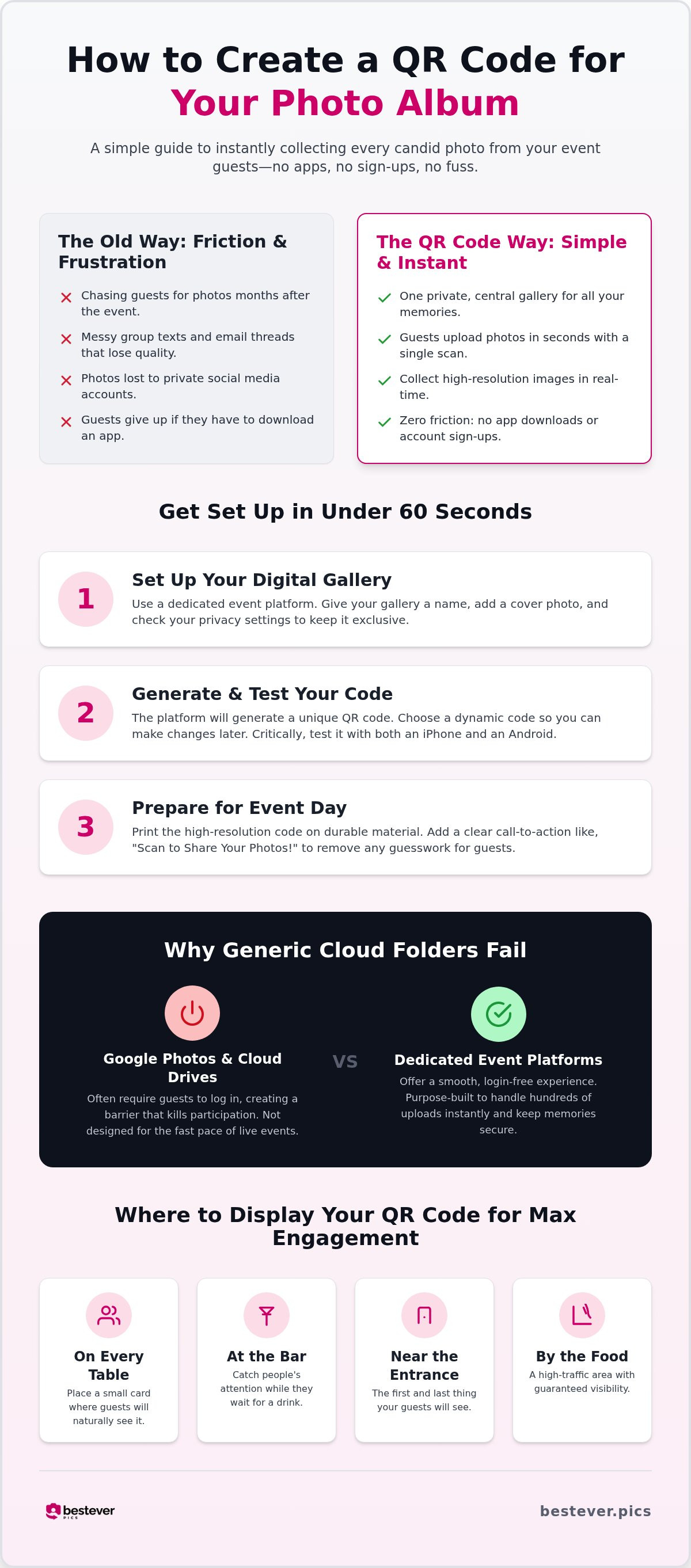
Speed is the primary factor when you're managing a live event. You don't need a degree in computer science to understand how to create a QR code for a photo album when you use a dedicated platform. The entire process takes less than sixty seconds from start to finish. Start by selecting a service that prioritizes the guest experience and removes the friction of account creation. This approach ensures that even your least tech-savvy guests can contribute without a second thought.
- Set Up Your Digital Gallery: Choose a platform like Bestever.pics that is built for events rather than just generic file storage. Create your gallery, give it a catchy name, and upload a cover photo to make it feel personal. Standard users can set up a single-use gallery in seconds, while Pro subscribers can organize multiple recurring events under one dashboard. Check your privacy settings to ensure only people with the physical code can view or upload media.
- Generate and Test Your Code: Once your gallery is live, the platform will generate a unique code for you. Always opt for a dynamic QR code so you can update the destination link without reprinting your signs if you need to adjust the gallery settings later. Scan the code with both an iPhone and an Android to ensure it works for every guest. Testing is critical before you send anything to the printer.
Preparing Your QR Code for Maximum Event Participation
High-contrast colors, such as black on white, ensure that scanners can instantly read the data even in dim reception lighting or under colored event lights. Now you need to get the code in front of eyes. Estimates suggest 99.5 million people in the U.S. will use QR codes by 2025, so your guests are already familiar with the technology. Visibility is the key to a full album.
- Prepare for Event Day: Print your high-resolution code on durable materials like acrylic or heavy cardstock. Place them on every table, at the bar, and near the entrance where guests naturally linger. Adding a clear, punchy call-to-action like "Scan to Share Your Photos" removes any guesswork for your guests. If you want a private wedding photo gallery that sets up in seconds and captures every candid moment, choosing a dedicated tool like Bestever.pics is the smartest move you'll make.
When you understand how to create a QR code for a photo album, you realize the tech is only half the battle. The rest is about making the process so easy that guests can't help but participate. By following these steps, you ensure a stress-free experience for yourself and a fun, interactive way for your guests to contribute to your digital memories.
The Problem with DIY Methods Like Google Photos
Many hosts think they've hacked the system by linking a basic QR code to a Google Photos folder. It's a trap. While it seems like a shortcut when you first learn how to create a QR code for a photo album, the technical debt hits you the moment your guests arrive. Google Photos forces every single person to sign in to a Google account before they can upload a single file. If a guest doesn't have an account or can't remember their password, that candid shot stays on their phone forever.
Privacy settings in generic cloud folders are notoriously confusing for hosts and guests alike. You might accidentally leave the folder open for anyone to delete files; or worse, keep it so locked down that no one can contribute. Free accounts also come with strict storage limits that can cut off your collection in the middle of the night. It is a messy, unreliable way to handle a once-in-a-lifetime event. You need a system that works as fast as your event moves.
Friction Kills Participation
Every extra click reduces the number of photos you will actually receive. If a guest faces a login screen or a password reset, they will put their phone away and stop participating. Older guests especially struggle with these digital barriers. bestever.pics eliminates these hurdles with a direct-to-upload interface. Guests scan, pick their photos, and they're done. No accounts, no passwords, and no delays to slow down the party.
Branding and Customization Trade-offs
A generic folder looks like a work document or a corporate spreadsheet. It does not scream "wedding" or "milestone celebration." Professional platforms allow you to inject your own style with custom colors and event-specific themes. This is vital for digital photo sharing for modern events where the aesthetic matters. You want a cohesive experience that feels like a planned part of the day, not a technical afterthought. When you are deciding how to create a QR code for a photo album, choose a method that treats your memories with the respect they deserve.
Where to Display Your QR Code for Maximum Engagement
Placement determines success. You've mastered how to create a QR code for a photo album; now you need eyes on it. Visibility is everything. Table centerpieces remain the most effective choice because they're right in front of your guests for the entire meal. It's a low-pressure environment where people naturally reach for their phones between courses. Your gallery will grow significantly when the code is within arm's reach of every seat.
The bar and buffet line are high-traffic zones that offer a captive audience. Guests often wait in these lines for several minutes. This is the perfect time for them to scroll through their camera rolls and contribute. A well-placed sign here transforms a short wait into a productive upload session. You should also include the code in your physical or digital invitations. This builds anticipation and lets guests know the gallery exists before they even step through the door.
Don't forget the final moments of the night. Place a large, high-resolution version of your code near the exit. This captures those final, emotional goodbye shots that happen as the music fades. These are often the most candid and heartfelt memories of the entire event. It's your last chance to ensure no memory is left behind on a guest's device.
Creative Signage Ideas
Functional decor is the secret to high participation. Print your codes on cocktail napkins for a subtle touch that guests will literally hold in their hands. If you're aiming for a more polished look, incorporate the QR code into a welcome mirror or a rustic wooden sign. It feels like a deliberate part of the event design rather than a technical requirement. For more inspiration on making your gallery a visual highlight, check out these creative qr code display ideas.
Instructions That Actually Work
Clear language beats clever language every time. Avoid technical jargon like "Access URL" or "Scan for redirect." Use a punchy, active command like "Scan to Upload" or "Share Your Best Shots." This tells the user exactly what to do in a single glance. Minimalist instructions mirror the speed of the service itself.
Skepticism is the enemy of participation. Explicitly mention that no app is needed to encourage guests who are tired of cluttering their phones with one-time downloads. A quick announcement from the MC or host can also provide a massive engagement boost. A ten-second reminder during the speeches ensures everyone knows exactly how to contribute. When you understand how to create a QR code for a photo album, you realize that the technology is only half the battle; the rest is about making it impossible to miss.
Simplify Your Event with Bestever.pics
Bestever.pics provides a sophisticated yet simple way to collect memories that legacy systems just can't touch. When you're researching how to create a QR code for a photo album, you need a solution that respects your time. Our platform is built for speed, allowing you to finish your setup in under sixty seconds. It handles both photos and videos in one centralized place without requiring a single guest to sign in. This makes it a perfect fit for DIY weddings, high-energy corporate parties, or community group events. You get professional-grade results with the ease of a personal project. It's about transforming the anxiety of missing moments into the excitement of seeing them all in one place.
App-Free Uploads for Every Guest
Eliminate the frustration of app store downloads during the party. Most guests won't bother if they have to install something new, especially when they're busy enjoying the event. Our platform works on any modern smartphone via the native camera app, ensuring that participation stays high from the first toast to the final dance. This accessibility is why we see such high engagement across all age groups. If you want to see the tech behind the curtain, our how it works page has a full breakdown. It's a digital-native solution that understands the fast-paced needs of modern event hosts who don't have time for technical delays.
Private and Secure Memory Keeping
Privacy matters. You own your data and control who sees the final album, which is a massive relief compared to public social media platforms. You won't have to worry about strangers scrolling through your personal memories or hashtags being hijacked by unrelated posts. This dedicated approach avoids the common privacy pitfalls of generic cloud folders or public feeds that often feel impersonal and clunky. It's the most secure way to manage your event media while maintaining a high level of aesthetic quality. Choosing a specialized platform is the smartest answer to how to create a QR code for a photo album. Ready to get started? You can create your private wedding photo gallery here and start seeing your event through your guests' eyes immediately.
Start Capturing Every Memory Today
Your event is a once-in-a-lifetime moment. Don't spend the morning after chasing guests for photos that might never arrive. Learning how to create a QR code for a photo album removes every barrier between your guests and your digital gallery. There is no app download required; guests just scan and upload in seconds. It's the fastest way to bridge the gap between their phones and your archive.
Event pros and wedding planners trust bestever.pics because it delivers professional results with a setup that takes under 60 seconds. It transforms every smartphone in the room into a powerful tool for your digital history. You get the candid shots, the videos, and the laughs without the friction of legacy sharing methods. It's sophisticated technology made incredibly simple for everyone involved.
Stop worrying about missing the best shots. Focus on the celebration and let your guests build a beautiful, private album that grows while the music is still playing. You have the tools to capture it all; now go make something unforgettable—and if your next adventure takes you to a bucket-list destination, you can learn more about Tripaholics to find inspiration for exploring the world's wonders.
Frequently Asked Questions
Do guests need to download an app to scan the QR code?
No, guests don't need to download anything to share their photos. Most modern smartphones have QR scanning built directly into the native camera app. When guests scan your code, it opens a web-based portal where they can upload photos and videos instantly. This app-free experience is a major relief for guests who don't want to clutter their phones with software they'll only use once. It ensures everyone can participate regardless of their tech skills.
Can I create a QR code for a Google Photos album?
Yes, you can generate a sharing link in Google Photos and use a third-party generator, but it often creates technical hurdles. Guests are usually forced to sign in to their own Google accounts before they can contribute. This extra step is a huge barrier for people who don't want to manage logins while they're on the dance floor. Dedicated platforms like bestever.pics avoid this by allowing direct, anonymous uploads without the hassle.
Is there a limit to how many photos guests can upload?
Limits vary depending on the platform you choose for your event. While generic cloud storage often has tight caps on free accounts, bestever.pics offers plans that support unlimited photo and video uploads. This is crucial for large events like weddings or corporate galas where hundreds of guests might be snapping away. When you're deciding how to create a QR code for a photo album, ensure your chosen system can handle the volume of a busy event.
Will the QR code still work after the event is over?
Yes, your QR code will continue to work as long as your digital gallery remains active. This is perfect for guests who realize they have a handful of great shots while they're scrolling through their camera roll the next morning. If you use a dynamic code, you can even redirect it to a "Thank You" page or a highlight reel once the upload window has closed. It's a flexible way to manage your post-event media.
Can guests see other people’s photos in the album?
You have total control over the privacy and visibility of your album. You can choose to let guests see everyone’s uploads in a live feed, which adds a fun, social element to the night. Alternatively, you can keep the gallery private so guests only have the ability to upload their own shots. This flexibility allows you to tailor the experience to the specific vibe of your wedding, birthday party, or professional corporate function.
What happens if my event venue has poor Wi-Fi or mobile signal?
If the signal is weak, most guests will simply wait until they have a better connection to finish their sharing. Some platforms allow guests to select their photos while at the venue, and the browser will automatically complete the upload once they're back on stable Wi-Fi or 5G. It's always a good idea to display the venue's guest Wi-Fi password right next to your QR code to help everyone stay connected and uploading in real-time.
Can I print the QR code on my wedding invitations?
Absolutely, and it's a brilliant way to build anticipation for the big day. Including a QR code on your physical or digital invitations lets guests know exactly where to share their shots before they even arrive. You can even use the same code to share important details like directions, gift registries, or a sneak peek of your engagement shoot. It sets a high-tech, organized tone for your entire celebration from the very first invite.