

How to Collect Wedding Photos from Guests: The 2026 Guide

Article by
Gabi
Hi, I'm Gabi - Co-Founder of Bestever Pics. Thanks for visiting our blog. We are working hard to produce content which we hope resonates with you. Feel free to drop us a line on socials or via the contact form on the site.
Research shows that browser-only QR code platforms achieve an 85% participation rate, which is why mastering how to collect wedding photos from guests is the most effective way to fill your digital album. This guide explains how to collect wedding photos from guests using bestever.pics to capture every candid moment without the friction of downloads or accounts. You'll learn exactly how to collect wedding photos from guests using practical, high-speed strategies that keep your friends and family focused on the party.
Key Takeaways
- Ditch expensive disposable cameras and unreliable hashtags that lose half your best shots.
- Master how to collect wedding photos from guests using high-speed, app-free tech that works on every smartphone.
- Boost guest participation by removing the friction of app downloads and account creation.
- Use strategic QR code placements to turn every reception table into a live content station.
- Launch your custom gallery on Bestever.pics in under a minute to capture every high-resolution candid moment.
The Problem with Collecting Wedding Photos from Guests
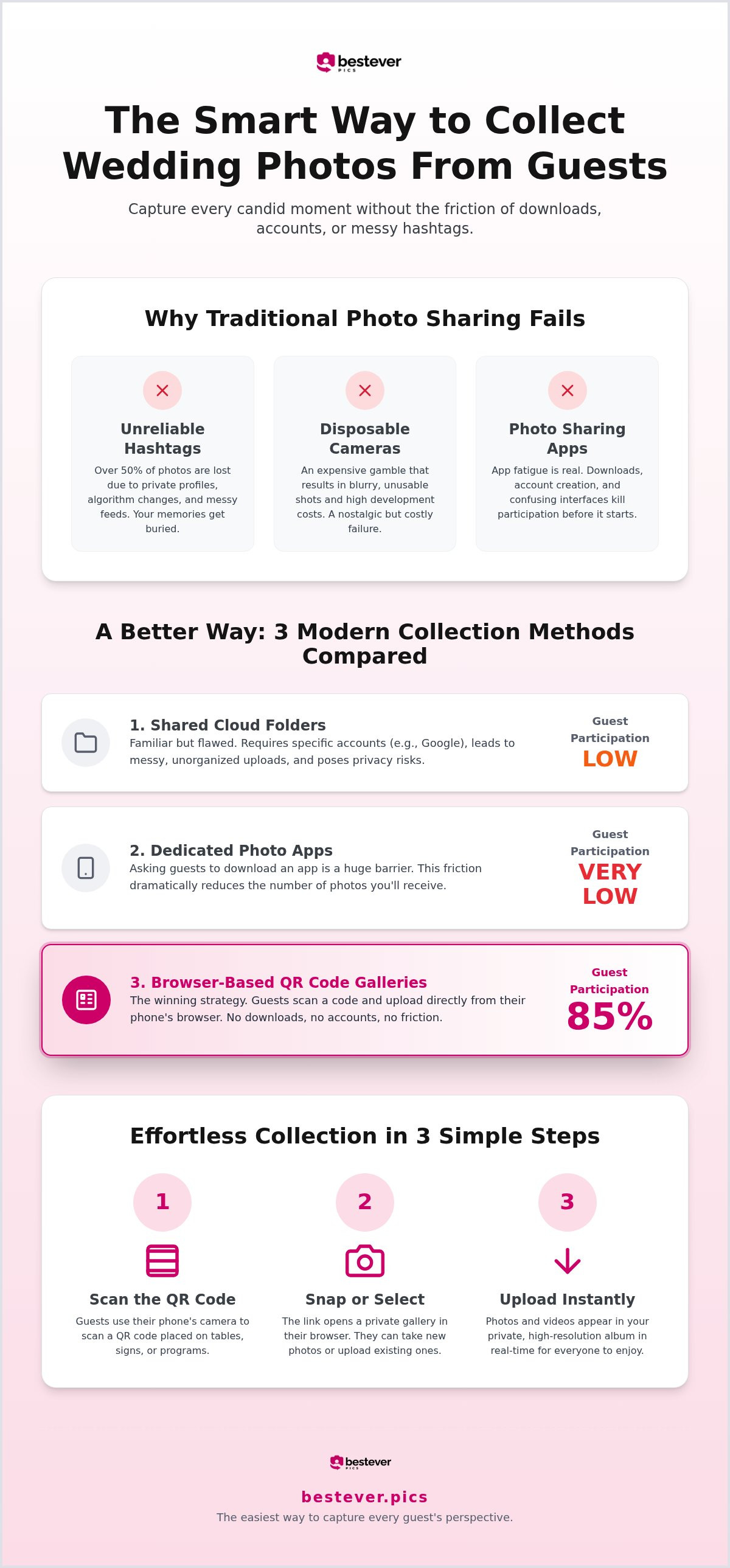
You spent months planning the perfect day. You hired a professional to catch the kiss and the first dance. But what about the hilarious selfie your cousin took at table four? Traditional methods of photo sharing are failing modern couples. Research suggests that hashtags often result in losing more than half of the photos taken by your guests. They are messy, hard to track, and rely on everyone having a public profile. Figuring out how to collect wedding photos from guests shouldn't be your biggest post-wedding chore.
Disposable cameras used to be the go-to for candids, but now they are a financial drain with disappointing results. You pay a premium for the plastic, then a fortune for development, only to receive blurry or unusable shots. It's an expensive gamble that rarely pays off in the era of high-definition smartphone sensors. Your guests have incredible cameras in their pockets; you just need a better way to get those files. Professional photographers capture the big moments, but they can't be at every table at once. You need the perspective of your guests to truly see the whole story of your celebration.
Even the best intentions fade once the honeymoon starts. Guests swear they will text you those videos or upload them to a shared drive, but life gets in the way. By the time you get back from your trip, those memories are buried under a week of work emails and new notifications. If you don't capture the moment while the energy is high, you likely won't get it at all. Learning how to collect wedding photos from guests efficiently means removing every possible barrier during the reception itself.
Why Wedding Hashtags are Fading Out
Social media isn't the private sanctuary it used to be. Many guests feel uncomfortable posting personal wedding moments to a public feed for the world to see. Algorithm changes and shadowbanning also mean your unique tag might get buried, making it impossible to find your photos later. You want a private vault, not a public spectacle. Check our guide on QR codes for wedding photo sharing to see why modern couples are switching away from social media tags.
The High Friction of Photo Sharing Apps
App fatigue is real. Asking a guest to delete their favorite photos just to make room for a one-time wedding download is a big ask. It kills the momentum of the party. Older guests often struggle with new interfaces, leading to frustration instead of participation. If it takes more than two taps, people stop. Speed is the only way to ensure your digital album stays full. You need a system that works instantly on every smartphone without technical troubleshooting.
3 Modern Ways to Collect Wedding Photos from Guests
Most couples realize too late that their plan for mediatised memories of weddings is fundamentally broken. You need a system that works as fast as the party moves. There are three main paths to consider when deciding how to collect wedding photos from guests in 2026. Each has its own trade-offs between cost, speed, and how many photos you actually end up with. You want your guests on the dance floor, not digging through the app store.
Shared cloud albums like Google Photos or iCloud are the standard free choice. They offer high quality, but they are messy for a large event. Dedicated apps try to offer more features, but they fail because guests hate downloading software. Finally, QR code galleries have emerged as the premier choice because they remove every barrier to entry. This approach turns every guest into a contributor without making them work for it. It is the inevitable evolution of the guest experience.
Shared Folders and Cloud Links
Google Photos and iCloud links are familiar. They don't cost anything, which is a win for the budget. However, they require your guests to have a specific account to contribute. If your uncle doesn't have a Google account, he's locked out. Public links are even riskier. If that URL gets shared beyond your guest list, your private moments are suddenly open to the internet. Managing these folders is a full-time job. You'll spend hours sorting through raw files and duplicate uploads. It's a free solution that costs you significant time later.
The Rise of QR Code Photo Albums
QR codes are the fastest path to a full album. They allow for instant uploads directly through a smartphone's native browser. There are no accounts to create. No apps to download. This simplicity is why these platforms see participation rates as high as 85%. It's the most inclusive way to ensure every demographic, from tech-savvy teens to grandparents, can contribute. You get a curated, high-resolution feed without the technical troubleshooting.
This method keeps the energy high. A guest sees a moment, scans a code on their table, and uploads it in seconds. It's sophisticated simplicity. If you want a private wedding photo gallery with no app needed, this is the only logical path forward. It's about capturing the modern wedding photo sharing experience without the friction. When you compare these methods, the choice becomes clear. QR code galleries prioritize the guest experience while delivering professional-grade results. It's the smartest way to solve the mystery of how to collect wedding photos from guests without the stress.
Why App-Free Collection Gets More Candid Shots
Speed is the ultimate driver of guest participation. If a process takes more than thirty seconds, you've already lost the shot. When guests are in the middle of a busy reception, they don't want to leave the moment to deal with technical hurdles. Browser-based uploads solve this by working on every smartphone without any troubleshooting. This immediate action is the core of how to collect wedding photos from guests at scale.
The best technology should also be the easiest to use. By removing the friction of account creation, you maximize your photo haul while keeping the energy high. It's about capturing the authentic, unposed reality of your day as it happens. You get a professional-grade output without forcing your guests to act like IT professionals. This results-driven approach transforms how to collect wedding photos from guests from a chore into a fun activity.
Capturing the Moments the Photographer Misses
Your pro photographer is essential for the big milestones, but they can't be everywhere at once. Guests capture the raw, behind-the-scenes fun that a formal kit simply can't reach. Those blurry dance floor selfies and quiet table conversations often become your most cherished memories. This is why learning how to collect wedding photos from guests effectively is so important for your final album.
- Encourage guests to look for small, personal details that reflect the real personality of your event.
- Ask friends to capture the reactions during speeches that the main camera might miss.
- Use these wedding photography tips for guests to help them elevate their candid game.
Universal Accessibility for All Ages
A digital guestbook is only effective if everyone can use it. Grandparents and tech-averse friends shouldn't be excluded from the fun. Scanning a QR code is now a standard part of the dining experience; it's intuitive for every demographic. You don't need to explain how to find an app store or use a complex interface. This inclusive approach is the best way for how to collect wedding photos from guests of all ages.
Reducing tech barriers ensures your collection is diverse and captures the whole room. It turns the process of how to collect wedding photos from guests into a shared activity that connects every generation. You won't have to spend your reception helping people with downloads. Instead, you can focus on the celebration while the photos roll in automatically. It's the smartest way to manage how to collect wedding photos from guests without the stress.
Creative Display Ideas to Encourage Guest Participation
Setting up the tech is only half the battle. If your guests don't see the portal, your digital album stays empty. You need high-visibility touchpoints throughout your venue to truly master how to collect wedding photos from guests. Start at the entrance with bold signage that sets the tone early. The bar is another gold mine for participation. Guests often have their phones out while waiting for a drink; it's the perfect moment to capture their attention and get them uploading.
Table cards are your most powerful tool. Guests spend hours at their tables during dinner and speeches, giving them plenty of time to interact with your gallery. Placing a QR code alongside the menu or centerpiece ensures it's always within reach. You can also incorporate the code into your physical guestbook station. This creates a dual-purpose memory zone where guests leave a written note and a digital memory at the same time. Print the code on the back of your ceremony programs too. It's a smart way to transition guests from "phones away" during the vows to "camera ready" for the party.
Integrating Codes into Table Decor
Don't let your tech clash with your aesthetic. Use elegant frames that match your wedding theme to house the QR code. A short, punchy instruction like "Scan to share your best shots!" is all you need to drive action. This turns a digital tool into a beautiful part of your decor. For more visual inspiration, check out our creative QR code display ideas to see what works for different wedding styles.
Using the DJ or MC to Drive Engagement
A human nudge makes a massive difference. Ask your MC to make a quick announcement during dinner about the digital album. A simple reminder that their photos help you see the day through their eyes goes a long way. If your venue has digital screens or a projector, display the QR code there during the party. This visual social proof encourages others to join in. It transforms a solo action into a collective celebration of your big day. Seeing others upload their shots creates a fun energy that fills your album fast.
Setting Up Your bestever.pics Gallery for Your Big Day
Getting your digital album ready shouldn't take more than a minute. Following these simple steps ensures you're ready to start figuring out how to collect wedding photos from guests with zero technical stress. It's a straightforward process designed for busy couples who want the most efficient way for how to collect wedding photos from guests with professional results.
- Create your private gallery by entering your event details and a custom name to begin your plan for how to collect wedding photos from guests.
- Customize the landing page colors and style to match your wedding theme for a professional look.
- Set your privacy permissions to keep the uploads exclusive to your invited friends and family.
- Download the high-resolution QR code and send it to your stationer or print it for your table signs.
- Test the upload process yourself to see how to collect wedding photos from guests in under ten seconds.
Managing Your Photos Post-Wedding
Once the celebration ends, you need a quick way to review the memories. You can manage your entire collection from a single dashboard, making it easy to see the day through your guests' eyes. This is the final piece of the puzzle when learning how to collect wedding photos from guests without the usual post-event headache. Our system simplifies how to collect wedding photos from guests so you can focus on your honeymoon.
- Review and curate the gallery to find the best candid shots from the night.
- Share the final curated link with your guests so they can relive the highlights.
- Download every high-resolution image in one click for your physical album or social media.
This streamlined system ensures you don't spend your honeymoon chasing people for files while wondering how to collect wedding photos from guests effectively. You get a secure, high-quality vault that houses every laugh and dance floor moment. Check our guide on how it works for more details on the technical side of the platform and how to collect wedding photos from guests with ease.
Capture Every Angle of Your Big Day
Your wedding is a series of high-energy moments that deserve to be documented from every perspective. Don't let those candid shots vanish because of app fatigue or technical hurdles. The most effective strategy for how to collect wedding photos from guests is to remove every barrier to entry. Focus on speed, prioritize privacy, and use creative QR code placements to keep the uploads flowing while the energy is high.
bestever.pics transforms your photo collection into a high-octane experience. We've built a platform that requires no app downloads and sets up in under 60 seconds. It's the sophisticated simplicity your celebration demands. You get professional-grade results without the stress of legacy methods.
Take control of your digital guestbook and start building your legacy right now. Your guests are ready to share their best shots; give them the easiest way to do it. Once the celebration ends and you begin your journey as a new family, you can check out Haevn to help keep your household management just as streamlined and private as your wedding gallery.
Frequently Asked Questions
What is the easiest way to collect photos from guests at a wedding?
The easiest way is using a browser-based QR code platform that requires no downloads. Guests simply scan a code on their table and upload shots instantly. It removes the technical friction that usually kills participation. This is the most effective strategy for how to collect wedding photos from guests because it works for everyone regardless of their tech skills.
Do guests need to download an app to share their wedding photos?
Guests don't need to download an app if you use a web-based service like bestever.pics. They use their phone's native camera and browser to contribute. This universal compatibility is essential for a smooth event. It ensures that older guests or those with limited phone storage can still share their favorite moments without any frustration or delays.
How do I create a QR code for my wedding photo album?
You create a code by signing up for an event gallery service and naming your private album. The platform generates a unique, high-resolution QR code for you instantly. You can then download this graphic and include it on your wedding stationery, menus, or reception signage. It's a fast process that takes less than a minute to complete from start to finish.
Is it free to collect wedding photos from guests using a QR code?
Some generic cloud links are free, but they lack the professional branding and speed of dedicated tools. Most couples choose a paid platform to ensure they get high-resolution files and a private experience. Investing in a specialized tool is the smartest way to manage how to collect wedding photos from guests while maintaining total control over your digital memories.
How can I make sure guests actually use the photo sharing QR code?
Visibility and verbal reminders are the best ways to drive engagement. Place your QR codes in high-traffic areas like the bar, the guestbook station, and every dinner table. Ask your MC to make a short announcement during the reception to remind people to share. When guests see how easy it is to upload, they are much more likely to participate.
Can I see the photos guests upload in real-time during the wedding?
Yes, you can view guest uploads in real-time through your private gallery link. This allows you to see the party unfolding from dozens of different perspectives as it happens. Some couples even choose to project this live feed onto a screen at the venue. It creates a fun, interactive loop that encourages even more guests to snap and share their own photos.
Are the photos uploaded by guests kept private?
Privacy is a major benefit of using a dedicated gallery over social media. Only people with your specific QR code or private link can access the photos. Your wedding memories aren't posted to a public feed or indexed by search engines. You have total authority over who sees your images, keeping your celebration intimate and secure for you and your guests.
What happens to the photos after the wedding is over?
Your photos are stored in a secure cloud album where you can view them anytime. Most platforms allow you to download the entire high-resolution collection in a single click after the honeymoon. This makes it simple to organize your favorites for a physical album or professional prints. You won't have to worry about losing files or chasing guests for months after the wedding.