

Google Photos Alternative for Events: Why QR Codes Win in 2026

Article by
Gabi
Hi, I'm Gabi - Co-Founder of Bestever Pics. Thanks for visiting our blog. We are working hard to produce content which we hope resonates with you. Feel free to drop us a line on socials or via the contact form on the site.
Eighty percent of your wedding's best candid moments will never leave your guests' phones if you rely on a link sent the next morning. You need a google photos alternative for events that captures the magic while it's actually happening. Most people agree that forcing guests to download a new app or wrestle with Google login screens during a celebration is a total vibe killer.
Stop settling for the friction of legacy cloud storage that treats your celebration like a corporate file transfer. Platforms like bestever.pics prioritize speed by using instant browser uploads to ensure you never miss a single memory. This guide reveals why QR code technology is the inevitable evolution for event photography in 2026. You'll learn how to bypass app stores and sync issues to collect every high-quality shot without asking your guests to do any heavy lifting.
Key Takeaways
- Account logins and app downloads prevent over half of your guests from sharing their photos.
- A specialized google photos alternative for events removes friction by using instant browser-based uploads via QR codes.
- High-resolution downloads and built-in moderation are essential for creating a professional, print-ready wedding album.
- You can launch a fully customized digital photo gallery in under 60 seconds to start collecting memories immediately.
- Browser-based systems drive guest participation up to 80% compared to the low engagement of legacy storage folders.
The Friction Problem: Why Google Photos Fails at Events
Google Photos is a vault. It's fantastic for keeping your personal memories safe for years, but it's a poor google photos alternative for events. A true collection engine needs to move as fast as your guests do. Most traditional cloud storage tools are built for long-term personal organization, which creates massive bottlenecks when you try to use them at a party or wedding.
The biggest hurdle is the "Sign in to continue" wall. Google requires an account login, which stops at least 50% of guests from contributing their shots. People don't want to remember passwords or link their private profiles to a public album while they're trying to enjoy a reception. This friction kills the momentum of the night and leaves you with a half-empty gallery. Using a dedicated google photos alternative for events ensures that the process is as simple as possible for everyone involved.
- Collection vs. Storage: Events need tools designed for gathering hundreds of photos from different sources instantly, not just archiving them.
- Login Barriers: Every extra click or login requirement reduces the number of photos you'll actually receive.
- Connectivity Issues: App downloads are a significant barrier at venues with spotty Wi-Fi or for guests with limited data plans.
- Permission Fatigue: Managing "shared album" permissions in standard cloud apps is often too complex for a quick wedding upload.
The Account Wall and Guest Drop-off
Privacy is a major concern for modern event-goers. When a guest sees a prompt to log into their Google account, they often worry about what else is being shared or tracked. They just want to send a photo, not sign up for a service. Contrast this with a simple "scan and upload" browser-based approach. By using a tool like bestever.pics, guests can contribute in seconds without creating a profile or giving away their data.
Cross-Platform Chaos: Android vs. iPhone
We've all seen the "green bubble vs. blue bubble" drama play out in group chats. iPhone users often struggle with Google-centric links if they don't already have the app installed, while iCloud links effectively shut out anyone on an Android device. This creates a divided gallery where you only see half the story. You need a neutral, browser-based ground that treats every smartphone the same way.
This is where the simplicity of a What is a QR Code? link comes in. These scannable codes act as a universal bridge, allowing any device with a camera to access a web-based uploader instantly. There is no app to download, which is vital for keeping everyone included. It's about removing every possible reason for a guest to say "I'll do it later," because we both know they rarely do.
Key Features of a Successful Google Photos Alternative
Choosing the right google photos alternative for events means looking past basic storage. You need a collection engine built for the heat of the moment. While big tech focuses on backup, event-specific tools focus on the guest experience. A professional google photos alternative for events ensures that the process is as simple for your grandma as it is for your tech-savvy friends.
High-resolution downloads are the first priority. Most social sharing apps crush your photo quality to save space. If you want to print a physical wedding album later, you need the original, uncompressed files. A dedicated platform ensures that every candid shot stays crisp enough for a large print. You should also look for these essential features:
- Video Support: Your gallery shouldn't be limited to static images; it needs to handle those short, funny clips of the dance floor.
- Powerful Moderation: You want the ability to filter out blurry shots or inappropriate content before they hit the final gallery.
- Custom Branding: Your QR codes should match your wedding stationery or corporate branding, not look like a generic tech sticker.
- Instant Access: Photos should appear in a live gallery as they're uploaded, creating immediate engagement.
Why "No App" is the Non-Negotiable Standard
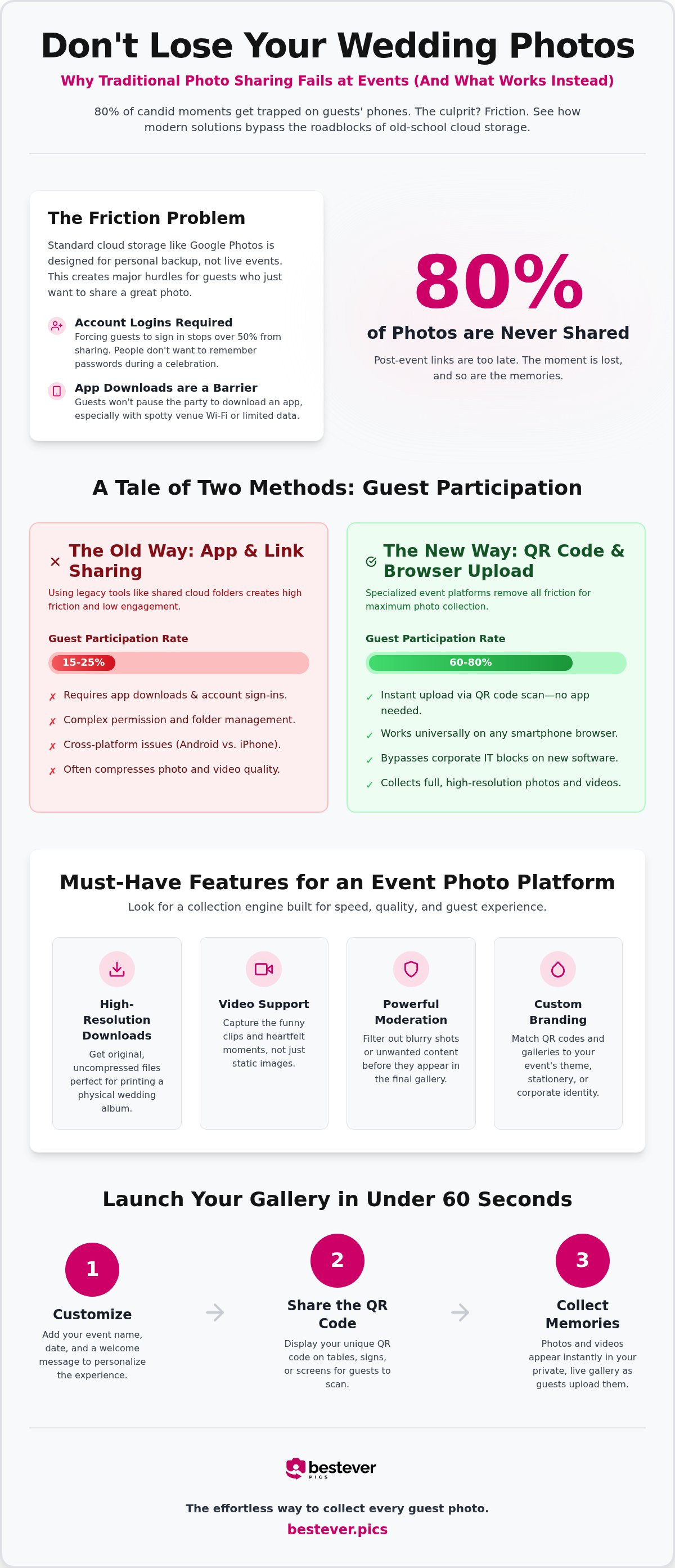
Participation is the only metric that matters. Research shows that app-based tools see roughly 15-25% guest participation. In contrast, QR-code-based platforms that skip the download jump to 60-80%. Every extra click or password prompt is a chance for a guest to give up. People want to stay in the moment, not wait for a progress bar in the App Store.
For corporate events, this is even more critical. Many company phones have strict IT policies that block new software. A browser-based uploader bypasses these restrictions entirely. You can see how it works in just a few seconds. It's the most reliable way to ensure your social media manager has a constant stream of fresh content.
Privacy and Ownership in 2026
In 2026, data privacy is a top concern for everyone. Big tech companies often treat your photos as data points for their AI training models. A private gallery keeps your memories between you and your guests. You should always check the terms to ensure you own the rights to your photos and that they aren't being sold to third parties.
The handover should be simple and fast. Look for a service that provides a single ZIP download of the entire collection. This saves you from clicking "save as" on five hundred individual images. If you're planning a big day, you might want to check out this private wedding photo gallery to see these features in action.
Comparing the Best Google Photos Alternative for Events
Finding a google photos alternative for events is about identifying where the friction lives and removing it. While big tech companies offer storage, they don't offer an experience. You need a tool that treats your wedding or party like a celebration, not a folder of tax receipts. Comparing the most popular options shows exactly why a specialized engine is the only way to capture every moment.
- Bestever.pics: This is the specialist for high-engagement guest collection. It's built specifically for speed and accessibility across all devices.
- iCloud Shared Albums: These are great for small families but fail at mixed-device wedding guest lists. If your guest has an Android, they're effectively locked out of the memory.
- Dropbox and Google Drive: These are powerful for professional photographers but too clunky for a guest at a stag do. Asking someone to click through a file-tree structure in the middle of a party is a big ask.
- Physical Photo Booths: They're fun, but they're limited to one location and cost significantly more. They also miss the hundreds of candid shots happening at the tables.
Bestever.pics vs. The Tech Giants
The difference is in the guest journey. With Apple or Google, a guest often faces a ten-click process involving logins, "Join Album" requests, and permission pop-ups. On Bestever.pics, that journey is shortened to just two clicks with no account requirements. This is a massive win for your older guests who only know how to use their basic camera app.
This simplicity ensures that you don't lose the 80% of candid shots that usually stay stuck on people's phones. You want your guests focused on the dance floor, not troubleshooting a login screen. By removing the "Sign in" wall, you create a neutral ground where iPhone and Android users share photos in the same high-quality gallery.
Specialist Event Tools vs. General Cloud Storage
A dedicated event tool feels festive and focused. Google Photos is where you keep your backup of your cat; it isn't where you want to host a live wedding experience. Specialized platforms offer features like live slideshows that display guest photos on big screens in real-time. This creates a feedback loop of excitement that encourages more people to upload their own shots.
For those running multiple events, the needs change. Professional wedding planners and venues often require a more scalable system to manage dozens of galleries at once. This is where a Bestever.pics pro subscription becomes the logical choice. It provides a professional-grade dashboard for recurring events that general cloud storage simply can't match.
How to Set Up Your Event Photo Gallery in 60 Seconds
Speed is your best friend when planning. You don't have time for complex tech setups or manual account approvals. This google photos alternative for events is designed to be ready before your coffee gets cold. It's a simple, five-step process that moves as fast as your planning checklist.
- Create your event on bestever.pics and choose your unique gallery name.
- Download your custom QR code and save it to your phone or computer.
- Print the code on table talkers, bar signs, or the back of the order of service.
- Make an announcement during the speeches to remind guests to scan and share.
- Review the uploaded candid shots and download the high-res gallery after the event.
Creative QR Code Display Ideas
Think about the physical flow of your venue. Guests should encounter the code at multiple touchpoints without feeling overwhelmed. Digital photo frames or large monitors can cycle through the QR code alongside a live gallery preview. This visual cue reminds guests that the digital album is growing in real-time. For more intimate gatherings like hen and stag dos, placing codes on the back of drink coasters or menu cards works perfectly. You can find more inspiration with these creative QR code display ideas.
Maximising Guest Participation
Engagement doesn't happen by accident. You have to lead the way. A "photo of the night" contest is a brilliant way to drive uploads and spark a bit of friendly competition. Using a specialized google photos alternative for events ensures that the tech remains invisible while the fun stays front and center. Offer a small prize for the most creative candid shot to turn sharing into a game. Have the bridal party or event staff lead by example by scanning and uploading early in the evening. Guests are much more likely to participate when they see others doing it first. Clear signage is your secret weapon. Use bold, high-contrast text like "Scan to Share Your Photos" so there is zero confusion about what to do.
Why Bestever.pics is the Logical Choice for Your Celebration
Choosing the right google photos alternative for events isn't just a technical decision; it's about who you trust with your memories. Big tech companies treat your wedding photos like data points to train their latest algorithms. You deserve a platform that treats your celebration with the same care you put into planning it. By focusing on a single, streamlined purpose, bestever.pics ensures your candid shots don't get lost in a cluttered cloud drive.
The platform handles the technical heavy lifting so you can stay in the moment. You don't need to worry about storage limits, file compression, or guest login failures. It's built for speed, making it the most reliable google photos alternative for events where every second counts. Whether it's a backyard birthday or a black-tie gala, the technology stays invisible while the results speak for themselves.
The Story Behind the Platform
This isn't a faceless corporate tool. bestever.pics was founded by a father-daughter team, Steve and Chloe, who saw a real problem that needed a human solution. They watched too many friends and family members lose their favorite wedding memories because guests simply forgot to upload them later. They knew there had to be a better way to capture the magic of a room without forcing everyone to download an app.
Their commitment to an app-free future is what sets this platform apart. When you use bestever.pics, you're supporting a family-run business that values the human connection behind the lens. They've spent years refining the "scan and share" experience to ensure it's the easiest tool on the market. It's a practical solution born from a genuine love for celebrating life's biggest milestones.
Scaling for Professionals: Venues and Planners
While DIY couples love the simplicity, professional event planners and venues need something more. Managing fifty weddings a year requires a system that is both reliable and scalable. Venues can offer a private digital gallery as a high-value add-on service, giving their clients a reason to book with them over a competitor. It's a simple way to increase your service offering without adding to your weekend workload.
For those running recurring events, corporate branding is a must. You can visit the bestever.pics business page to see how the platform adapts to professional needs. Having a consistent, reliable system for every weekend of the year means you can spend less time troubleshooting tech and more time creating incredible experiences for your guests. It's the logical evolution for any modern event professional who wants to stay ahead of the curve.
Start Capturing Every Candid Moment Today
Your celebration is a collection of hundreds of tiny, unscripted moments that a single professional photographer just can't catch. By removing the friction of app downloads and account logins, you're giving your guests the power to help tell your story. Choosing a specialized google photos alternative for events ensures these memories stay high-resolution, private, and ready for your physical album later.
We've built bestever.pics as a family-owned platform that respects your time and your data. It's about keeping the focus on the dance floor while the technology works quietly in the background. You don't need a tech degree to set this up; you just need sixty seconds and a vision for your perfect digital gallery.
Enjoy every second of your big day knowing that every laugh, toast, and dance move is being saved forever. Your future self will thank you for making it this easy for everyone to share the love.
Frequently Asked Questions
Do my guests need to download an app to share photos?
No, your guests don't need to download anything to share their photos. They simply scan the QR code with their phone's camera, which opens a secure upload page in their mobile browser. This removal of friction is why many hosts choose this as a google photos alternative for events. It ensures that even the least tech-savvy guests can contribute without struggling through an app store.
Is there a limit to how many photos guests can upload?
Most plans offer unlimited uploads to ensure you don't miss a single moment of your celebration. Whether you have fifty guests or five hundred, the platform is built to handle a high volume of images and videos. You don't have to worry about hitting a storage cap mid-party or paying for extra gigabytes. This allows you to collect every candid shot without restriction or hidden costs.
Can I use this for a corporate event with strict IT policies?
Yes, browser-based uploads are ideal for corporate environments where IT departments often block new app installations on company phones. Since the platform runs entirely through a standard web browser, it bypasses these security restrictions. This makes it a reliable choice for professional conferences or team-building days. It ensures your social media manager gets the content they need without the technical delays of traditional software.
How do I get my photos back after the event is over?
You can download your entire gallery as a single, high-resolution ZIP file directly from your host dashboard. This saves you from the tedious task of saving hundreds of individual images one by one. You'll receive the original files, which are perfect for printing or creating a professional physical album. It's a fast and organized way to secure your memories once the celebration has come to an end.
Will the QR code work for guests with older smartphones?
Yes, the QR code technology is a universal standard that works on any smartphone with a functioning camera. Most modern phones have built-in scanners, while older devices can use any basic scanning app. Once scanned, the web-based uploader is optimized to run smoothly on older browsers and hardware. This ensures that every guest, regardless of their device, can join in on the fun without feeling excluded.
Is this more expensive than using a free Google Photos link?
While Google Photos is free, you often pay the price in lost participation due to login requirements. A specialized google photos alternative for events is a paid service, but it provides significantly higher engagement and better organization. You're investing in a tool that ensures you actually receive the photos rather than hoping guests will push through a complex login wall. The real value is found in the memories you'd otherwise lose.
Can I moderate the photos before they appear in the gallery?
Yes, you have full control over which photos appear in your live gallery or final album. The host dashboard allows you to review and hide any blurry or inappropriate shots in real-time. This is particularly useful if you're displaying a live slideshow on a big screen during your reception. It gives you peace of mind that the shared content remains family-friendly and high-quality throughout the entire event.
Does bestever.pics support video uploads as well?
Yes, guests can upload short video clips alongside their static images. This captures the sound and movement of the dance floor or the emotion of the speeches in a way that photos alone cannot. All video files are stored in high quality, ensuring they look great when you watch them back later. It's a complete way to document the atmosphere of your celebration from every possible angle and perspective.