

Event Tech for Modern Couples: 5 Tools Worth Considering

Article by
Gabi
Hi, I'm Gabi - Co-Founder of Bestever Pics. Thanks for visiting our blog. We are working hard to produce content which we hope resonates with you. Feel free to drop us a line on socials or via the contact form on the site.
More wedding technology doesn’t automatically make planning easier. It can also mean more tabs, notifications, and instructions to manage. If event tech for modern couples feels like a pile of disconnected tools, start with the task you need each one to handle.
This guide compares five practical categories, from planning and guest information to candid photo sharing. Use the comparisons to choose a small set of tools that fits your wedding and gives guests clear, manageable steps.
Key Takeaways
- Choose event tech for modern couples by the job it needs to do, not by how many features it offers.
- Compare planning, guest coordination, and photo-sharing options by setup effort and who’ll use them.
- Check how much effort a tool asks of guests before adding it to your wedding plans.
- Test each tool and assign someone to manage event-day setup so it doesn’t land on a busy host.
- Decide whether candid guest photos would add to your memories, alongside professional photography rather than instead of it.
Event Tech for Modern Couples: What Should Your Wedding Tools Actually Do?
Wedding event technology includes digital tools for planning, coordinating, and remembering a celebration. It can help organise guest details before the day, share practical information during it, or collect photos afterwards. The right tools support specific tasks without needing to replace conversations, paper plans, or professional services.
Use that as your starting point when comparing event tech for modern couples: identify the job, then consider who needs the tool and what setup it requires. Event management covers the planning and delivery of an event. Technology can support parts of that work without needing to run the entire celebration.
- Planning: Collect RSVPs, organise schedules, or keep guest and seating details in one place.
- Guest coordination: Share timings, directions, and seating information guests may need on the day.
- Memory capture: Give guests a simple way to contribute candid photos to a shared collection.
Which wedding-day jobs can technology make easier?
Separate what you need to organise before the wedding from what guests need during it. RSVP tracking and schedule planning support preparation. Accessible seating details and a clear timeline help guests on the day. Photo sharing has a different purpose, so keep each tool focused and avoid duplicating information across platforms.
When does a digital tool add friction instead of value?
Consider the guest experience: they may be checking instructions between travel plans and other messages. A required download, account creation, or unclear sign can turn a quick task into a reason to give up. Connectivity, accessibility needs, and personal preferences can also affect whether guests can or want to use a digital option.
Useful event tech removes a real task without creating a harder one for guests or hosts. Every added tool can bring setup, notifications, or instructions to manage. Compare categories by purpose and trade-offs rather than relying on an unverified ranking of brands.
Five Event-Tech Categories Modern Couples Can Compare
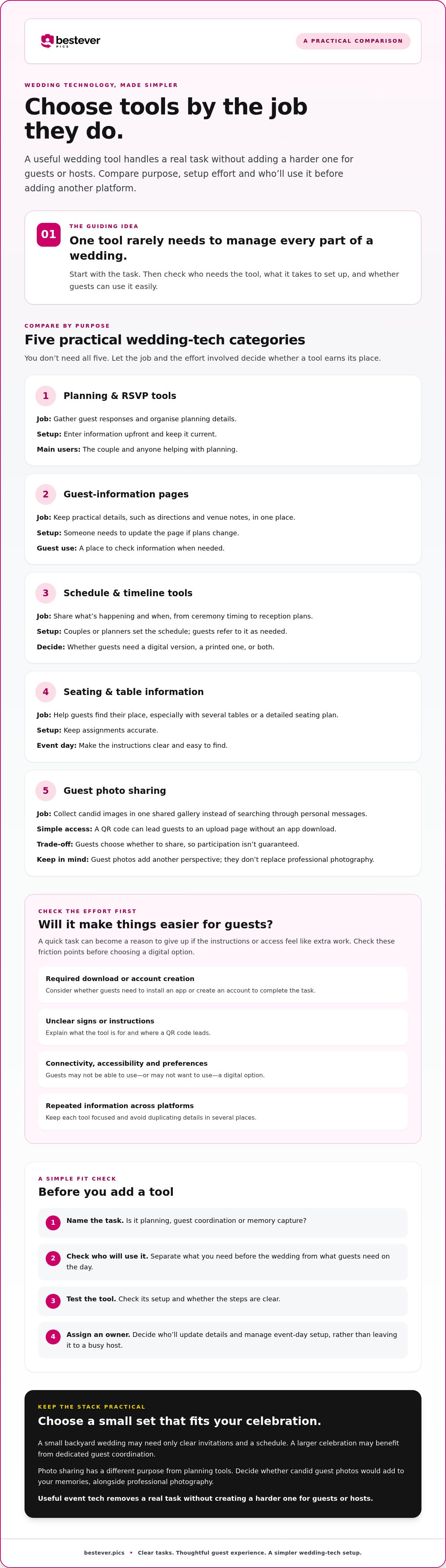
You don’t need to adopt every category. Compare each option by the task it handles, the effort it takes to set up, and who will use it. This keeps event tech for modern couples practical: a tool should earn its place by saving time or making an important moment easier to manage.
A Microsoft Research study on the practical pursuit of magic in modern weddings looks at how technology can support both wedding logistics and the experience couples want to create. Keep that distinction in mind as you compare these categories:
- Planning and RSVP tools: Gather guest responses and keep planning details organised. Setup takes time upfront to enter information and keep it current. Couples and anyone helping with planning are the main users.
- Guest-information pages: Put practical details, such as directions or venue notes, in one place. They help when guests need to check information, but someone must update the page if plans change.
- Schedule and timeline tools: Share what’s happening and when, from ceremony timing to reception plans. Couples or planners set the schedule; guests refer to it as needed. Decide whether guests need a digital version, a printed one, or both.
- Seating and table information: Help guests find their place, especially when there are several tables or a detailed seating plan. Setup depends on accurate assignments, and instructions need to be clear on the day.
- Guest photo sharing: Collect candid images in a shared gallery instead of searching through personal messages later. A QR code can take guests to an upload page without an app download, though participation depends on guests choosing to share. These photos add another perspective; they don’t replace professional photography.
Planning, RSVP, and guest-information tools
Digital planning can bring guest responses and key details together, but it won’t keep itself accurate. Decide who will update the information when the schedule, venue details, or guest list changes. If you are also managing gift registries and want to track presents from engagement parties through the big day, you can explore Annual Mobile App Subscription options designed to keep gift lists organised. For photo sharing, separately consider whether a QR code fits naturally into your guest instructions.
Photo sharing and digital keepsakes
A gallery gives guests one shared place to contribute. Personal messages, by contrast, can scatter photos across different conversations. Keep the upload steps simple and explain where the QR code leads. If a private gallery suits your plans, explore this private wedding photo gallery as a focused photo-sharing option, not a full planning system.
How to Compare Wedding Event Tech Without Adding Guest Friction
Good event tech for modern couples should make a task easier without turning guests into tech support. A tool can be simple to open and still not suit everyone, so weigh guest effort alongside the work it saves you. Easy access can encourage participation, but it can’t ensure that every guest will use the tool.
What should couples check before choosing a tool?
Before committing, check what guests must do. Does the tool ask them to download an app, create an account, or follow unfamiliar steps? Consider how you’ll share instructions, who’ll keep the information current, and what alternatives are available to guests who don’t have access to a device or prefer not to use the digital option.
Review the provider’s own product information for details about privacy and access controls. Don’t assume every gallery or planning tool handles personal information in the same way.
| Task | Guest effort | Host effort | Key trade-off |
|---|---|---|---|
| RSVPs and guest details | Respond using the method provided | Set up the guest list and check responses | Information can be easier to organise, but details still need attention as plans change. |
| Schedules and event information | Find and read the relevant details | Write clear instructions and update changes | One shared source may reduce confusion, but guests need to know where to find it. |
| Photo sharing | Open the gallery and choose whether to upload | Set up the sharing option and explain how to use it | Guest photos can capture candid moments, but participation is optional and the gallery doesn’t replace professional photography. |
How do app-free photo galleries fit the comparison?
A QR code can shorten the path from seeing an invitation to share to reaching a photo-upload page. Bestever.pics offers a QR code guests can scan to upload photos to a shared digital album without downloading an app. Guests still need to scan the code, open the page, and choose to upload, so some may prefer not to contribute.
If that approach suits your guest mix, you can explore an app-free wedding photo gallery. Keep the invitation clear and low-pressure, and consider a non-digital way to share essential wedding information.
A Simple Wedding-Tech Plan From Early Decisions to Event Day
A short process can keep wedding technology useful instead of turning it into another planning project. Start with the wedding tasks that need support, then choose only the tools that fit. This gives event tech for modern couples a clear purpose and helps you prepare guests and share event-day responsibilities.
What should couples decide before selecting event technology?
Begin with your wedding plans, not a list of apps. Note recurring tasks that take time, such as tracking guest responses, and event-day moments where clear information would help, such as finding the schedule or locating a table. Then decide which details guests need and when. A seating plan may matter on the day, while travel details may be useful well before it.
Use this four-step sequence:
- Identify a need. Name the specific task or guest question you want to address.
- Choose a tool. Select one option that fits that task, rather than adding a platform with features you won’t use.
- Test it. Check the full experience before you print, post, or send anything. Scan QR codes and open shared information on a phone, just as a guest would.
- Explain it. Give guests a short, clear instruction and tell them where to find the information or tool.
For a broader view of planning priorities, connect each digital choice to the wider wedding planning process. A tool should support your plan, not create a separate one to manage. If your celebration also requires technical production such as sound systems, screens, or venue lighting, visit LivewireAV to see how professional event production can help.
How can couples make tools easy to use on the day?
Keep directions visible and use everyday wording. If you’re sharing a QR code, test the printed version before producing stationery or signs. Check that it opens the intended page and that the next step is clear. Ask a trusted person to try the guest journey on their phone. They may spot a confusing instruction or a setup issue you’ve overlooked.
Assign an owner for each event-day tool. A partner, member of the wedding party, or trusted helper can check that signs are in place and shared details are ready, so setup doesn’t fall to one busy host. For guest-facing QR signage, browse these creative QR code display ideas. Keep a simple non-digital option for anyone who doesn’t want to use a phone or can’t access the tool.
Choose a Guest-Photo Tool That Fits Your Wedding
Guest-photo sharing is worth considering if you’d like candid views alongside your formal wedding photographs. Guests may capture quick reactions, conversations, and in-between moments that aren’t part of a planned shot list. A shared gallery is an extra way to collect memories, not a replacement for a professional photographer or a complete record of the day.
Is a guest photo gallery right for your wedding?
Think about your priorities and your guest mix. A gallery may suit a relaxed reception where guests are already taking photos, or a celebration where friends and family are spread across different tables and moments. It may be less useful if sharing instructions won’t reach guests or if people would rather keep their phones away. No tool can guarantee uploads or capture every moment.
Before choosing, consider:
- What you hope to collect: Candid guest perspectives, not formal coverage.
- How guests will take part: Instructions need to be easy to notice and follow.
- What matters to you: Check the provider’s product page for access and upload details, and decide whether its approach fits your expectations.
What should couples do next?
If a private, app-free gallery fits your plans, Bestever.pics is one option to consider. Its wedding photo album uses a QR code guests can scan to upload photos without downloading an app. That removes the app-download step, but guests still need to scan the code and choose to share. Check the product page for access and upload details before deciding.
Then pass the plan to whoever is handling your signs or guest communications. Make sure they know where the QR code will appear and what the instructions should say. A clear, low-pressure invitation lets guests choose whether to contribute without making photo sharing another wedding-day obligation.
Choose the gallery only if it suits the memories you want and feels straightforward for your guests. Review the details and decide whether it fits your event-tech plan.
Make Your Wedding Tech Feel Simple and Personal
The best event tech for modern couples isn’t the longest list of tools. It’s a small, thoughtful set that solves real planning or event-day needs without creating extra work for you or your guests.
Choose tools for specific jobs, check the effort they ask of guests and hosts, and test links and QR codes before sharing them. Keep instructions clear and assign someone to handle event-day setup. For guest photos, remember that candid contributions can add another perspective, but they’re not a substitute for professional photography, and participation is always a choice.
A wedding photo gallery can be a practical fit if you want guests to share moments in one place. Bestever.pics provides custom QR codes guests can scan to reach a shared photo album and upload photos without downloading an app. Check the gallery details to decide whether that approach suits your guests.
Choose what helps, leave out what doesn’t, and give yourself more room to enjoy the celebration you’ve planned.
Frequently Asked Questions
What event technology do modern couples actually need?
Event tech for modern couples should solve specific planning or event-day tasks, not fill a checklist. You might use a digital tool to organise RSVPs, share schedule and seating details, or collect guest photos in a shared album. Start with what’s taking too much time or what guests need to know. Choose only tools that address those needs, and check the setup effort before asking guests to use them.
How can couples collect wedding photos from guests without an app?
Choose a web-based photo-sharing option that lets guests upload through a browser. With a QR code, guests can scan to reach the shared album without downloading an app. Make the code easy to find, explain what it’s for, and test the upload steps on a phone before the wedding. Guests still choose whether to participate, so treat their photos as additional candid memories rather than a complete record.
Do wedding guests need to download an app to share photos?
Not always. Some photo-sharing services let guests open an upload page in a web browser, while other tools may ask them to install an app or create an account. Check the provider’s instructions before choosing, and consider how comfortable your guests are with extra setup. If you want to reduce friction, look for a clearly explained browser-based option and test the guest experience before sharing it.
Is a QR code enough to get guests to share wedding photos?
A QR code can make a gallery easier to reach, but it can’t ensure guests will upload photos. They need to notice the code, scan it, understand the next step, and want to take part. Put it somewhere visible and pair it with a short, friendly instruction. Check that it opens the right page before printing signs or stationery, and keep the invitation optional.
Should couples use a photo-sharing gallery and a professional photographer?
Yes, if both suit your plans. A professional photographer provides planned coverage and experienced image-making; a guest gallery can add informal viewpoints from friends and family. They serve different purposes, so a shared album shouldn’t be treated as a replacement for professional photography. Guests may miss moments, choose not to upload, or take photos that don’t match the formal images you want to keep.
How many event technology tools should a couple use?
There’s no set number that fits every wedding. Use as few as you need to handle the tasks that matter, such as organising guest responses, sharing essential details, or gathering candid photos. Each additional tool can mean more setup, updates, notifications, and instructions. If two tools duplicate the same job, consider choosing one. Keep the stack manageable for both the couple and the people helping on the day.
How can couples make wedding technology easy for guests?
Keep instructions short, visible, and written in everyday language. Before sharing a link or printing a QR code, ask someone else to try it on a phone and follow the steps as a guest would. Assign a trusted person to check event-day signs and information, so the task doesn’t fall to a busy host. Offer a practical non-digital way to get essential details, too.