

Event Photo Sharing Australia: Compare Event Tech Options

Article by
Gabi
Hi, I'm Gabi - Co-Founder of Bestever Pics. Thanks for visiting our blog. We are working hard to produce content which we hope resonates with you. Feel free to drop us a line on socials or via the contact form on the site.
The most useful event photo-sharing setup may be the one guests barely notice. At a wedding, footy club celebration or work function, a candid shot can disappear into someone’s camera roll before they remember to send it. That’s why the event photo sharing Australia hosts choose should make contributing straightforward.
An app or group chat can work, but each adds a step or scatters photos across conversations. The right approach depends on what you want to collect, how much organising you can take on and how your guests prefer to participate.
This guide compares event photo sharing Australia options, from social media and messaging to shared albums and professional photography. You’ll see what each approach does well, where it can create extra work and how to choose a practical fit for your event.
Key Takeaways
- Start with the job you need event technology to do: capture, collect, display or organise moments.
- Compare options by guest effort, host workload and the kind of media they produce.
- Match event photo sharing Australia options to your event, whether it’s a backyard wedding, work function or footy finals gathering.
- Use a simple pre-event checklist to make sharing instructions clear and easy to find.
- Choose a setup that fits your guests and organiser capacity, rather than adding tools you don’t need.
Event photo sharing Australia: what event technology can, and cannot, do
Event photo sharing brings images guests take on their own phones into one shared digital album. The host sets up access, often through a QR code or link, and invites guests to upload. The result is a collection of personal perspectives, not a replacement for professional photography.
For Australian hosts, start by deciding what you need the technology to do: capture moments, collect guest photos, display images during the event or organise event information. These jobs can overlap, but they aren’t interchangeable. A tool built to gather candid guest shots won’t automatically manage registrations or provide the planned coverage of a photographer.
What counts as event photo-sharing technology?
Guest photo-sharing platforms commonly use a QR code that opens a browser-based upload page. Guests scan it, choose images on their device and add them to a shared album. A link can provide another way to access the page. The host creates access, then makes participation clear with a sign, a note in event materials or a brief announcement.
For a backyard wedding, for example, guests can add candid moments from the day to the couple’s album instead of relying on everyone to remember to send photos afterwards. Place the QR code where people have a moment to notice it, such as on a welcome sign or reception table, and make the instruction short enough to read at a glance.
This is one part of a wider event technology toolkit. A physical photo booth creates a more directed activity, professional photography provides planned image coverage, and event-management tools can handle other organising tasks. Choose by purpose, not by the broad label “event tech”.
When guest photos solve a different problem from a photographer
A photographer works to capture important moments with considered timing, framing and coverage. Guests notice different things: a table laughing between speeches, a child dancing or friends catching up away from the formalities. These images can add personality and extra viewpoints, but participation is voluntary, and quality and framing will vary.
That distinction matters. A guest album can complement professional coverage by bringing informal perspectives into one place. It shouldn’t be treated as a substitute when planned photography is important to the event. For background on the history of event photography and its common practices, see the general overview of the field.
At a wedding, a QR-code album gives guests a straightforward route to contribute their own photos alongside the photographer’s work. Couples comparing options can explore Australian wedding QR-code photo sharing as one approach. The same guest-contribution idea can suit a work function, community gathering or footy finals celebration, where organisers want attendees’ perspectives collected together.
Compare Australian event tech suppliers by guest effort and host workload
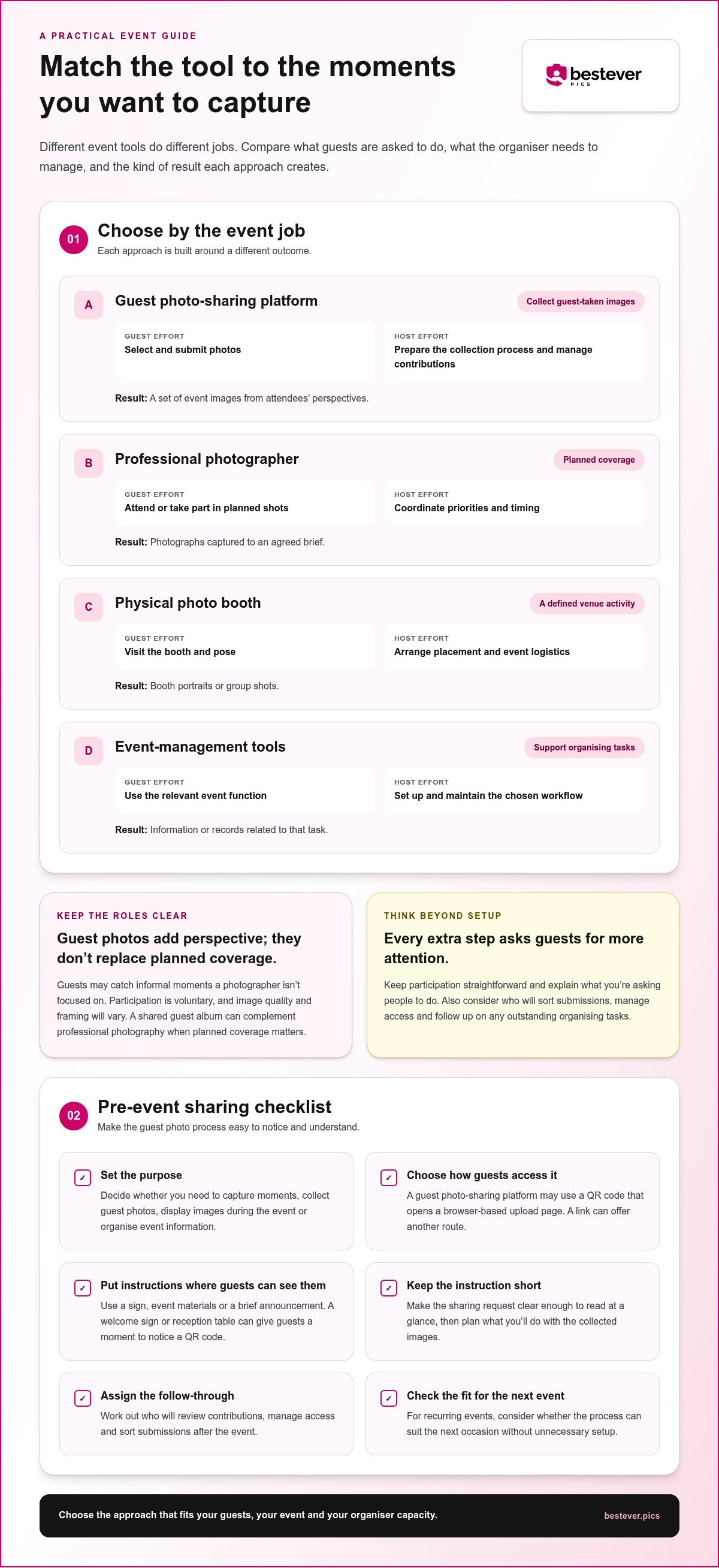
Compare options by the event job they handle, the steps they ask guests to take and the work left for the organiser. The table focuses on broad categories. Use it to identify which type of approach fits your priorities before comparing the details of individual services.
| Option | Event job | Guest effort | Host effort | Typical result |
|---|---|---|---|---|
| Guest photo-sharing platform | Gather attendee-submitted images | Select and submit photos | Prepare the collection process and manage contributions | A set of guest-taken event images |
| Professional photographer | Document agreed moments and portraits | Attend or take part in planned shots | Coordinate priorities and timing | Photographs captured to a brief |
| Physical photo booth | Offer an activity at the venue | Visit the booth and pose | Arrange placement and event logistics | Booth portraits or group shots |
| Event-management tools | Support organising tasks | Use the relevant event function | Set up and maintain the chosen workflow | Information or records related to that task |
Every extra step asks for a little more attention from guests. Keep participation straightforward and explain what you’re asking people to do; even then, some may choose not to take part. For hosts, the other side of the comparison is what happens after the event: who sorts submissions, manages access and follows up on outstanding organising tasks?
Which supplier type fits the moments you want to capture?
Start with the output you value most. A guest photo-sharing platform collects images attendees choose to submit. A photographer works to agreed coverage priorities, while a booth creates a defined activity for guests at the venue. Event-management tools serve a different purpose, such as supporting the organiser’s planning workflow. Choose the category that does the job you need, rather than expecting one tool to cover every event task.
What to compare before choosing a photo-sharing workflow
Look beyond the sign-up step and consider the full process for guests and hosts. Think through how participants will submit images, who will review contributions and how you plan to share the results. The right fit may differ for a one-off celebration and a team that runs events regularly.
- Guest steps: Are the instructions clear and easy to follow?
- Host workload: Who prepares the setup and manages submissions?
- After-event use: What will you do with the collected material?
- Repeat use: Can the process suit your next event without unnecessary setup?
For a wedding, consider whether a private wedding photo gallery fits the way you want to gather and manage guest contributions.
Event photo sharing in Australia: options for weddings, work events and footy finals
Different events call for different levels of structure. A backyard wedding may need a relaxed invitation guests can follow without interrupting the celebration, while a venue event may need someone assigned to keep the option visible. For a community gathering or footy finals event, consider when attendees have a moment to contribute and who’ll manage the collection afterwards.
Weddings and milestone celebrations
For a DIY wedding, keep the sharing plan in step with the day. Decide whether you want photos from the whole celebration or a particular part, then choose where and when to mention the option. A backyard or micro wedding may call for a personal announcement; a venue wedding might include the invitation in event materials as well as on the day.
Give guests a clear reason to take part and make the request easy to remember. For instance, invite them to share moments from the reception rather than leaving the prompt open-ended. Couples planning how a shared collection fits their celebration can explore modern wedding photo sharing.
Corporate, community and sporting events
At a work function, decide who owns the process and how the invitation fits the run sheet. Workplace IT settings can make app-based tools difficult for some attendees, so consider how guests will access the upload page. A short prompt tied to a team activity or celebration can make the purpose clear without taking over the event.
Recurring business events need a repeatable routine, not just a one-off plan. Organisers may want a consistent process for preparing instructions, assigning responsibility and deciding how collected images will be reviewed or shared. Venues and planners managing multiple events can use a professional workflow; a single-event host may prefer to keep each task simple.
Community groups and sports clubs can tailor their approach to the occasion. At a footy finals gathering, an organiser might invite photos from the event, then decide how the club will use or circulate the collection. The key is to make responsibilities clear before the event starts.
- Backyard or micro wedding: Choose a natural moment to explain the sharing option.
- Venue celebration: Assign someone to keep the invitation easy to notice.
- Work function: Account for workplace access settings and fit the prompt into the run sheet.
- Recurring event or club gathering: Set a repeatable process for ownership and follow-up.
For event photo sharing Australia, match the workflow to the occasion and the people responsible for it. A clear plan helps the sharing option fit the event, rather than becoming another job guests or organisers have to figure out.
How to judge whether an event photo-sharing setup will work on the day
A good setup should be easy to explain, easy to find and manageable for whoever’s hosting. Use this pre-event checklist to catch small points of friction before guests arrive. Clear instructions help, but they can’t guarantee that everyone will upload. Some guests may prefer not to contribute, and that’s fine.
Before the event: prepare the guest journey
Start with the outcome, then walk through the process as a guest would. Keep the request optional and welcoming. A guest who can’t or doesn’t want to share should still feel included in the event.
- Set the goal. Decide what you hope to collect, such as candid moments from the day or photos from different parts of the event. Tell guests what kind of contributions you’re inviting.
- Choose a natural prompt. Decide who will introduce the sharing option and when. A brief welcome or announcement can explain why the album exists and what guests need to do.
- Place the QR code thoughtfully. Put it where people have a moment to notice it, such as near the entrance or on tables, rather than somewhere guests pass too quickly. Keep it at a scannable size and avoid visual clutter around it.
- Write concise signage. Use a short instruction, such as “Scan to add your photos”, with a clear note that sharing is optional. Make sure the text is readable from where guests will stand or sit.
- Test the guest-facing steps. Scan the code with a phone and follow the upload flow as a guest. Check that the page opens and the instructions make sense without extra explanation.
During and after the event: make collection manageable
On the day, assign one organiser to keep the signs visible and answer basic questions. They don’t need to chase guests. A friendly verbal reminder can help people notice the option, but repeated prompts may feel like pressure.
- Offer a backup link. Include a simple web address alongside the QR code. It gives guests another route if scanning doesn’t suit their phone or circumstances.
- Consider access and comfort. Keep instructions easy to read and allow time for guests to participate at their own pace. Don’t assume everyone can scan a code, has their phone handy or wants to upload.
- Plan the follow-up. Decide who will review the album, how you’ll organise its contents and who should receive access. Set realistic expectations: the collection depends on guest participation and may include a mix of photo styles.
If you’re planning how to encourage contributions without making the process feel demanding, these practical ways to collect event photos can help you shape the guest experience.
Choose an app-free guest photo-sharing supplier for your next Australian event
Choose technology by the job you need done, the steps guests must take and the time you can give it as organiser. If collecting attendee perspectives is the priority, a guest photo-sharing platform fits that need. If you also want planned coverage, pair it with a professional photographer. A shared album gathers contributions, but it can’t guarantee guests will upload.
A quick decision framework for hosts and planners
For a one-off event, keep the setup proportional to the occasion. A couple planning a backyard wedding may want guests to add candid photos, while a corporate organiser may need an approach that fits workplace access settings. In both cases, consider the guest journey and who will look after the album after the event.
Bestever.pics provides app-free, web-based guest photo sharing: guests scan a QR code to upload photos to a shared digital album. It’s a way to collect guest contributions, not a photography service. For weddings, it can sit alongside a photographer’s planned coverage, adding informal guest perspectives without promising that everyone will take part.
Planners and venues running recurring events have another consideration: whether they can repeat the process without rebuilding every detail. A consistent workflow can help organisers prepare instructions and manage albums from event to event. For a single event, a simpler setup may be enough. Choose what matches your actual workload, not a more complex system than you need.
Make the next step simple
Before choosing a gallery, picture the guest experience from first notice to upload. Can guests see the instructions? Is the request clear? Is there a straightforward route to the album? These details can make participation easier, though some guests may still choose not to contribute. Keep the invitation optional and expect the album to reflect the photos guests choose to share.
QR codes connect printed instructions with an online album. Think about where to introduce the option and how guests will reach it. For a wedding, a private gallery gives guests a shared destination for their images, while the couple remains free to use professional photography for planned coverage.
If a private wedding gallery suits your event, explore the guest photo-sharing option and consider how it fits your day.
Make your next event easier to remember
Start by deciding what you want guests to contribute, then choose a sharing option that fits the way your event will run. For event photo sharing Australia organisers can keep the plan guest-friendly by making the invitation clear, placing it where people will notice and giving guests room to take part in their own way. A little preparation can make collecting those extra perspectives feel like part of the occasion, not another task competing for your attention.
Bestever.pics offers web-based guest photo sharing for events, with QR-code access to a shared album and uploads that don’t require an app download. The platform is operated by Steve and Chloe. For couples planning a wedding, a guest gallery is one way to bring attendees’ photos together.
Make guest photo sharing part of your event plan with a simple, app-free QR-code gallery from Bestever.pics.
Frequently Asked Questions
Can guests share event photos without downloading an app?
Yes. With a web-based sharing page, guests scan a QR code or open a link on their phone, then follow the page’s instructions to upload. This removes the app-install step, which can help guests who don’t want another app or can’t install one on a work device. Test the guest-facing process before the event so the instructions are easy to follow.
How do I collect photos from guests at an Australian event?
Choose a collection method before the event and decide who will manage it. For example, a couple could include a sharing link with their wedding information, then remind guests during the reception. A community organiser might share the link through the group’s usual event communications. Afterward, set aside time to review what guests contributed and decide who should have access to the collection.
Is a QR code enough to get guests to upload their photos?
No. A QR code makes the upload page easier to reach, but it can’t prompt guests on its own. Some may miss it, be busy enjoying the event or prefer not to share. Pair the code with a brief explanation of what you’d like guests to contribute, and mention it at a natural moment. Keep the invitation optional, so participation feels like a choice, not a task.
Can event photo-sharing technology replace a professional photographer?
No. Guest-sharing technology gathers photos taken by attendees; it doesn’t provide planned photographic coverage. Guests might capture spontaneous reactions or small moments a photographer isn’t focused on, but their images can vary in quality and may not cover important parts of the event. If you want polished portraits or a considered record of key moments, plan for professional photography and use the guest album as an additional source.
Will guests need mobile reception or Wi-Fi to upload event photos?
Guests generally need an internet connection to open a web-based upload page and send photos. That may be through mobile data or Wi-Fi, depending on what’s available at the venue and on each guest’s phone. Don’t assume connectivity will be reliable in every room or outdoor area. Share the upload link as well as a QR code, so guests have another way to access it.
How much does event photo-sharing technology cost in Australia?
Costs vary between platforms and depend on what’s included, so compare current plans. Consider whether the option suits your event size and how long guests can contribute or the organiser can access the album. Also think about whether you need features beyond collecting photos. For event photo sharing Australia, comparing limits and inclusions can help you judge value for your particular event.
Can one photo-sharing setup work for weddings and recurring business events?
It can, if the setup fits both the guest experience and the organiser’s process. A couple may only need to prepare one event and share access with guests. A business, venue or planner running recurring events may need a repeatable way to prepare instructions, organise each album and manage access afterwards. A consistent approach can reduce repeated setup work, but the workflow should still suit each event’s audience and purpose.