

Create QR Code for Photo Album: The Complete 2026 Guide

Article by
Gabi
Hi, I'm Gabi - Co-Founder of Bestever Pics. Thanks for visiting our blog. We are working hard to produce content which we hope resonates with you. Feel free to drop us a line on socials or via the contact form on the site.
Why are you still chasing guests for photos weeks after your event ends? Most people won't download a clunky app just to share a few snaps; you're often left with low-quality screenshots sent via messaging apps instead. It's time to learn how to create qr code for photo album that actually works for every guest in the room without the friction of account sign-ups or app store downloads.
We all agree that your wedding or birthday deserves a central gallery filled with high-quality candid shots by the next morning. This 2026 guide promises to show you exactly how to generate a code that lets guests upload instantly without accounts or downloads. We'll preview the best browser-based tools, including how bestever.pics simplifies the process, and pro strategies to ensure your digital keepsake is perfect.
Chasing people for photos is exhausting and unnecessary when modern technology offers a faster path. You need a system that respects your guests' time while capturing every precious moment in full resolution. This guide breaks down the technical steps to create qr code for photo album access and move you from legacy methods to a streamlined, app-free experience for everyone from DIY couples to professional event planners.
Key Takeaways
- Eliminate the stress of chasing guests for blurry photos by centralizing every candid snap in one high-quality digital gallery.
- Follow our 2026 walkthrough to create qr code for photo album sharing that works instantly without requiring your guests to download any apps.
- Compare the storage limits and login requirements of standard cloud tools against dedicated platforms to find the best fit for your event size.
- Learn creative ways to integrate QR codes into your event decor to ensure high engagement even in low-light dance floor environments.
- Discover how bestever.pics offers a simple, father-daughter founded solution for unlimited uploads that stay live long after your party ends.
Why You Should Create a QR Code for Your Photo Album
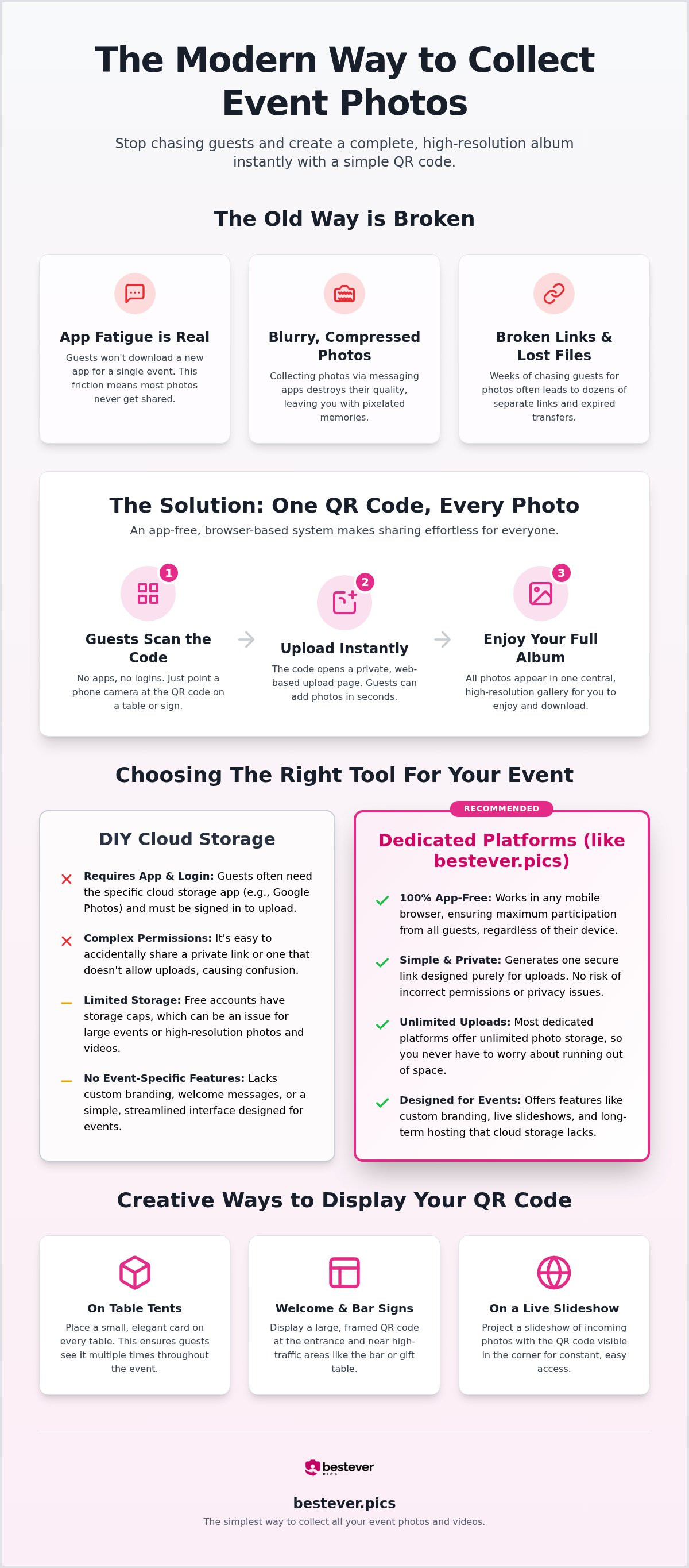
Stop spending your honeymoon or the week after a major corporate gala chasing people for blurry WhatsApp photos. When you create qr code for photo album access, you're essentially setting up a digital net that catches every memory in real time. It's a faster, sharper way to collect content without the friction of traditional methods. Instead of low-quality screenshots that lose their resolution in transit, you get a central gallery filled with high-resolution shots from every angle of the room. This ensures your digital keepsake is as clear as the night itself.
Traditional physical photo booths are fun, but they're often expensive and limited to one specific corner of the venue. A digital alternative turns every guest's smartphone into a high-end camera they already know how to use. This approach ensures even your least tech-savvy relatives can contribute by simply pointing their camera at a printed card on their table. A QR code serves as the bridge between the physical event and your digital archive. Using bestever.pics to manage this process is a cost-effective way to democratize the photography at your event, allowing everyone to play a part in the storytelling.
Solving the Problem of App Fatigue
Most guests won't download a new app for a single night, and forcing them to do so usually results in zero uploads. For maximum participation, digital photo sharing should always be browser-based. It's about removing barriers. When you create qr code for photo album sharing, you're prioritizing the user experience by keeping things app-free. Scanning the code takes seconds, making it the most efficient way to gather content. This streamlined path ensures your gallery grows throughout the night rather than staying empty because of technical hurdles. You want your guests focused on the dance floor, not the App Store.
Capturing the Moments Your Photographer Misses
Your professional photographer is there for the big, staged moments; your guests are there for the soul of the party. While the pro captures the first dance, your friends capture the laughter at Table 5 or the candid reaction to a speech. Using qr codes for wedding photos allows you to see the event through a hundred different lenses. These 'behind-the-scenes' perspectives create a much more inclusive and authentic memory book. You'll wake up the next morning to a rich collection of moments you didn't even know happened, from the perspective of the people who matter most.
How to Create a QR Code for Photo Album Sharing
Speed is your greatest asset when you create qr code for photo album access. You need a platform that handles your specific guest count without technical lag or privacy leaks. Start by selecting your hosting environment based on the scale of your event; a 500-person conference requires more storage than a 20-person dinner. Once you've chosen, generate a unique URL for your specific upload portal. This link acts as the digital doorway for every photo taken. Use a high-resolution generator to turn that link into a crisp, scannable image. Consult official guidance on QR codes to ensure your digital setup meets modern security standards.
Step-by-Step DIY Generation
Creating a portal manually involves a few technical hurdles that you must clear to avoid guest frustration. First, open your cloud storage and create a dedicated shared album. You must explicitly enable the 'Collaborate' or 'Link Sharing' feature so others can contribute. Copy the specific sharing link from the internal menu. This is critical; the URL in your browser bar often points to a private view, which will fail for your guests. Paste that verified link into a generator and choose a high-contrast design. It's the most manual way to create qr code for photo album portals for high-stakes events. If you want a faster path, you can generate a private wedding photo gallery that automates these permissions instantly.
Testing Your Code for Event Success
Your event signage is only as good as the code printed on it. Testing is the difference between a gallery full of memories and a night of technical support complaints. Perform these checks before you commit to a professional print run. Digital-native hosts don't leave these things to chance.
- Scan the code from three different mobile devices to ensure it works for both iOS and Android users.
- Verify that the link leads directly to an upload screen rather than a login or account creation page.
- Test the scannability in different lighting; your code must work in the dim light of a dance floor.
- Check the resolution of the printed code at various distances to ensure guests don't have to crowd the signage.
When you create qr code for photo album sharing, these small details prevent the friction that kills engagement. A well-tested code ensures that every guest, regardless of their tech skills, can contribute to your collection without hesitation. You'll wake up the next morning with a full gallery instead of an empty folder and a list of excuses.
Google Photos vs. Dedicated Event Platforms
When you create qr code for photo album access, it's tempting to use a free tool like Google Photos. It's familiar and costs nothing upfront. However, the hidden costs appear the moment your guests try to contribute.
Google requires every contributor to have a Google account to upload to a shared album. If your guest doesn't have one, or isn't signed in on their mobile browser, the process stops dead. Research confirms that Google's shared albums are limited to 100 contributors, which is a major bottleneck for weddings or corporate galas.
The Hidden Friction of Free Tools
App fatigue is real, and guests won't sign in to a personal account just to share a photo of your cake. This login barrier is why many galleries stay half-empty by the end of the night. bestever.pics removes this hurdle by allowing instant uploads without accounts or downloads. Following QR code usability guidelines means making the path from scan to action as short as possible.
Using a professional platform avoids the common pitfalls of DIY cloud folders:
- Guests can't accidentally delete photos or reorganize your gallery.
- Unlimited storage ensures you don't hit the 15 GB free tier cap mid-event.
- Data ownership remains clear, keeping your private memories off public search indexes.
Professional Features for Planners
For those running multiple events, pro features are essential for a polished delivery. Venues and wedding planners need moderation tools to filter out blurry shots before they hit a live slideshow. Business environments also have strict IT policies that often block personal Google Drive links. A professional system avoids these workarounds and provides a branded experience that builds instant credibility with clients.
Creative Ways to Display Your Album QR Code
Your QR code shouldn't look like an afterthought. When you create qr code for photo album access, think of it as a piece of your event's visual story. You want it to be visible enough to catch the eye but stylish enough to blend with your flowers and linens.
Strategic Placement for High Engagement
Go beyond the standard table tent and think about where your guests spend their time. Bar menus are prime real estate; people always look at them while waiting for a drink. You can explore creative display ideas like etching the code onto custom acrylic signs or framing it in a vintage gold border. Putting the code on the back of the order of service ensures every guest has a personal copy in their hand from the start.
A large 'Hero' sign at the entrance sets the tone early. It lets everyone know they're the official photographers for the night, whether it's a micro-wedding or a corporate hen and stag do. Include a short, punchy instruction like "Scan to share your snaps" right next to the code. This gives guests the immediate agency they need to start contributing before they even find their seats.
- Bar menus and cocktail lists for high-traffic visibility.
- Table centrepieces and place cards for intimate access.
- Entrance 'Hero' signage to set expectations early.
- The back of printed programmes or event itineraries.
Lighting and Size Considerations
Signage fails in the dark. Avoid placing your codes behind reflective glass or near pulsing strobe lights, as these can confuse smartphone sensors. If the room is dim, a small dedicated spotlight or a nearby candle can make all the difference for a successful scan. You don't want your guests struggling with technology when they should be enjoying the party.
Size matters for technical success. A code should be at least 2cm by 2cm to ensure older devices can lock onto it quickly. To ensure the scan works every time, aim for a contrast ratio of at least 4.5:1 between your code and the background. Following these simple rules when you create qr code for photo album displays keeps the scanning process fast and frustration-free for everyone.
Collecting Memories with bestever.pics
You shouldn't need a degree in computer science to manage your event memories. Steve and Chloe founded this platform in 2023 to solve a specific problem: the frustration of collecting photos from guests who don't want to download apps. It's built on the idea that the best technology is the kind that disappears into the background. You get unlimited photo uploads and a gallery that stays live long after the party ends, ensuring your digital keepsake is always accessible. It's the inevitable evolution of event photography, moving away from clunky hashtags toward a results-driven system that works for weddings and corporate gigs alike.
Why bestever.pics is Different
We focus on sophisticated simplicity by keeping everything browser-based. Guests simply scan the code and start sharing, removing the friction that usually kills engagement. It's the most efficient way to create qr code for photo album access that actually gets used by your guests. This commitment to an app-free experience makes it easy for all ages to contribute without the anxiety of account sign-ups. While DIY weddings are where we started, our system is now a preferred choice for large-scale business functions and sports clubs. Professional planners appreciate that our platform bypasses the strict IT policies that often block personal Google or iCloud links in corporate settings. It's a secure, private way to centralize candid shots from every table in the room.
Getting Started in Seconds
When you decide to create qr code for photo album portals with us, you're choosing speed. You can set up your event, customize the gallery look, and download your high-resolution QR code in less time than it takes to pour a drink. For pro subscribers running multiple events, our dashboard provides a scalable way to keep everything organized without technical workarounds. This allows you to manage your event with total confidence, knowing the system handles the heavy lifting while you focus on your guests. You'll wake up the next morning to a central gallery filled with the soul of your event, viewed through the eyes of the people who were actually there. It transforms the exhaustion of chasing photos into the excitement of reliving the best moments instantly.
Capture Every Angle of Your Next Event
Chasing guests for blurry screenshots is a relic of the past. When you create qr code for photo album access that requires no login or app download, participation sky-rockets instantly. You move from a fragmented collection of messages to a high-quality, central gallery that captures the soul of your celebration from every table in the room.
This results-driven approach is why planners and hosts worldwide trust bestever.pics for everything from intimate weddings to massive corporate functions. You get unlimited photo and video uploads without forcing your guests to manage a complex sign-up process. It's a sophisticated yet simple way to ensure your digital keepsake is filled with candid memories by the next morning.
Stop worrying about technical hurdles and start focusing on the moments that matter. Your guests are ready to share their perspective; you just need to give them the right doorway to do it. Build your gallery today and enjoy a stress-free morning after, browsing through the eyes of your favorite people.
Frequently Asked Questions
Is it free to create a QR code for a photo album?
You can use free tools like Google Photos to generate a link and then a separate generator; however, these often come with hidden friction like account requirements. bestever.pics offers a professional, app-free experience designed specifically for high-stakes events. While DIY methods cost nothing upfront, they often result in lower guest participation due to login barriers. Choosing a dedicated platform ensures everyone can contribute without the technical hurdles of traditional cloud storage.
Do guests need to download an app to upload photos?
No, your guests won't need to download anything to share their snaps. When you create qr code for photo album access through bestever.pics, the entire process happens right in their mobile browser. This removes the app fatigue that often prevents people from sharing photos at weddings or parties. It's as simple as scanning the code, selecting photos from their camera roll, and hitting upload. This streamlined path maximizes the number of candid shots you'll collect.
How many photos can a QR code album hold?
Storage limits depend entirely on the platform you choose for your event. While a standard Google Photos shared album can hold up to 20,000 items, it's shared across your personal 15 GB storage limit. bestever.pics is built to handle unlimited photo uploads, so you don't have to worry about hitting a cap in the middle of your reception or corporate gala. This freedom allows you to capture every single moment without monitoring a data meter.
Can I use one QR code for both photos and videos?
Yes, a single QR code can act as the gateway for both high-resolution photos and video clips. Modern browser-based platforms are designed to handle various media types simultaneously. This means you can capture the best man's speech on video and the table centerpieces in photos through the same simple scan. It keeps your collection organized in one central digital gallery for easy viewing later. There's no need for separate codes or confusing instructions for your guests.
What happens if my event venue has poor Wi-Fi?
If the venue's Wi-Fi is patchy, guests can still scan the code and keep the upload page open on their phones. Their devices will typically queue the uploads and complete them once they reach a stronger signal or return home. To help with this, we recommend placing your QR codes in areas with the best reception, like near the entrance or the main bar. This ensures the initial connection is made before they move to the dance floor.
Can I moderate the photos before they appear in the public gallery?
Yes, moderation is a key feature for professional planners and corporate hosts who need to maintain a specific aesthetic. The bestever.pics Pro version allows you to review every image before it goes live in the shared gallery. This is particularly useful for large-scale events where you want to filter out blurry shots or inappropriate content before showing a live slideshow on big screens. It gives you total control over the story being told in real time.
How long does the QR code remain active after the event?
Your QR code and the associated gallery stay active long after the last guest has left the dance floor. Unlike some temporary file-sharing links that expire after 24 hours, our galleries are designed to be a permanent digital keepsake. You can continue to create qr code for photo album displays on thank-you cards weeks later, allowing guests who forgot to upload on the night to contribute their memories. Your gallery remains a living record of your celebration.
Will the photos be high resolution or compressed?
Photos uploaded via our platform maintain their original high resolution, avoiding the heavy compression found on social media or messaging apps. When guests upload directly from their camera rolls, you get the full-quality files that are perfect for printing or large-screen displays. This ensures your wedding or event memories aren't lost to the blurry, low-quality versions often shared via WhatsApp or Messenger. You receive the professional-grade output your event deserves without the hassle of chasing files.