

Collecting Photos from Multiple Wedding Events: A Practical Guide

Article by
Gabi
Hi, I'm Gabi - Co-Founder of Bestever Pics. Thanks for visiting our blog. We are working hard to produce content which we hope resonates with you. Feel free to drop us a line on socials or via the contact form on the site.
What if the easiest way to collect wedding photos is to give guests one familiar routine and a clear destination for every celebration? When you’re collecting photos from multiple wedding events, candid moments from the welcome party, ceremony, and reception can end up scattered across group chats, social posts, and forgotten links.
You don’t need to chase everyone or build a complicated system. This guide explains how to make sharing simple, label each event’s photo destination, and choose a collection method that fits your guests. You’ll also get a repeatable routine couples, planners, and venues can use to keep photos easy to identify and retrieve.
Key Takeaways
- Decide which celebrations belong in your photo-sharing plan before choosing a method.
- Make collecting photos from multiple wedding events easier by giving each event a clear photo destination, if your chosen tool supports separate destinations.
- Compare group chats, shared albums, hashtags, and QR uploads by guest effort, access needs, and likely follow-up.
- Use a simple before, during, and after routine to remind guests without turning photo collection into another job for the couple.
- Choose a setup that fits your schedule and capacity, with repeatability in mind if you plan or host celebrations regularly.
Why Collecting Photos from Multiple Wedding Events Needs a Clear Plan
A wedding weekend can include a welcome gathering, ceremony, reception, and brunch or another post-wedding get-together. Guests capture small, candid moments throughout: a toast with old friends, a funny exchange on the dance floor, or a family conversation away from the main photographer. While professionals trained by the Institute of Wedding Photographers capture the essential portraits and milestones, these candid snapshots add another perspective that is easy to overlook without a simple plan for collecting them.
The challenge grows when photos arrive days later. Guests may mean to send their favourites, then forget once the celebration is over. Others post a few publicly, share some in a group chat, and message different images directly to the couple. The photos end up split across conversations, accounts, and camera rolls, making them harder to find and sort.
Which wedding events should share a photo-collection plan?
Start with the events where guest photos would be useful, rather than assuming every gathering needs the same setup. A welcome event, ceremony, reception, and next-day gathering may all belong in the plan, but each has a different group, mood, and set of moments. A couple’s celebrations are connected; a planner’s recurring weddings are separate events, each with its own clients and access needs.
For each event, ask two questions: who needs to view or retrieve the photos, and when will they need them? The answers help you decide how to label and group submissions. If you want a distinct destination for each event, check that your chosen collection tool supports that setup before sharing instructions. You’ll find more practical ideas in our guide on collecting event photos.
Why do guest photos get lost between celebrations?
After the party, guests return to everyday routines. A request sent later by email or text competes with everything else, and even well-meaning friends may not return to their camera rolls to upload photos. Across several celebrations, it can also be unclear whether a picture belongs with the welcome gathering, ceremony, or reception.
Scattered channels add more work. Group chats, direct messages, and social posts each keep photos in a different place. Some messaging platforms may also compress images, depending on the platform and sharing settings. A consistent approach to labels, storage, and access can make files easier to organize and retrieve. You can also explore event photo collection best practices to streamline your workflow using platforms like Bestever.pics. That clarity matters whether you’re collecting photos from multiple wedding events for one couple or building a repeatable process for celebrations you manage professionally.
How to Set Up Collecting Photos from Multiple Wedding Events
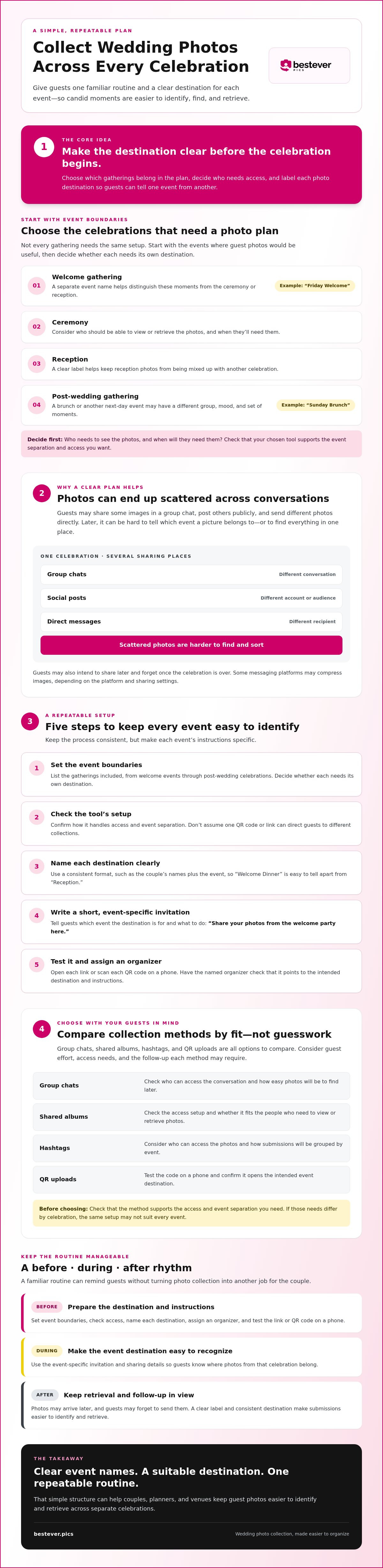
A repeatable setup starts with clear event boundaries, not with printing a QR code. Decide which celebrations belong in the plan, who will manage each one, and where guests should send their photos. Give every event a name guests can recognize quickly, such as “Friday Welcome” or “Sunday Brunch.”
How should you decide whether events need separate galleries?
Think about who needs access and whether they should see photos from every event. The same couple and close-knit guest group may prefer one shared destination, while different audiences or privacy needs may make separate destinations more suitable. Before promising separate galleries or codes, confirm that the selected service supports the structure you want.
What should a repeatable event-by-event checklist include?
Keep the process consistent, but make each event’s instructions specific. Assign an organizer to prepare and check the sharing details, then test the link or QR code on a phone before displaying it. A quick scan can catch a typo, an unexpected sign-in prompt, or a destination that doesn’t match the event.
- Set the event boundaries. List the gatherings included, from welcome events through post-wedding celebrations, and decide whether each needs its own destination.
- Check the tool’s setup. Confirm how it handles access and event separation. Don’t assume one QR code or link can direct guests to different collections.
- Name each destination clearly. Use a consistent format, such as the couple’s names plus the event, so guests can tell “Welcome Dinner” apart from “Reception.”
- Write a short invitation. Tell guests which event the destination is for and what to do. For example: “Share your photos from the welcome party here.”
- Test and assign. Scan each QR code or open each link on a phone. Have the named organizer check that the instructions point to the intended destination.
This check can prevent a common mix-up: guests uploading reception photos to a welcome-event collection because the directions looked the same. For more help refining your instructions, read [LINK: event photo collection best practices]. Boho Weddings also shares ideas on how to actually get guest photos, including QR-code placement.
If you’re considering QR-based sharing for a wedding, explore this private wedding photo gallery as one option. Check that its setup fits your event-by-event plan.
Compare Photo Collection Methods for Wedding Weekends and Repeat Events
The best method depends on your guests, event structure, and how much follow-up you can manage. A familiar group chat may suit a small gathering, while a planner handling recurring weddings may prefer a setup they can repeat. Compare the practical trade-offs before choosing how to collect photos from multiple wedding events.
| Method | Guest effort | Event separation | Follow-up burden | Access needs |
|---|---|---|---|---|
| Group chat | Low for guests already using the chat | Can get confusing if one chat covers several events | Uploads and reminders can get buried in conversation | Guests need access to the messaging platform and group |
| Shared cloud album | Varies by service and guest familiarity | Separate albums may help, if the service supports them | Organizer may need to manage links and permissions | Sign-in or account requirements may apply |
| Social hashtag | Easy for guests who already post publicly | Event-specific hashtags can help distinguish celebrations | Someone may need to search for posts and check visibility | Guests need access to the social platform; private posts may not be visible |
| QR-based browser upload | Guests scan a code and upload through a browser | Distinct destinations can help, if the selected service supports them | Clear instructions can reduce chasing, but won't remove every follow-up | Guests need a phone and internet access to open the upload page |
Can group chats or shared albums work across several events?
Yes, especially for a small group that already uses the same platform. A chat is quick to start, but photos can be hard to find among messages. Shared albums give uploads a more focused home, though access settings and sign-in steps can create friction. Consider what your guests already use, who needs access, and who will keep the collection organized.
When does a QR-code upload flow make sense?
A QR code can suit guests who’d rather scan and upload in a browser than install an app or join another group chat. It still depends on the guest having a phone, internet access, and a clear destination. No method guarantees that every guest will contribute or that every image will arrive unchanged. Messaging platforms, for example, may affect image quality depending on their settings. For a broader overview, see digital photo sharing for modern events.
Keep Guest Uploads Organized Before, During, and After Each Wedding
A little preparation keeps photo sharing from becoming another task for the couple or planner during the celebration. Give each event a named point person and make the routine easy to repeat. The host can enjoy the evening while someone else answers questions about where to upload.
Before: Prepare the destination and instructions
For each event, confirm its name, upload destination, and guest-facing directions. If you’re using a QR code or link, open it on a phone to check that it leads to the right place and the instructions make sense. Brief the planner, venue contact, or trusted helper so guests know whom to ask.
- Use the event’s name in the instruction, such as “Share photos from the welcome dinner here.”
- Choose a visible spot where guests naturally pause, without assuming every venue has the same layout.
- Keep the invitation short and readable. If you’re displaying a QR code, add a plain-language direction for guests who aren’t sure what to do.
For more ideas on making a code easy to notice, see these creative QR code display ideas.
During: Keep the reminder simple
Ask the point person to check that the instructions remain visible and answer basic questions, rather than leaving the couple to manage uploads all evening. A brief reminder during a natural pause can help guests share while the moments are still fresh. Keep the wording specific to that celebration so guests don’t confuse the welcome event with the reception.
After: Check access and send one thoughtful nudge
Once the event has passed, have the organizer confirm they can access the submitted photos and that the collection is labelled clearly. If guests may have missed the invitation, send one concise reminder through a channel they already use. Name the event and include the correct destination. Avoid repeated chasing; some guests won’t contribute, and that’s okay.
For collecting photos from multiple wedding events, use the same basic routine each time, but check the event name and destination before sharing instructions. A consistent process saves effort, while a clear event label helps keep each set distinct.
Choose a Repeatable Photo-Sharing Setup for Couples, Planners, and Venues
The right setup should fit the people using it, not add another job to the wedding schedule. Couples can consider how many events they’re hosting, what guests already know how to use, and who has time to check submissions. Planners and venues need to consider those factors too, along with whether staff can repeat the process without mixing one client’s photos with another’s.
What should a couple prioritize for a wedding weekend?
Keep guest instructions short and consistent across celebrations, while naming the specific event each time. Decide who needs access to each set, then choose an organization approach that suits those needs. If the couple is busy hosting, assign a trusted helper to check the plan and answer basic questions instead of making photo collection one more responsibility.
- Consider event count: A single gathering may need a lighter setup than a full wedding weekend.
- Think about guest familiarity: A tool guests already understand can reduce friction, though access requirements still matter.
- Be honest about follow-up: Choose a method the couple or helper can maintain without repeatedly chasing uploads.
What should planners and venues consider for recurring weddings?
For recurring events, check whether staff can follow the same preparation steps each time and identify the right destination for each couple. Consider who needs access, how event information stays distinct, and whether the approach fits your organization’s usual tools. The professional event photo-sharing information can help planners and venues assess a dedicated option.
Bestever.pics offers QR-based guest photo sharing, with a web-based upload experience that doesn’t require guests to download an app. Before choosing any setup, check that its available organization and access options match your event plan. For couples comparing approaches, focus on simple directions, clear event labels, and a manageable amount of follow-up.
Choose a process you can explain in a sentence and repeat without guesswork. That’s a practical starting point for collecting photos from multiple wedding events, whether you’re planning one weekend or supporting celebrations for different couples.
Make Every Celebration Easier to Remember
Collecting photos from multiple wedding events works best when guests know where to share and organizers know how each set will be labelled. Choose a method that suits your guests, check whether it can keep events distinct, and assign a helper so the couple isn’t managing uploads all evening.
QR-code sharing can give guests a browser-based upload experience without an app download. Bestever.pics supports guest photo sharing for weddings, corporate events, and community gatherings. The right setup still depends on your event and access needs.
With clear instructions and a simple routine, you can make it easier to gather the candid moments guests capture across the celebrations. Pick a plan that feels manageable, then enjoy the moments as they happen.
Here’s to remembering every celebration through the moments your guests saw, shared, and helped preserve.
Frequently Asked Questions
How do you collect photos from multiple wedding events in one place?
Choose a collection method guests can use easily, then label photos by event so each set is simple to identify. A shared album or guest photo-sharing platform can gather uploads in one digital location, but check whether it supports separate event galleries if you need them. Share clear instructions at each celebration and name the right destination. Assigning a helper to check access can keep the couple from managing uploads throughout the wedding weekend.
Should each event in a wedding weekend have its own photo gallery?
Not always. Separate galleries can help if different guests, organizers, or privacy needs apply to each celebration. If the same group will access every set, one shared destination with clear event labels may be simpler. Before choosing, check that the service supports the gallery structure you want and decide who needs access. A Friday welcome party and Sunday brunch, for example, should be easy to tell apart even if they share one collection.
Can wedding guests upload photos without downloading an app?
Yes. Some guest photo-sharing services use a QR code that opens a browser-based upload page, so guests can share photos without installing an app. They’ll still need a phone and internet access to open the page. Test the code before the event, and make sure the instructions explain what guests should do after scanning. This can suit friends who’d rather not download an app or join another group chat.
What is the easiest way to collect photos from guests after a wedding?
The easiest approach is usually the one guests can find and understand without searching old messages. Share a clear upload link or QR code during the event, name the destination, then send one short reminder through a channel guests already use. A shared folder may work for a small, familiar group, while a dedicated guest photo-sharing platform can offer a more focused destination. Either way, some guests may not upload, so keep expectations realistic.
How can a wedding planner collect photos for multiple couples?
Use a repeatable checklist for each wedding, but keep every couple’s event name, upload destination, and access details distinct. Assign a staff member to prepare and test the instructions, then confirm the collection is accessible to the people who need it. Before adopting a tool, check that its setup supports the separate galleries or destinations you require. A consistent process helps staff avoid mix-ups without assuming every wedding needs identical sharing settings.
Do group chats reduce the quality of wedding photos?
They can, depending on the messaging platform and how guests send images. Some platforms compress photos by default, while others may let senders choose a higher-quality option or share files differently. Check the app’s settings if preserving image quality matters. Group chats are familiar and convenient for small groups, but photos can get buried among messages, and guests may need to save images individually. They’re not automatically the right fit for every wedding.
When should guests upload photos from a wedding event?
Invite guests to upload during the celebration or soon afterwards, while the moments are still fresh and the sharing instructions are easy to find. A reminder the next day can help people who meant to contribute but got busy. Make the event name and upload destination clear, and leave a reasonable window if your chosen service allows it. Guests have different schedules, so an immediate upload request won’t suit everyone.